
Beskrivelse
Enable Google Analytics on your website and get your daily stats on http://www.google.com/analytics.
Features
- Track a single domain, multiple domains or multiple sub-domains.
- Track using old Urchin Web Analytics.
- Exclude contents from tracking (archives, searches, post previews…).
- Exclude users from tracking (admins, editors, contributors…).
- Exclude posts and pages from tracking
Languages
- English
- Français
Skærmbilleder
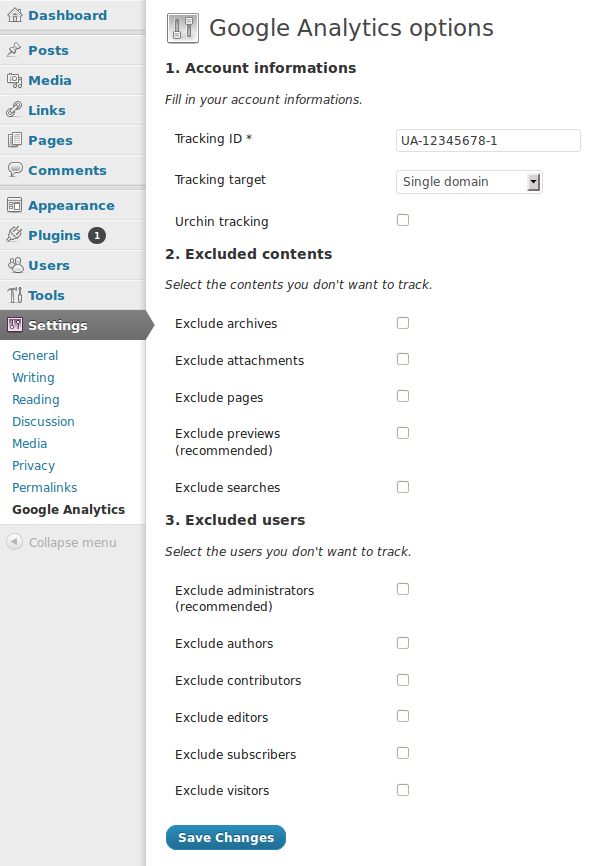
screenshot-1.png
Installation
- Extract the plugin to your plugins directory.
- Activate the plugin in the plugins page.
- Fill in your Analytics ID on the plugin settings page.
Anmeldelser
Der er ingen anmeldelser for denne widget.
Bidragsydere & udviklere
“JK – Google Analytics” er open source-software. Følgende personer har bidraget til dette plugin.
Bidragsydere
Oversæt “JK – Google Analytics” til dit eget sprog.
Interesseret i udvikling?
Gennemse koden, tjek SVN repository, eller abonner på udviklerloggen via RSS.
Ændringslog
1.2
- Added the option to exclude posts and pages.
1.1.1
- Fixed the bug that made the admin bar disappear.
1.1
- Changed some texts.
- Added the possibility to exclude users (by role) from tracking.
- Removed option to exclude admin pages, it’s now excluded by default and cannot be changed.
1.0
- Added basic account options (tracking ID, tracking target).
- Added Urchin tracking.
- Added the possibility to exclude contents (by type) from tracking.
- Added support for English and French languages.