

Beskrivelse
Pipe Audio Video and Screen Recorder lets your website visitors and users record video, audio, and screen + camera directly from your WordPress pages and posts — no apps to install, no file uploads to babysit, no custom development.
The plugin connects your WordPress website to the Pipe recording platform. You generate a shortcode from your WordPress admin, paste it into any page or post, and a fully working browser-based recorder appears on your site. Every recording is automatically processed, converted to MP4, stored, and made available for playback and download — from both your WordPress backend and your Pipe account dashboard.
To use the plugin, you need a trial or paid account with addpipe.com.
What You Can Build
- Collect video testimonials — let happy customers record a testimonial straight from a page on your site, then embed the best ones anywhere with a playback shortcode.
- Accept recorded resumes and async video interviews — the easiest way for recruiters to collect video answers and self-introductions from candidates.
- Add recording to online courses and quizzes — capture spoken or on-camera answers from students, including on pages with many recorders such as LearnDash quizzes (with lazy loading, each recorder only initializes when scrolled into view).
- Capture user-generated content — video messages, voice notes, feedback, contest entries, and crowdsourced recordings that boost engagement.
- Record voice messages and audio feedback — a lightweight audio-only recorder for voicemail-style pages, podcast listener questions, or language practice.
- Turn your blog into a vlog — record takes from the WordPress backend, keep the one where you nailed it, and embed it in your post.
- Collect screen recordings — perfect for bug reports, product feedback, tutorials, and support requests, with optional camera overlay.
How It Works
- Install the plugin and connect your Pipe account by entering your Account Hash and Environment Code in the plugin’s Settings page.
- Generate a recorder shortcode from the plugin’s Embed Recorder page — choose video, audio-only, or screen + camera, and set the size, colors, and recording time limit.
- Paste the shortcode (e.g.
[pipe_recorder 1]) into any page or post using the Gutenberg shortcode block, the Classic Editor, or a page builder like Elementor.
That’s it. Recordings start flowing in, and you can review, play back, download, and embed them without leaving WordPress.
Recording Features
- Video, audio-only, and screen + camera recording — all three recording types from one plugin.
- Works on desktop and mobile — the Pipe recording clients ensure your users can record no matter their device or browser.
- Up to 4K video — the Pipe Platform can record and properly manage videos up to 4K in resolution.
- Reliable on slow connections — client-side and server-side buffering produces high-quality recordings even over 3G, 4G, and spotty public Wi-Fi.
- Universal MP4 playback — different devices record to different formats (.mov, .mp4, .3gp, .webm); Pipe converts everything to a proper .mp4 file that plays everywhere.
- Automatic snapshots — a thumbnail is generated for every video recording.
- Configurable recording limits — set a maximum duration per recorder (20 seconds by default, adjustable per shortcode).
- Optional file uploads — let users upload an existing video or audio file instead of recording live.
- Countdown timer and background blurring — give users a 3-2-1 countdown before recording starts, and offer a webcam background blur toggle for privacy.
WordPress Features
- Reusable, editable shortcodes — create a recorder configuration once and reuse it across your site; edit an existing shortcode instead of creating a new one for every small change.
- Multiple recorders per page — place several recorders on the same page or post and they all work reliably.
- Lazy loading — optionally initialize each recorder only when it scrolls into view, so pages with many recorders don’t request every camera and microphone at once.
- Manage recordings from the WordPress backend — review, play, download, and delete recording entries without leaving wp-admin (recordings are also always available in your Pipe account dashboard).
- Playback shortcodes — embed any recording for playback in your posts and pages.
- Know who recorded what, and where — each recording is linked to the logged-in WordPress user who made it (or marked as made by a visitor) and to the page or post it was recorded on.
- Customizable recorder appearance and behavior — control the recorder’s size (in any CSS unit), background and menu colors, resolution (240p up to 2160p), autosave, the initial screen, and the bottom control menu.
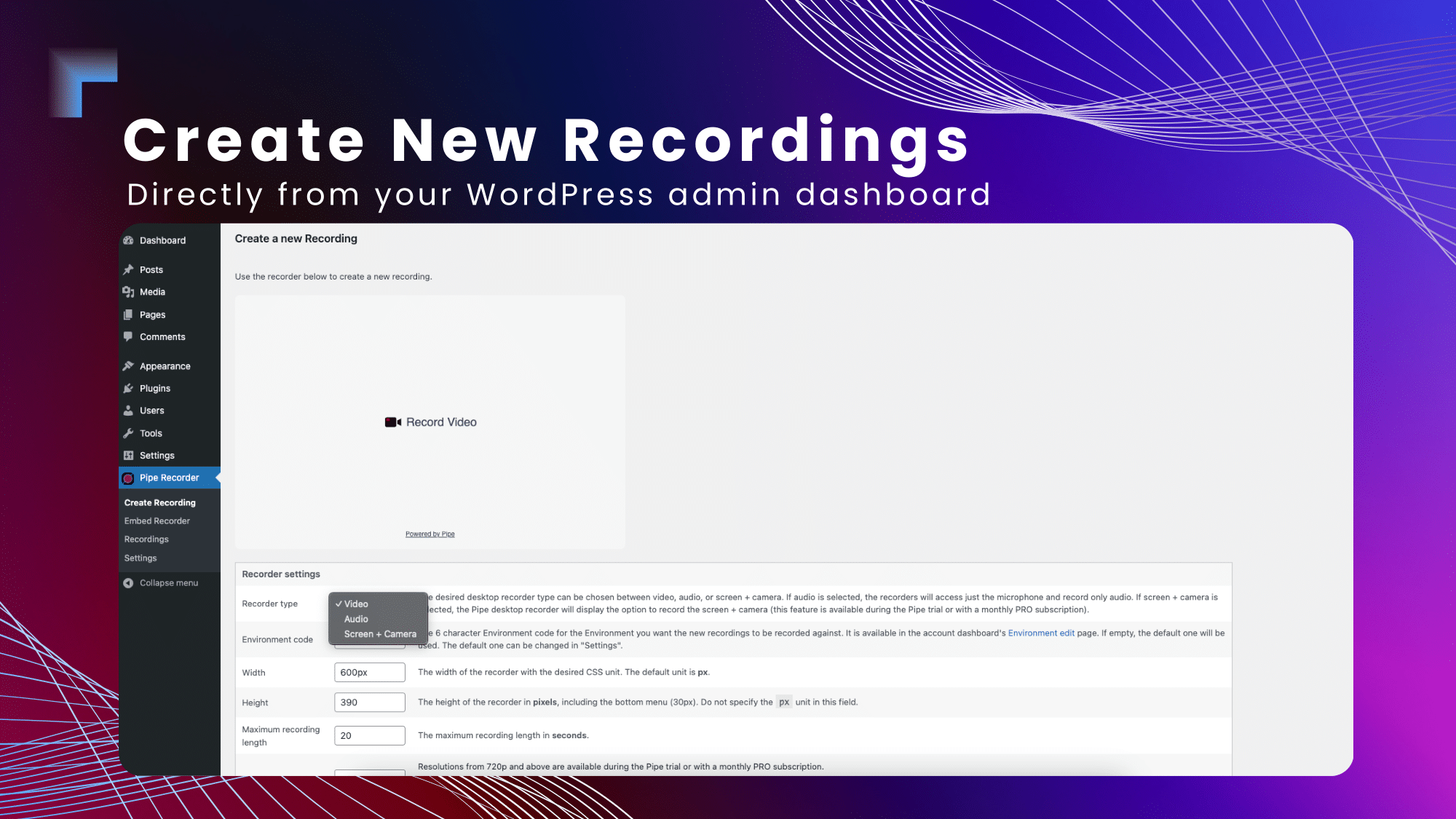
- Record from the backend too — create your own audio, video, and screen recordings directly from the WordPress admin.
- Performance friendly — the recording client’s JS and CSS load only on pages that actually contain a recorder, not across your whole site.
- Works with any WordPress theme — and with page builders such as Elementor.
- Secure webhooks — recording notifications sent to your site are validated with signature-based (HMAC) authentication.
Storage and Data Ownership
Recordings are processed by the Pipe Platform and stored on Pipe’s complimentary storage. You can also push the original and converted files to your own storage: Amazon S3 (or S3-compatible services), Cloudflare R2, DigitalOcean Spaces, Google Cloud Storage, Dropbox, Box, or your own server via SFTP, FTP, and FTPS. You control how long recording data is kept, with options to delete it manually or automatically.
Requirements and Pricing
The plugin is free, but it requires an active account with the Pipe Platform to work. You can sign up for a trial account at addpipe.com — trial accounts work with the plugin, so you can test everything before subscribing.
External Services
This plugin relies on the Pipe Platform (https://addpipe.com) to provide video, audio, and screen recording functionalities. To use it, you need an account or subscription with https://addpipe.com. The following external files are loaded directly from Pipe’s CDN:
- pipe.min.js (https://cdn.addpipe.com/2.0/pipe.min.js) — required for recording functionality.
- pipe.css (https://cdn.addpipe.com/2.0/pipe.css) — required for styling the recording client.
Data Transmission
- When using the plugin, recorded media is sent to the Pipe Platform servers for processing and storage.
- Users can configure their Pipe account to store recorded media on external storage services like Amazon S3, Dropbox, or their own servers.
Privacy and Terms
- Privacy Policy: Pipe Privacy Policy
- Terms of Service: Pipe Terms of Use
Documentation and Support
- Plugin documentation — installation, configuration, webhooks, and shortcode reference.
- Pipe Platform documentation
- Questions? Contact us or post in the plugin’s support forum.
For Developers
The plugin provides two hooks so you can extend recordings from your own plugin or theme without editing the plugin files. Full examples are in the documentation.
addpipe_recorder_payload(filter) – modify the recorder payload before a recorder is initialized. The payload is returned with the recording’s webhook, so you can append your own comma-separated values and read them back later. Default:accountHash,userId,postId.addpipe_webhook_processed(action) – fires after an incoming webhook has been validated and saved to the database, before the response is sent. Receives the event name, the webhook data object, and the comma-split payload values.
Skærmbilleder



Installation
The installation instructions and full documentation can be found at https://addpipe.com/docs/plugins/wordpress-plugin/#installation .
FAQ
Q: Do you need an active addpipe.com account for this plugin to work?
A: Yes.
Q: Can I use a trial addpipe.com account to make this plugin work?
A: Yes.
Q: Is there any time limit for each recording?
A: By default, the embeddable recorders created by the plugin will have a 20-second limit, but you can change it for each of your embed codes.
Q: Where are the recordings stored?
A: The Pipe Platform offers complimentary storage on Amazon and Scaleway S3 buckets. You can also push the recording files to your S3 bucket, to Dropbox or your own server, or to other storage solutions through SFTP, FTP, and FTPS.
Q: Why do some recordings don’t appear in the table in the plugin’s Recordings section?
A: Your webhook might not be set up correctly to notify the plug-in about new recordings. See the Installation section above.
Q: Is there a limit to how many recordings I can make?
A: No, but abuse is prohibited.
Q: How long do you keep the recording data?
A: Until it is manually or automatically deleted by the account owner. The Pipe platform has lots of privacy options to keep the recording data and its metadata for at least as possible, including options not to collect some data.
Q: Where do I find the documentation?
A: The plugin’s docs are available at https://addpipe.com/docs/plugins/wordpress-plugin/. The wider Pipe Platform documentation is available at https://addpipe.com/docs/ .
Anmeldelser
Der er ingen anmeldelser for denne widget.
Bidragsydere & udviklere
“Pipe Audio Video and Screen Recorder” er open source-software. Følgende personer har bidraget til dette plugin.
Bidragsydere


Oversæt “Pipe Audio Video and Screen Recorder” til dit eget sprog.
Interesseret i udvikling?
Gennemse koden, tjek SVN repository, eller abonner på udviklerloggen via RSS.
Ændringslog
1.0.0
- First release
1.0.1
- Added a composer.json configuration file
- Removed unused files and code
1.0.2
- Load pipe.js and pipe.css only in the pages or posts where it is required
1.0.3
- Copy and other changes before submitting it to the WordPress Plugin Directory
1.0.4
- Improved security and code quality to meet WordPress Plugin Directory standards
1.0.5
- Improved security by implementing signature-based authentication for webhook requests.
- Updated the settings page to include the Pipe Webhook Key (optional, required for webhooks).
1.0.6
- Improved security by properly escaping all dynamic attributes in the playback and recorder shortcodes, following WordPress Plugin Directory guidelines.
1.0.7
- Fixed an issue where the recording client width was incorrectly using pixels instead of the specified unit
- Exposed new embed code options to customize the background and menu colors of the recording client
1.1.0
- Fixed an issue where only the last recorder on a page or post worked reliably when multiple recorders were present.
- New option to lazy load recorders. The option is present in the shortcode generator/editor. When enabled, a recorder initializes only once it is scrolled into view, which avoids opening every camera/microphone at once on pages with many recorders (e.g. LearnDash quizzes). A recorder that has already started stays active even if scrolled out of view.
- New ability to edit existing shortcodes. You don’t have to create a new shortcode every time you need to make a small config change.
1.2.0
- Added the
addpipe_recorder_payloadfilter, so other plugins can extend the recorder payload (e.g. with LearnDash question IDs) without editing the plugin. - Added the
addpipe_webhook_processedaction, fired after a webhook is saved and before the response, for reacting to recording events. - Fixed “Sync Deleted Recordings” not removing recordings that had been deleted on the Pipe side.
- Fixed the video resolution selector.