
Beskrivelse
Auto Clear Cache For Elementor simplifies cache management for Elementor sites by automating the cache-clearing process. Perfect for keeping your site fresh without manual intervention, this plugin offers simple and effective features:
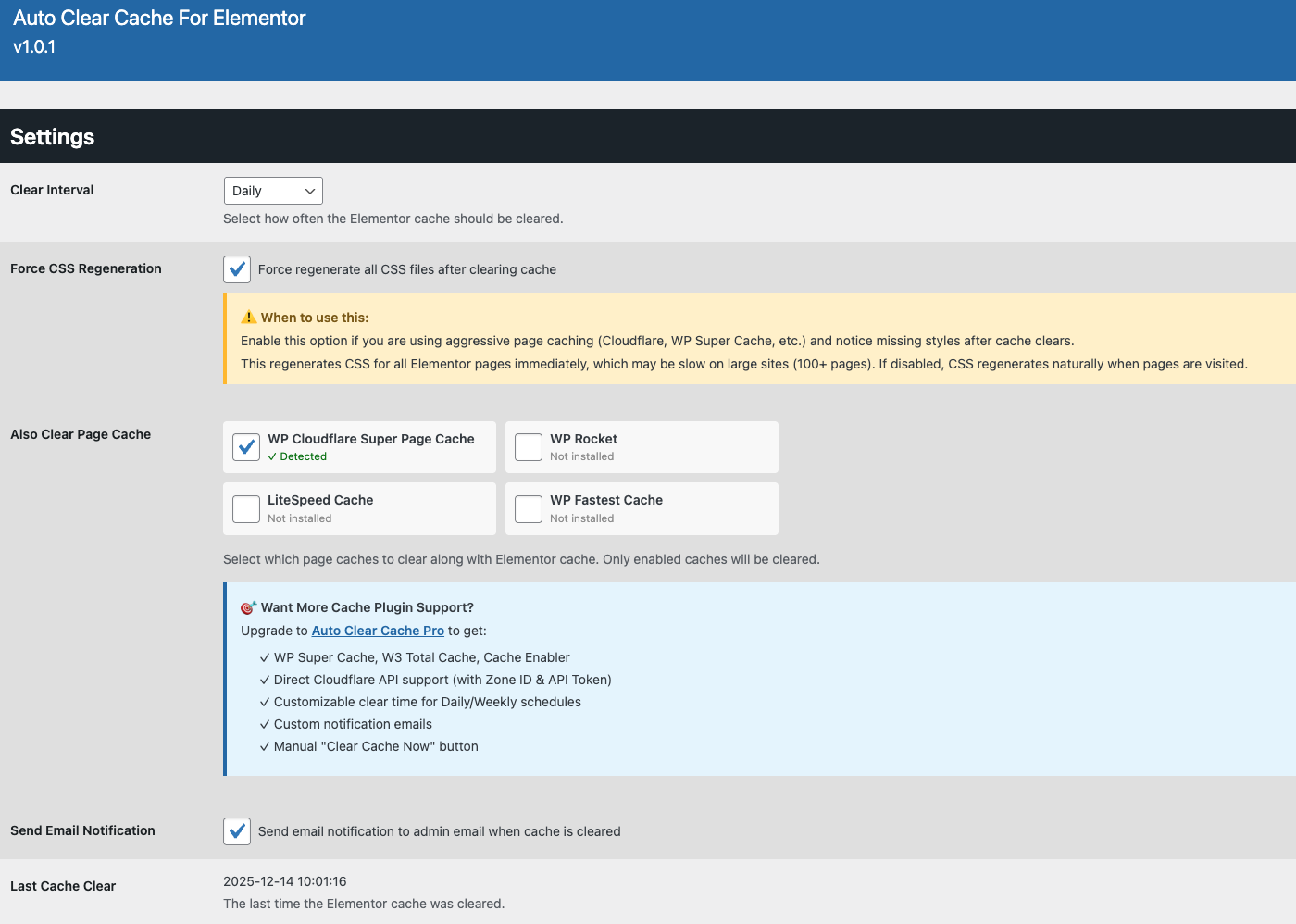
- Customizable Schedules: Choose from multiple intervals (Hourly, Twice Daily, Daily, Weekly) to automatically clear the Elementor cache.
- Email Notifications: Receive optional email notifications to the admin email when the cache is cleared.
- Option to clear certain other cache plugins at the same time.
- Option to regenerate Elementor CSS files straight away after clearing.
- Last Clear Status: View the timestamp of the last cache clear for easy monitoring.
- Lightweight and Secure: Built with WordPress best practices, ensuring performance and security.
Pro Version
For advanced features, check out Auto Clear Cache Pro For Elementor. The Pro version includes:
- Customisable Schedules: Choose from multiple intervals (Hourly, Twice Daily, Daily, Every 6 Hours, Weekly) to automatically clear the Elementor cache.
- Specific Clear Time: Set a precise time of day for Daily or Weekly cache clears, aligned with your site’s timezone.
- Email Notifications: Receive optional email notifications when the cache is cleared, sent to a custom email address or the admin email.
- Manual Clear Option: Clear the Elementor cache instantly with a dedicated “Clear Cache Now” button.
- Last Clear Status: View the timestamp of the last cache clear for easy monitoring.
- Option to clear other cache plugins at the same time.
- Lightweight and Secure: Built with WordPress best practices, ensuring performance and security.
To upgrade, visit Auto Clear Cache Pro For Elementor for details.
Skærmbilleder
Installation
From your WordPress dashboard
- Upload the auto-clear-cache-for-elementor folder to the /wp-content/plugins/ directory or install the plugin directly through the WordPress plugins screen.
- Activate the plugin through the ‘Plugins’ screen in WordPress.
- Navigate to Settings > Auto Clear Cache For Elementor to configure the schedule and email notifications.
- Save your settings and the plugin will automatically clear the Elementor cache based on your chosen schedule.
FAQ
-
How does the plugin clear the Elementor cache?
-
The plugin uses Elementor’s built-in cache-clearing functions to regenerate CSS files in /wp-content/uploads/elementor/css/. It runs automatically based on your chosen schedule.
-
Can I receive notifications when the cache is cleared?
-
Yes, enable the “Send Email Notification” option to receive notifications at the admin email after each cache clear.
-
What happens if Elementor is not installed?
-
The plugin checks for Elementor and only runs cache-clearing functions if Elementor is active, ensuring compatibility with non-Elementor sites.
-
The scheduled clear never seems to run.
-
The plugin uses WP-Cron. On a low traffic site WP-Cron only fires when someone visits the site, so a scheduled clear can run late. If your host has disabled WP-Cron, set up a real system cron that calls wp-cron.php.
-
Does uninstalling remove my settings?
-
Yes. Deleting the plugin from the Plugins screen removes every option it created and clears its scheduled event.
-
Support
-
If you find an issue or bug, please email me at info@smdev.au
Anmeldelser
Der er ingen anmeldelser for denne widget.
Bidragsydere & udviklere
“Auto Clear Cache For Elementor” er open source-software. Følgende personer har bidraget til dette plugin.
Bidragsydere
Oversæt “Auto Clear Cache For Elementor” til dit eget sprog.
Interesseret i udvikling?
Gennemse koden, tjek SVN repository, eller abonner på udviklerloggen via RSS.
Ændringslog
1.0.2
- Fixed a fatal error that could take a site down during the cache clear. The CSS regeneration fallback only checked for a method, which also reports missing when the whole Elementor class is gone and the resulting Error was not caught. Now guarded with a class check and Throwable handling.
- Fixed the LiteSpeed Cache hook being removed and never restored, which made the plugin’s own LiteSpeed purge fall back into an empty hook and silently do nothing.
- Fixed the activation and deactivation hooks, which were registered against a path WordPress never resolves and so never fired. Deactivating the plugin now correctly removes its scheduled event.
- CSS regeneration now runs in batches with a configurable ceiling instead of loading every Elementor page at once, which could exhaust memory on large sites.
- Removed error suppression around third party cache purges so real failures are visible and wrapped them so a broken cache plugin cannot break the clear.
- Escaped the cache plugin detection output on the settings page.
- Last Cache Clear and Next Scheduled Clear now display in your site’s date, time and timezone settings.
- Added an uninstall routine that removes all plugin options and the scheduled event.
- Added a link to the Pro version at the foot of the settings page.
- Tested up to WordPress 7.1.
1.0.1
- Add options to clear certain cache plugins at the same time to fix 404 issues on certain cache setups.
- Add force regeneration of the Elementor CSS files to fix 404 issues on certain cache setups.
1.0.0
- Stable release