
Beskrivelse
Webhooks for Contact Form is a WordPress plugin that extends Contact Form 7 by allowing you to send form submissions to any webhook endpoint. This enables easy integration with external services, automation tools, and custom workflows.
Features
- Send Contact Form 7 submissions to any webhook URL
- Supports custom headers and payloads
- Easy setup and configuration
- Compatible with popular automation platforms
Configuration
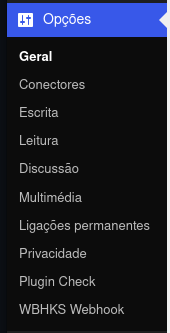
- Go to the plugin’s Settings page under Settings > WBHKS Webhook.
- Add your webhook URL in the provided field.
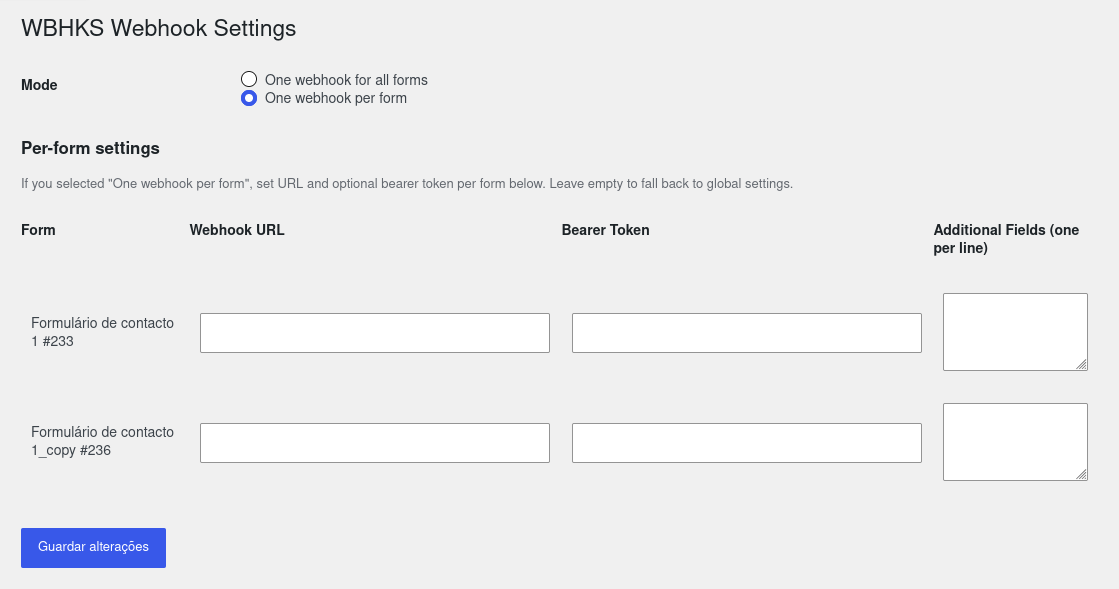
- Optionally add a Bearer token, choose per-form mode, and select additional fields.
Logging
This plugin records webhook delivery attempts and response previews to help troubleshoot delivery issues.
- Where: Open the plugin settings page in WordPress (Settings WBHKS Webhook) and scroll to the Webhook Logs section.
- What is logged: date/time, form title and ID, delivery status (success / failed / skipped), HTTP status code (if available), webhook URL used, a message and a truncated response body (preview).
- Privacy: Submitted form fields are not logged directly. Response previews, error messages, and webhook URLs may contain personal or sensitive data returned by your endpoint. Use trusted endpoints and clear logs when appropriate.
- Storage: Logs are saved in the WordPress options table under the option
wbhks_webhook_logsand capped to the most recent 200 entries. - Clearing logs: Use the Clear Logs button on the settings page; this action requires administrator capabilities and is protected by a nonce.
Per-form mode
You can choose between a single global webhook for all forms or a per-form webhook configuration:
- One webhook for all forms — set a single Webhook URL and optional Bearer Token used for every Contact Form 7 submission.
- One webhook per form — configure a distinct Webhook URL (and optional Bearer Token) for each Contact Form 7 form on your site. Leave a per-form URL empty to fall back to the global URL.
Skærmbilleder
Installation
- Download the plugin from the WordPress Plugin Directory or from your repository.
- Upload the
webhooks-for-contact-form-7folder to your WordPress plugins directory. - Activate the plugin via the WordPress admin dashboard.
FAQ
-
Can I send data to multiple webhooks?
-
In version 1.1.3, the plugin supports two modes: a single global webhook for all forms or a per-form configuration.
If you are using version 1.1.2, the plugin only supports one webhook per form.
For multiple endpoints, update to version 1.1.3. -
Is the plugin secure?
-
Use trusted HTTPS endpoints for webhook delivery and keep WordPress, Contact Form 7, and your server’s PHP runtime updated. See the PHP security review below.
-
What was reviewed for version 1.1.6?
-
The plugin source was reviewed for submission forwarding, global and per-form configuration, settings sanitization and output escaping, log access and clearing, and uninstall cleanup. This maintenance release updates release metadata and screenshot documentation. The review does not establish compatibility with every hosting environment.
-
Does version 1.1.6 fix CVE-2026-109618 and CVE-2026-109619?
-
These vulnerabilities affect the PHP runtime. Updating this plugin does not fix a vulnerable PHP installation, and attacks can occur before plugin code runs. Ask your hosting provider to install PHP 8.2.35, 8.3.36, 8.4.27, or 8.5.12 or later within the corresponding branch, or a vendor package explicitly fixing both CVEs, and restart all PHP workers. The declared PHP minimum is a compatibility requirement, not a security guarantee.
See the official PHP security advisory for details.
Anmeldelser


Bidragsydere & udviklere
“Webhooks for Contact Form 7” er open source-software. Følgende personer har bidraget til dette plugin.
Bidragsydere
Oversæt “Webhooks for Contact Form 7” til dit eget sprog.
Interesseret i udvikling?
Gennemse koden, tjek SVN repository, eller abonner på udviklerloggen via RSS.
Ændringslog
1.1.6
- Reviewed plugin source for submission forwarding, settings handling, delivery logging, and cleanup.
- Added hosting guidance for PHP vulnerabilities CVE-2026-109618 and CVE-2026-109619; a patched PHP runtime is required.
- Fixed WordPress.org screenshot filenames, asset placement, and numbered captions.
- Aligned PHP compatibility declarations at PHP 7.4 and corrected documentation links and logging privacy guidance.
1.1.5
- Added a logging feature to record webhook delivery attempts and response previews for troubleshooting.
- Tested plugin with the WordPress Version 7.0.4 to ensure compatibility.
1.1.4
- Changed the plugin name for better clarity.
- Tested the plugin with the WordPress Version 7.0 and made sure it’s stable.
- Changed the plugin icon to make it more aligned with the brand.
1.1.3
- Changed the plugin name to “Webhooks for Contact Form” for better clarity.
- Stable version with 1 webhook per form and optional Bearer token authentication.
1.1.2
- Changed the plugin name in the header to “WODS Webhook for Contact Form 7” for better clarity.
- Stable version with 1 webhook per form and optional Bearer token authentication.
1.1.1
- Added optional Bearer token authentication.
- Improved error handling and logging.
1.1.0
- Initial release.