Spring til indhold
WordPress.org

Dansk

  • Temaer
  • Plugins
  • Nyheder
  • Support
  • Om
  • Meetup
  • Vær med
  • Om
  • Få WordPress
Få WordPress
WordPress.org

Plugin Directory

WP ShareX

  • Indsend et plugin
  • Mine favoritter
  • Log ind
  • Indsend et plugin
  • Mine favoritter
  • Log ind

Dette plugin er ikke blevet testet med de seneste 3 større udgivelser af WordPress. Det vedligeholdes eller understøttes muligvis ikke længere og kan have kompatibilitetsproblemer, når det bruges med nyere versioner af WordPress.

WP ShareX

Af joomdev
Download
  • Detaljer
  • Vurderinger
  • Installation
  • Udvikling
Support

Beskrivelse

WP ShareX is an advanced WordPress Social Share plugin enables you to add social share buttons on Posts and pages. You can assign buttons on Top of the Content, Bottom of the Content, Sidebar and on media.

Features of WP Social Share by JoomDev
1. 24 Social Network
2. You have the option to select either Icons or Icons with Text
3. 3 Button Shapes
4. 4 Button Animations
5. URL Shortening Option with Bitly and Goo.gl
6. Embed Twitter Handle and desired tags with Tweet
7. 4 Button display Location e.i. Top of the Content, Bottom of the content, Media, and Sidebar
8. Hide On Mobile Ability
9. Default Share Count Option. (You can play with your user’s mind)
10. Encourage your Audience to share your content with Share Incentive Feature

Skærmbilleder
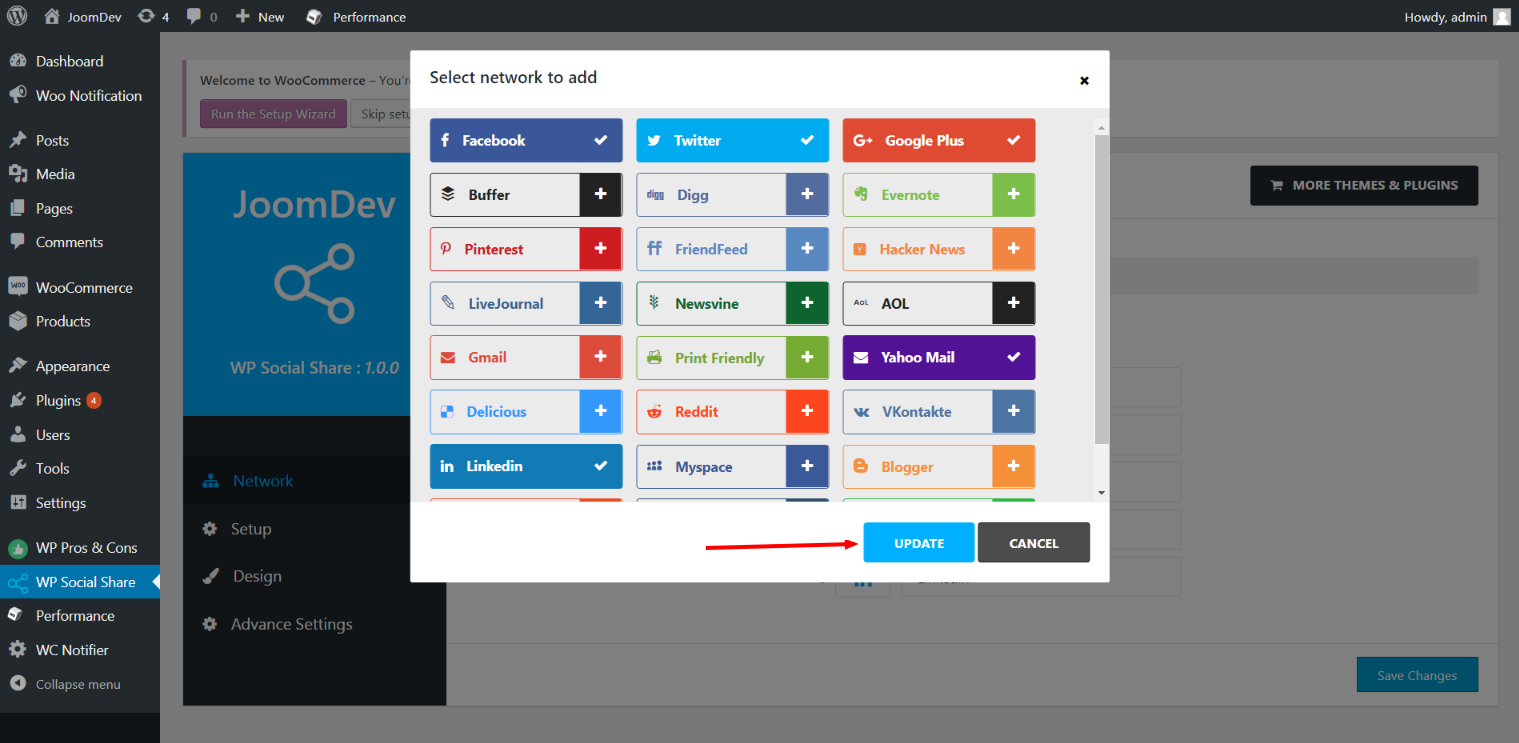
Click here to select networks
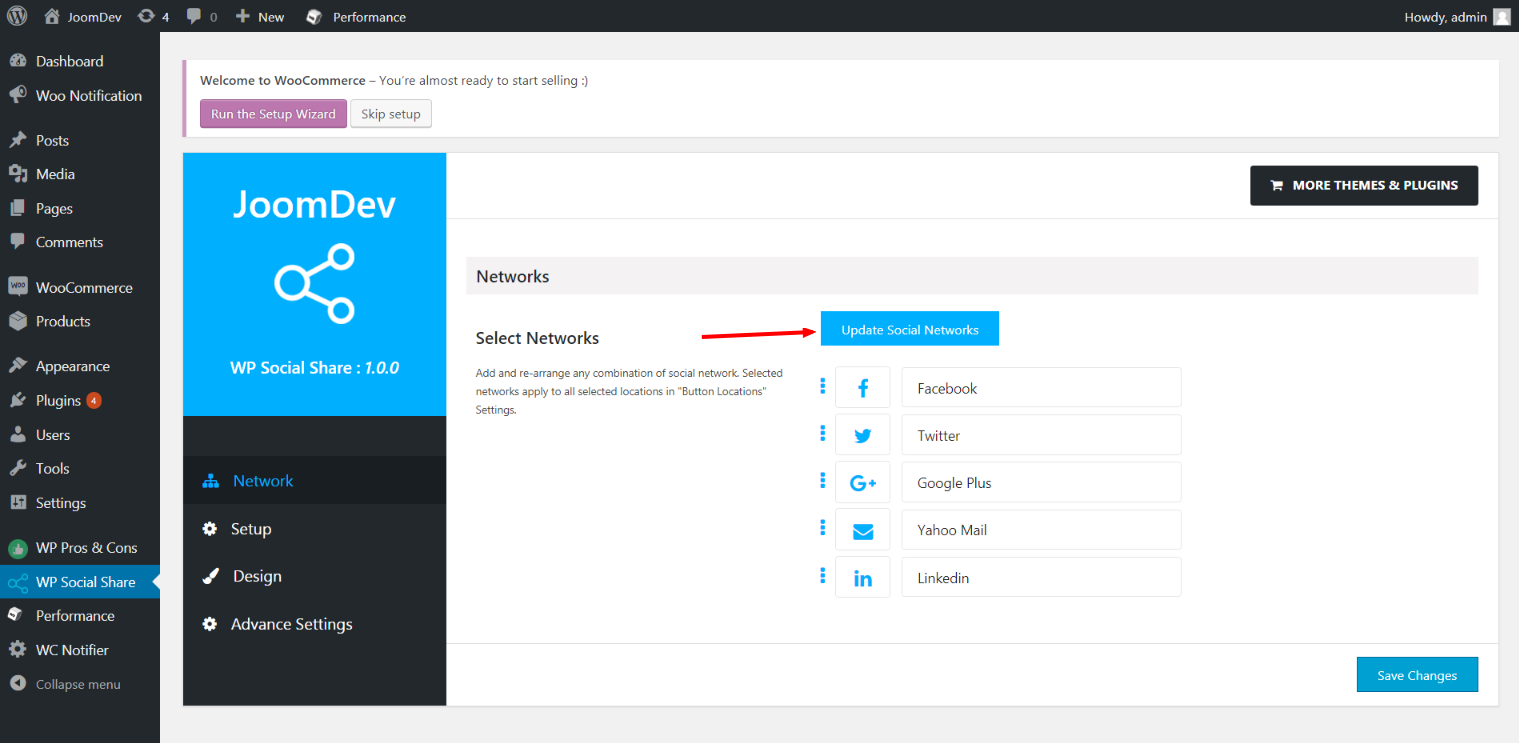
Update networks after selecting them.
Setup plugin and api settings.
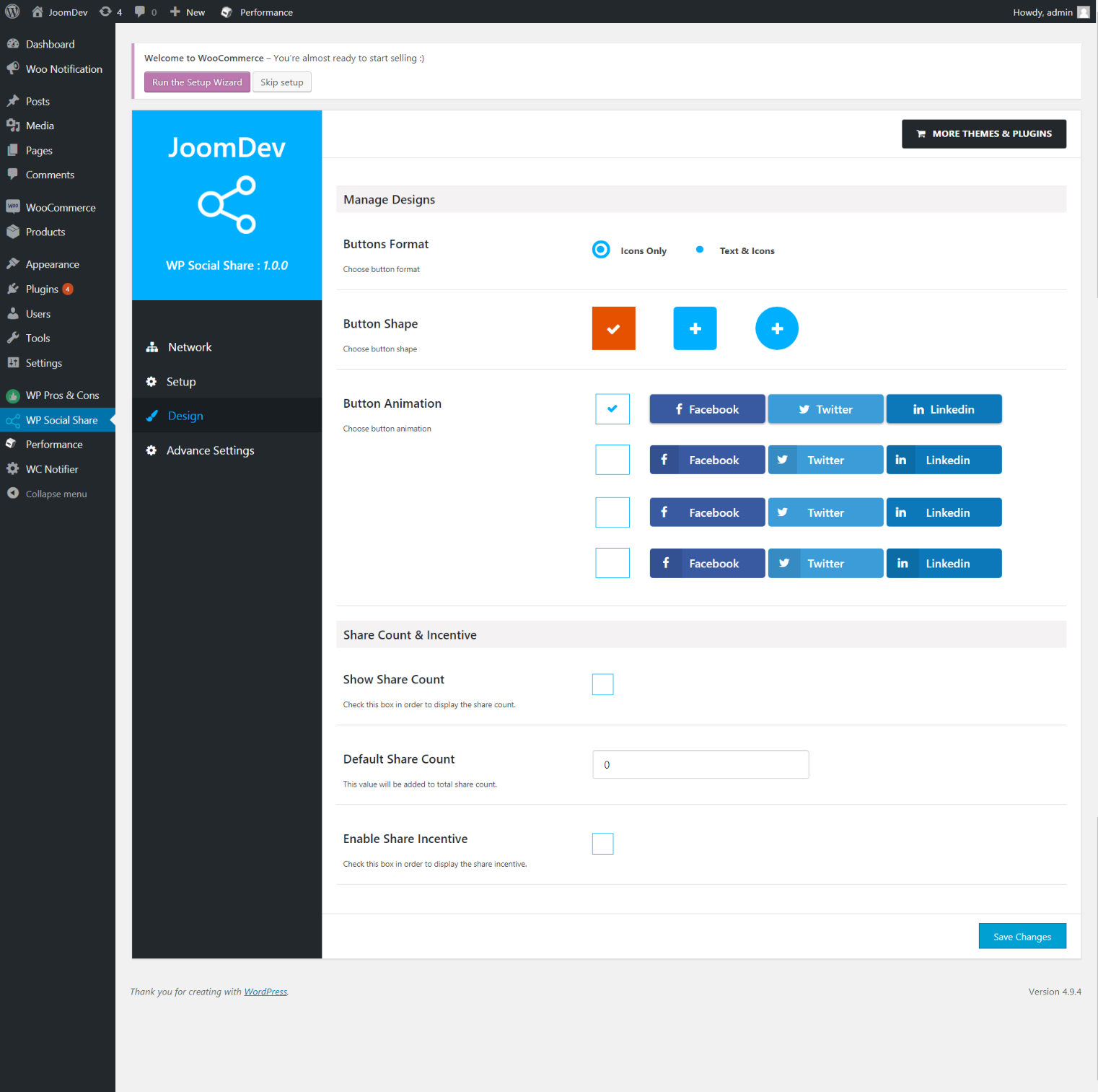
Select any design to display the buttons.
For mobile
For mobile

Installation

Way 1: 1. Upload joomdev-wp-social-share.zip to the /wp-content/plugins/ directory 2. Extract the zip file. 3. Activate the plugin from wordpress plugins page. And you have done.

Way 2: 1. Go to plugins page in admin. 2. Click on Add New button. 3. Search for “WP ShareX”. 4. Click install on WP Social Share. 5. Activate the plugin.

FAQ

Installation Instructions

Way 1:
1. Upload joomdev-wp-social-share.zip to the /wp-content/plugins/ directory
2. Extract the zip file.
3. Activate the plugin from wordpress plugins page. And you have done.

Way 2:
1. Go to plugins page in admin.
2. Click on Add New button.
3. Search for “WP ShareX”.
4. Click install on WP Social Share.
5. Activate the plugin.

How do I use this plugin?

See description.

Anmeldelser

Excellent!

Arnab Mohapatra 16. marts, 2018 1 svar
Incredible plugin. It allows to add any sharing button on the page simply and fast!
Læs 1 anmeldelse

Bidragsydere & udviklere

“WP ShareX” er open source-software. Følgende personer har bidraget til dette plugin.

Bidragsydere
  • joomdev

Oversæt “WP ShareX” til dit eget sprog.

Interesseret i udvikling?

Gennemse koden, tjek SVN repository, eller abonner på udviklerloggen via RSS.

Ændringslog

1.0.0

  • New Plugin initialized.

Meta

  • Version 1.0.0
  • Senest opdateret 8 år siden
  • Aktive installationer 10+
  • WordPress-version 3.0 eller højere
  • Testet op til 4.9.29
  • Sprog
    English (US)
  • Tags
    sharesocialsocial share
  • Avanceret visning

Bedømmelser

5 ud af 5 stjerner.
  • 1 5-stjernet anmeldelse 5 stjerner 1
  • 0 4-stjernet anmeldelser 4 stjerner 0
  • 0 3-stjernet anmeldelser 3 stjerner 0
  • 0 2-stjernet anmeldelser 2 stjerner 0
  • 0 1-stjernet anmeldelser 1 stjerne 0

Your review

Se alle anmeldelser.

Bidragsydere

  • joomdev

Support

Har du noget at sige? Har du brug for hjælp?

Vis supportforum

Donér

Vil du gerne støtte udviklingen af dette plugin?

Donér til dette plugin

  • Om
  • Nyheder
  • Hosting
  • Privatliv
  • Fremvisning
  • Temaer
  • Plugins
  • Blokgrupper
  • Lær
  • Support
  • Udviklere
  • WordPress.tv ↗
  • Bliv involveret
  • Begivenheder
  • Doner ↗
  • Fem for Fremtiden
  • WordPress.com ↗
  • Matt ↗
  • bbPress ↗
  • BuddyPress ↗
WordPress.org
WordPress.org

Dansk

  • Besøg vores X (tidligere Twitter) konto
  • Besøg vores Bluesky-konto
  • Besøg vores Mastodon konto
  • Besøg vores Threads-konto
  • Besøg vores Facebook side
  • Besøg vores Instagram konto
  • Besøg vores LinkedIn konto
  • Besøg vores TikTok-konto
  • Besøg vores YouTube-kanal
  • Besøg vores Tumblr-konto
Kode er poesi.
The WordPress® trademark is the intellectual property of the WordPress Foundation.