
Beskrivelse
The plugin was originally created for Dave Draper’s website where it is used on the music pages. For an example, please see the page for the Wild Bunch album featuring Dave on vocals and bass.
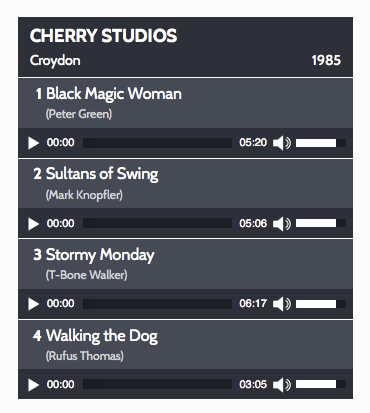
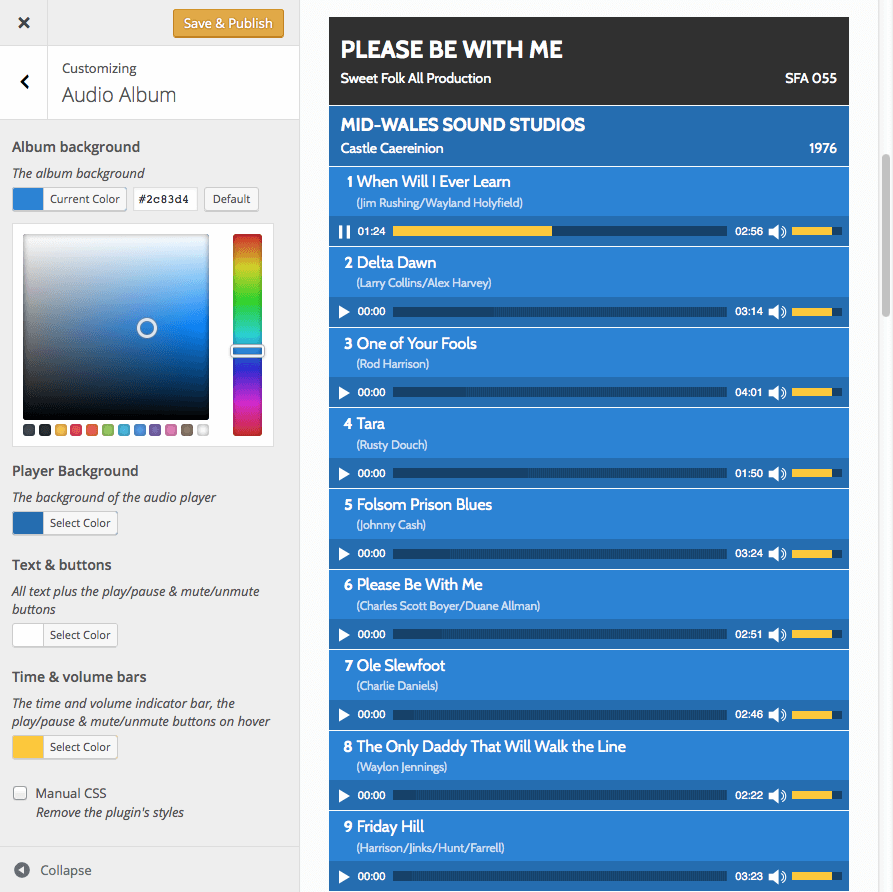
Audio Album uses the default audio capabilities of mediaelement.js included with core WordPress files and enables you to style a group of audio files (MP3 etc) as single block formatted as an album. The colours can be customized in the Audio Album section of the WordPress customizer.
You can display as many Audio Albums as you need on your site, with multiple albums on each page.
Usage:
There are two shortcodes that can be used [audioalbum] and [audiotrack]
[audioalbum]
Denne shortcode er påkrævet og kan bruges som en overskrift før [audiotrack] shortcodes.
- Titel
- detail
-
Dato
[audiotrack]
Dette fungerer som en indpakning til WordPress [audio] shortcode og bruger de samme parametre som [audio] shortcode, plus de følgende, der er specifikke for dette plugin: -
Titel
- Bredde
- Højde
- songwriter
- buttontext
- buttonlink
The following attributes can also be used in the [audiotrack] shortcode in the same way in which they are used in the default WordPress [audio] shortcode:
- src
- mp3
- ogg
- wma
- m4a
- wav
- loop
- autoplay
- preload
Eksempel
[audioalbum title="The Album Title" detail="Some other Details" date="2022"]

[audiotrack title="Song One" songwriter="credit" mp3="http://domain.com/wp-content/uploads/audiofile1.mp3"]

[audiotrack title="Song Two" songwriter="credit" mp3="http://domain.com/wp-content/uploads/audiofile2.mp3"]
Lyrics / other info in a popup window
There are some additional parameters which can be added to the [audioalbum] shortcode to optionally add a button to allow a visitor to open a link on each audio track to open a page in your site within a popup window.
You need to first create the page, post, or custom post type post and make a note of the post/page id.
Der er fire parameter/værdi-par, der kan tilføjes til [audiotrack] shortcode for at lave et popup-link
- buttonlink
- buttontext
- Bredde
- Højde
Indtast side-/indlægs-ID’et for målsiden som værdi for knap link parameteren. En knap vises kun, når der er angivet en værdi for knap link parameteren.
The buttontext attribute is optional, if no value is specified, the default label of ‘lyrics’ will be shown on the button.
The dimensions of the popup window can also be specified using optional width and height attributes. If no values are given, default values of 520px (width) and 400px (height) will be used.
If your site is using a Genesis child theme, as a little bonus, a landing-page template without a masthead, menus, sidebars or other distractions will be applied to the popup page.
Example with default ‘lyrics’ button
[audiotrack title="Song One" songwriter="credit" mp3="http://domain.com/wp-content/uploads/audiofile1.mp3" buttonlink="808"]
Example with custom button and custom popup window dimensions
[audiotrack title="Song Two" songwriter="credit" mp3="http://domain.com/wp-content/uploads/audiofile2.mp3" buttonlink="909" buttontext="linklabel" width="300" height="500"]
The parameters used with the standard native WordPress audio shortcode outlined in the codex: Audio Shortcode page can also be used in the [audiotrack] shortcode.
Skærmbilleder
Installation
- Upload the plugin folder to your ‘/wp-content/plugins/’ directory
- Activate the plugin through the ‘Plugins’ menu in WordPress
FAQ
-
Where is the plugin’s admin page?
-
Gå til Udseende -> Tilpas -> Audio Album
-
Is it responsive?
-
Ja, det burde fungere med alle responsive temaer. Det er som standard indstillet til at fylde 100% af bredden af det omsluttende element. Hvis du bruger et tema eller en plugin, der giver kolonne-shortcodes, bør det også fungere godt med disse.
-
Kan jeg ændre skrifttyperne?
-
The fonts used are inherited from your theme, so in most cases they should work well, but if you do need to change them, ensure that the font you want to use has already been made available in your theme, and add the following css rule (with the appropriate font name) to your child theme or a custom CSS plugin:
.audioheading, .audioalbum, .track { font-family: 'verdana', sans-serif; } -
Hvordan kan jeg foretage mere omfattende tilpasninger af stilarterne?
-
Select the checkbox for manual CSS in the Audio Album customizer section. This will prevent the audio album styles from loading. Then copy the default audio album stylesheet from the plugin into your child theme or custom theme’s stylesheet or into a custom CSS plugin, and make your customisations to this copy. The manual CSS option is intended for experienced developers with CSS skills.
-
Can I display multiple albums on a single page?
-
Yes you can. As many as you like.
-
Hvad med afspilningslister?
-
Audio Album blev oprettet før afspilningsliste-funktionaliteten blev introduceret til WordPress med version 3.9, så det bruger ikke eller giver nogen afspilningslistefunktioner.
-
Can you create for me a customized stylesheet to fit in with the colours of my website?
-
I would love to, but my time is limited and this is beyond of the scope of the free support that I can give on the forums, I can offer this as a paid service. Please send me details of your requirements via the cubecolour contact form.
-
Er der andre gratis Cubecolour-plugins?
-
Hvis du kan lide dette plugin, kan du måske også lide nogle af mine andre plugins i WordPress.org-pluginsmappen. Disse er listet på pluginsiden på min WordPress.org profilside.
-
Alle spor har nummer ‘1’ i stedet for stigende numre
-
Dette kan ske, hvis du ikke har en audioalbum shortcode før audiotrack shortcodes.
-
Why do you spell the word ‘color’ incorrectly?
-
Det gør jeg ikke, jeg er fra England, og ‘colour’ er den korrekte stavemåde.
-
Hvorfor er der base64-kode i pluginets stylesheet?
-
Base64 er en måde at repræsentere binære data ved kun at bruge teksttegn. Selvom base64 nogle gange bruges til at skjule scripts med skadelig hensigt i php-filer, bruges det legitimt til at muliggøre indlejring af små gif- og png-billeder i stylesheet som data-URIs.
-
I am using the plugin and love it, how can I show my appreciation?
-
You can donate via my donation page
If you find the plugin useful I would also appreciate a five star review on the plugin review page
-
Hvorfor virker det ikke?
-
The plugin does work on the sites it has been tested on. If it is not working for you, you may have done something wrong or maybe your theme was not built to WordPress standards. If it isn’t working for you, please read the documentation carefully, and if that doesn’t address your issue, post a question on the plugin support forum so we can have an opportunity to try to get it working before you leave a review that tells people more about you than about the plugin.
-
Hvilke supportniveauer er tilgængelige?
-
I can offer free forum support for free cubecolour plugins where all communication takes place on the WordPress.org forums and a link is provided to the page on your site where I can see the issue without needing a password.
Hvis betingelserne for at opnå gratis support på det offentlige forum ikke er kompatible med det nødvendige supportniveau, er der betalt support via e-mail tilgængelig. Denne forudbetalte e-mail-support kan anmodes om på: cubecolour.co.uk/premium-support
Anmeldelser


Bidragsydere & udviklere
“Audio Album” er open source-software. Følgende personer har bidraget til dette plugin.
Bidragsydere
“Audio Album” er blevet oversat til 1 sprog. Tak til oversætterne for deres bidrag.
Oversæt “Audio Album” til dit eget sprog.
Interesseret i udvikling?
Gennemse koden, tjek SVN repository, eller abonner på udviklerloggen via RSS.
Ændringslog
1.5.1
- Various bugfixes
1.5.0
- Removed jQuery as dependency on the front end (although mediaelement still requires jQuery)
1.4.4
- Make translatable
1.4.3
- Fix js error caused by WP migrate no longer being loaded in WP
1.4.2
- Formatting improvements
1.4.0
- Inline script loaded with a dependancy to the enqueued script to ensure jQuery is loaded.
1.3.1
- added CSS for replay button after track has completed playing.
1.3.0
- corrected register_style issue in shortcode function
- corrected $preload variable used instead of array value
- added animated gif loading image as data url
- added transparent png images for time & volume track as data urls
- improved default colours & added customizer controls for colour
- removed font definition from stylesheet to enable the font to be inherited from theme’s body style
- removed rem values from stylesheet
- improved alignment of generated track numbers
- now uses Dashicons for play/pause/mute/unmute buttons – so they can be styled
- Popup template improvements (Genesis only)
- The [audioalbum] shortcode is no longer mandatory before [audiotrack] shortcodes
1.2.0
- improve delimiting for comments
- add default value for preload shortcode param: metadata so total track time appears in player
- improved parameter value sanitization
- use array for shortcode parameters instead of extract
- use constant for plugin version
- use visibility instead of display for delaying appearance of tracks
1.1.0
- Fixed WordPress 4.4 compatibility issue
- Improved enqueuing so script & stylesheet are only loaded when needed
1.0.4
- Improved function to audio players with default style briefly showing as the page loads
- Uses Dashicons in plugin page links
- Minor CSS tweaks
1.0.3
- Fixes incorrect path to svg file in stylesheet
1.0.2
- Prevent unstyled players being flashed onscreen until the page has fully loaded
- Flat Player buttons to replace default gradient filled buttons
1.0.1
- Fixes function name collision when another cubecolour plugin is installed
1.0.0
- Initial Version