

Beskrivelse
Endelig WordPress-statistik, du rent faktisk vil bruge
Google Analytics er overkill. De fleste andre WordPress-statistikplugins er rodet og forvirrende. Du vil bare spore besøgende og vide, hvad der sker på dit site – uden en datavidenskabsgrad.
Burst Statistics giver dig et rent, intuitivt analysedashboard med fokus på de målinger, der faktisk betyder noget. Ingen eksterne analysekonti. Ingen kompleks opsætning. Installer, aktiver, og forstå din hjemmesides trafik på få sekunder.
Betroet af 200.000+ WordPress-sider. Bygget af teamet bag Team Updraft, kendt for UpdraftPlus, WP-Optimize og All-In-One Security (AIOS).
Hvad vores brugere siger
“Endelig et analyseplugin, jeg rent faktisk kan forklare til kunder.”
— @anguskeystone på wordpress.org“Jeg prøvede WP Statistics og Independent Analytics, men de er overfyldte og forvirrende. Bursts brugerflade er intuitiv og fokuseret på det, der betyder noget for mig.”
— @vallered på wordpress.org
Hvorfor vælge Burst Statistics?
Analyse designet til at være handlingsorienteret
Andre analyseplugins kaster alt efter dig. Burst viser det, der betyder noget – besøgende, sidevisninger, henvisninger og topsider – i et dashboard, du faktisk vil bruge. Ingen dataoverkill. Ingen forvirrende menuer. Se hvorfor Burst er perfekt til bloggere.
Privatlivsvenlig analyse by design
Al sitestatistik forbliver på din server, hvilket gør Burst til en ægte lokal analyseløsning. Ingen ekstern sporing. Dine data er dine – vi ser dem aldrig uden din udtrykkelige tilladelse. Designet til GDPR-kompatibel analyse ud af boksen. Læs hvorfor Burst Statistics er privatlivsvenlig.
Nul opsætningsbesvær
Installer, aktiver, færdig. Ingen Google Analytics-konto, ingen GA4-opsætning, ingen sporingskoder, ingen konfigurationshovedpine. Begynd at se live-besøgende med det samme. Ny til analyse? Start med vores guide om WordPress-analyse.
WordPress-native analyse
Ikke en port fra en anden platform. Bygget specifikt til WordPress med native performance og problemfri integration. Fungerer med WooCommerce, blogs, virksomhedssider og medlemssider.
Letvægtsanalyse, hurtig som standard
Optimerede databaseforespørgsler. Et lille sporingsskript på under 4 KB. Ingen eksterne afhængigheder, der bremser dine sider. Designet til at spore præcist selv ved aggressiv server-side caching. Se beviset i gør Burst min hjemmeside langsommere.
Funktioner
Forstå din websitetrafik
- Bedst præsterende sider og indlæg på et øjeblik
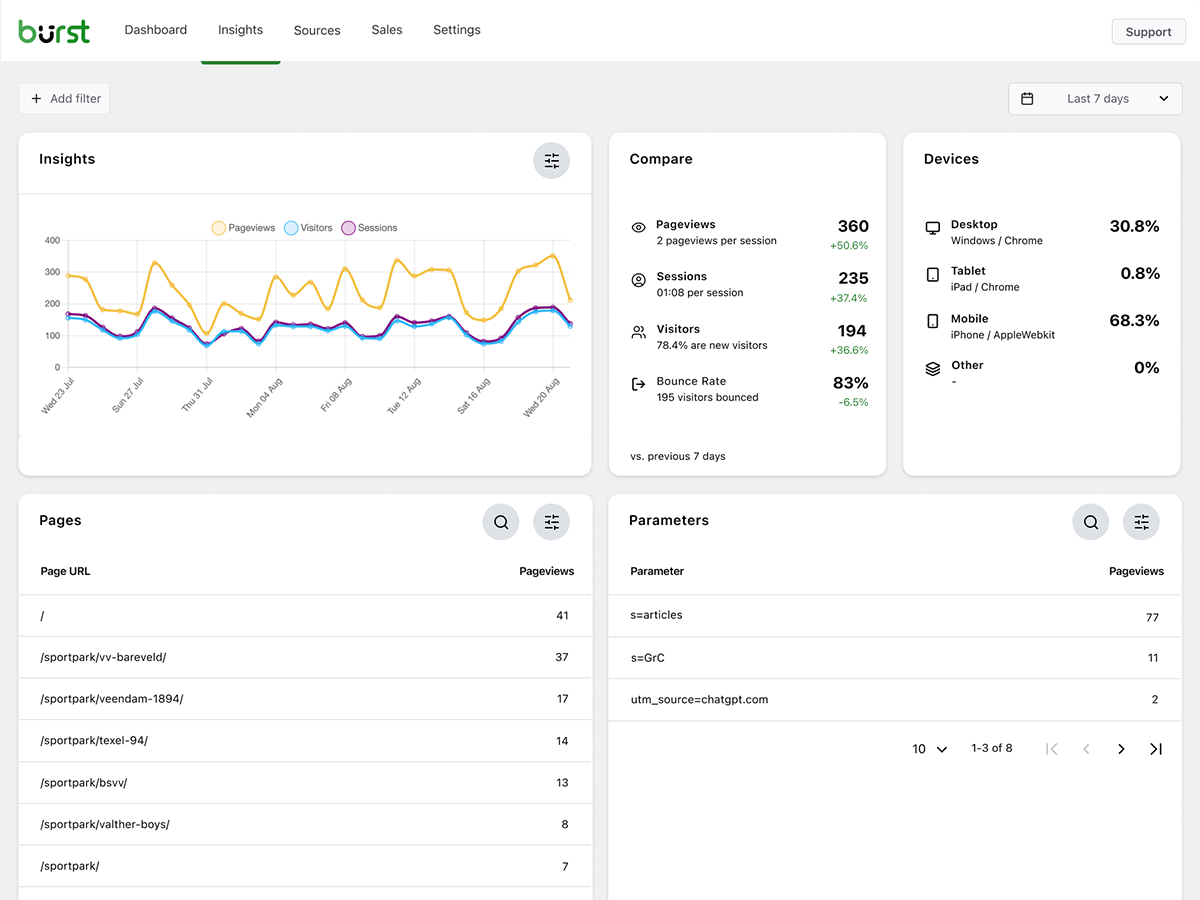
- Spor nøgletal: besøgende, sessioner, sidevisninger, afvisningsprocent
- Opdeling af besøgende efter enhed (desktop, tablet, mobil)
- Filtrer data efter brugerdefinerede datointervaller
- Sammenlign trafik mellem perioder
- Search Console-integration – se Google-søgninger direkte i dit dashboard
Realtidsanalyse
- Find kilden i realtid for besøgende lige nu
- Se de specifikke sider, brugerne besøger lige nu
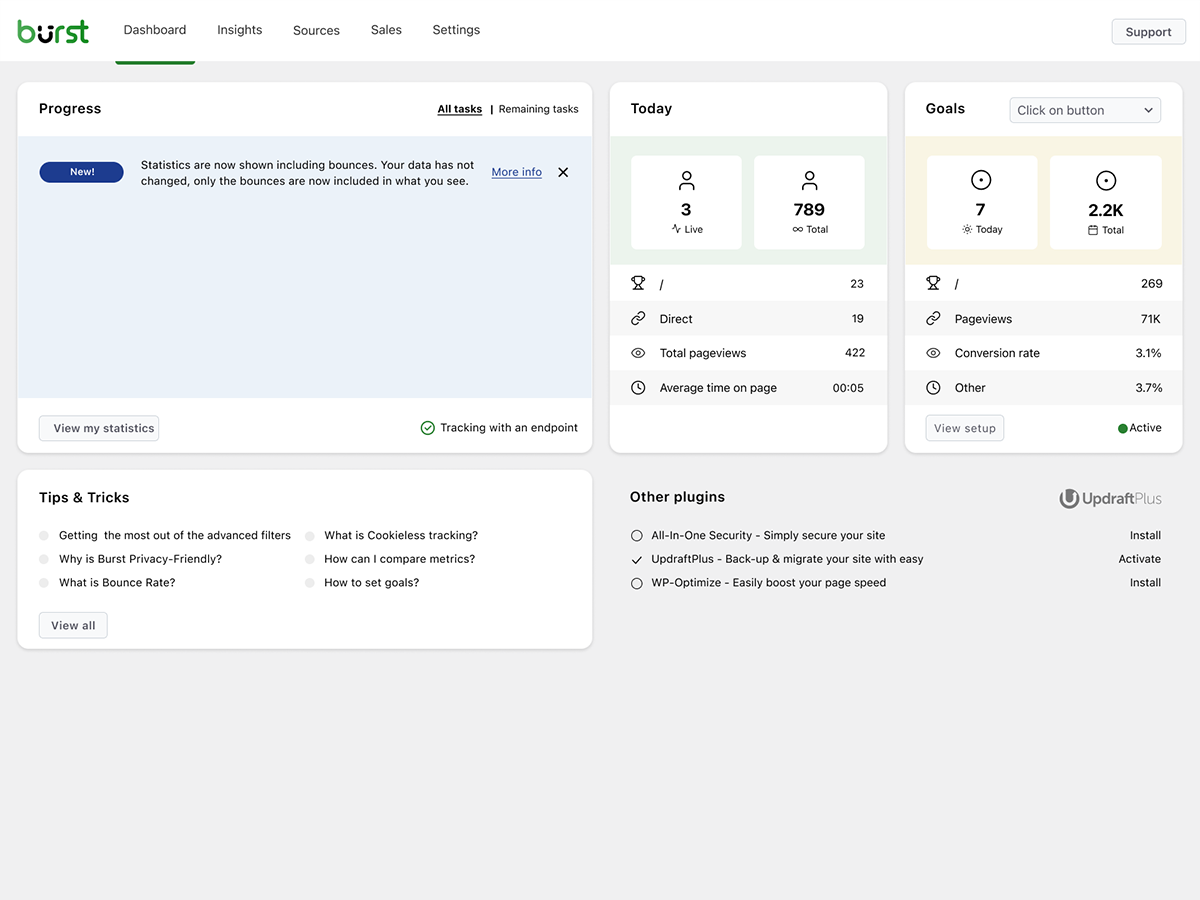
- Live-tæller over aktive brugere på dit site
Se hvilket indhold der klarer sig godt
- Top sider og indlæg rangeret efter visninger
- Sammenlign enhver datoperiode
- Følg med i, hvordan hver enkelt side klarer sig
Brugerdefineret konverterings- og målsporing
- Spor visninger, klik og WordPress-hooks
- Spor WooCommerce-analyser og salg (Burst Pro Business)
- Spor brugerdefinerede hændelser og konverteringer
- Trin-for-trin-opsætning i vores guide til mål
Privatlivsvenlig analyse uden kompromiser
- 100 % selvhostet – al statistik gemmes lokalt i din WordPress-database
- Cookiefri sporing – en cookiefri analyseopsætning uden behov for samtykkebanner i mange lande
- Analyse designet til at understøtte overholdelse af GDPR, CCPA, DSGVO, AVG, RGPD og PECR
- Ingen data deles med Google, Facebook eller tredjepart
Hold dig opdateret
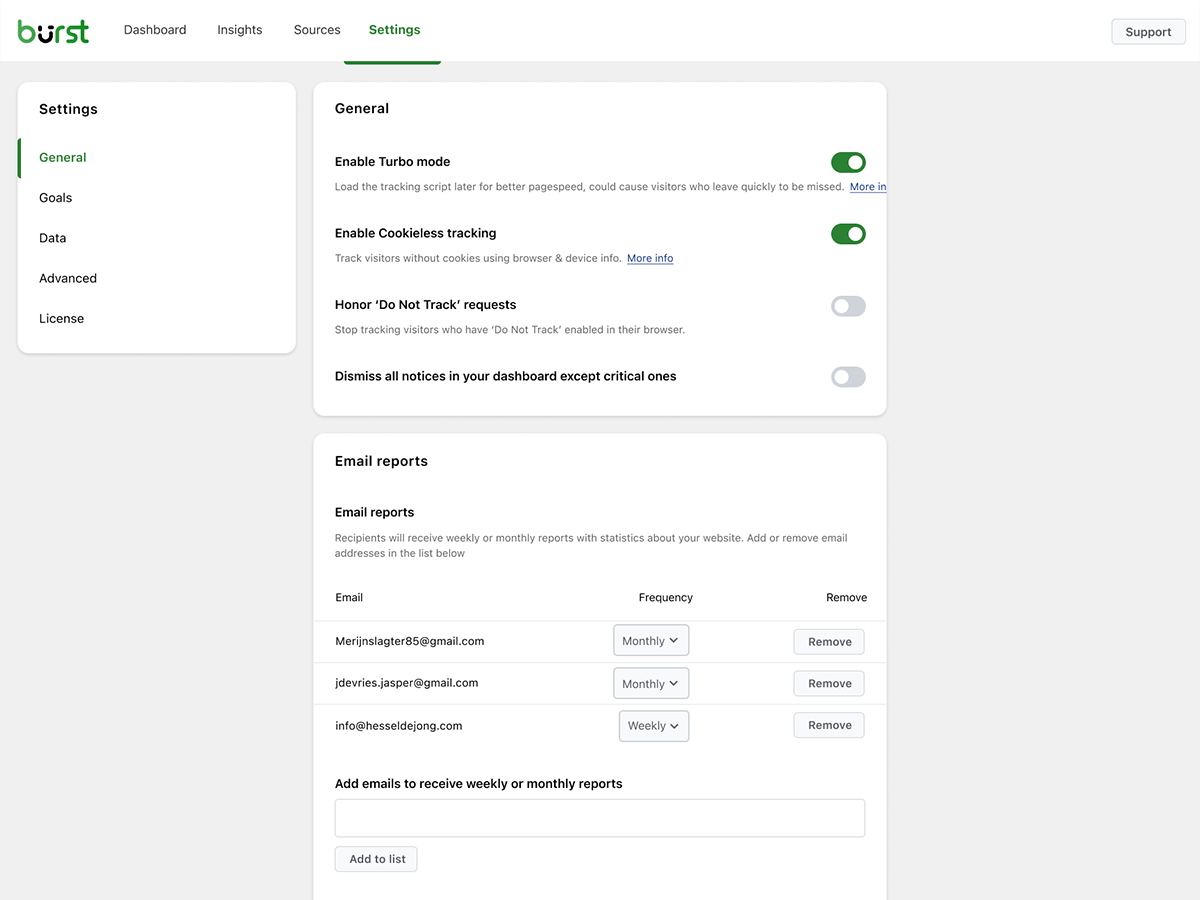
- Ugentlige eller månedlige e-mailrapporter sendt direkte til din indbakke
- Sammenlign perioder for at opdage tendenser
- Få besked når sporing ikke virker
Et WordPress-native alternativ til Google Analytics
Hvis du er vokset fra Google Analytics, eller aldrig ønskede GA4 fra starten, er Burst bygget til dig. Som et Google Analytics-alternativ bytter Burst GA4’s kompleksitet ud med klarhed. Du får de målinger, der betyder noget, på ét enkelt dashboard – uden sampling, uden datatærskling og uden at sende dine besøgende gennem Googles annoncenetværk.
GA4 er bygget til at gøre Googles annonceforretning bedre. Burst er bygget til at gøre din hjemmeside bedre.
Nysgerrig på det fulde billede? Læs hvorfor WordPress-siteejere forlader Google Analytics eller den direkte sammenligning Burst Statistics vs Google Analytics.
Fra teamet bag UpdraftPlus, WP-Optimize og All-In-One Security
Burst Statistics er en del af Team Updraft, teamet bag nogle af de mest installerede WordPress-plugins på markedet:
- UpdraftPlus – WP backup and migration plugin
- WP-Optimize – cache, bildekomprimering, minifikation og databaseoprydning
- All-In-One Security (AIOS) – sikkerhed og firewall
Hvem er Burst Statistics til?
Burst fungerer til alle WordPress-sider, men vi har bygget specifikke løsninger til de fire målgrupper, der får mest ud af det:
- Bloggere og indholdsskabere, se hvilke indlæg der vækker genklang hos dit publikum
- Iværksættere og ejere af små virksomheder, forstå din trafik og dine kampagner uden kompleksitet
- WooCommerce-butikker, spor besøgsadfærd, omsætning og produktperformance
- Bureauer og freelancere, administrer analyse og rapportering for flere kundesider
- Privatlivsbevidste siteejere – GDPR-kompatibel analyse uden samtykkebannere
- Alle der er trætte af Google Analytics – få klarhed i stedet for forvirring
Gratis vs Pro
Burst Statistics (gratis) inkluderer alt, hvad du behøver for at forstå din websitetrafik. Besøgende, sidevisninger, henvisninger, topindhold, enhedsstatistik, målsporing, e-mailrapporter og meget mere.
Burst Pro tilføjer avancerede funktioner til virksomheder og professionelle. Sammenlign alle planer på prissiden.
CREATOR-PLAN
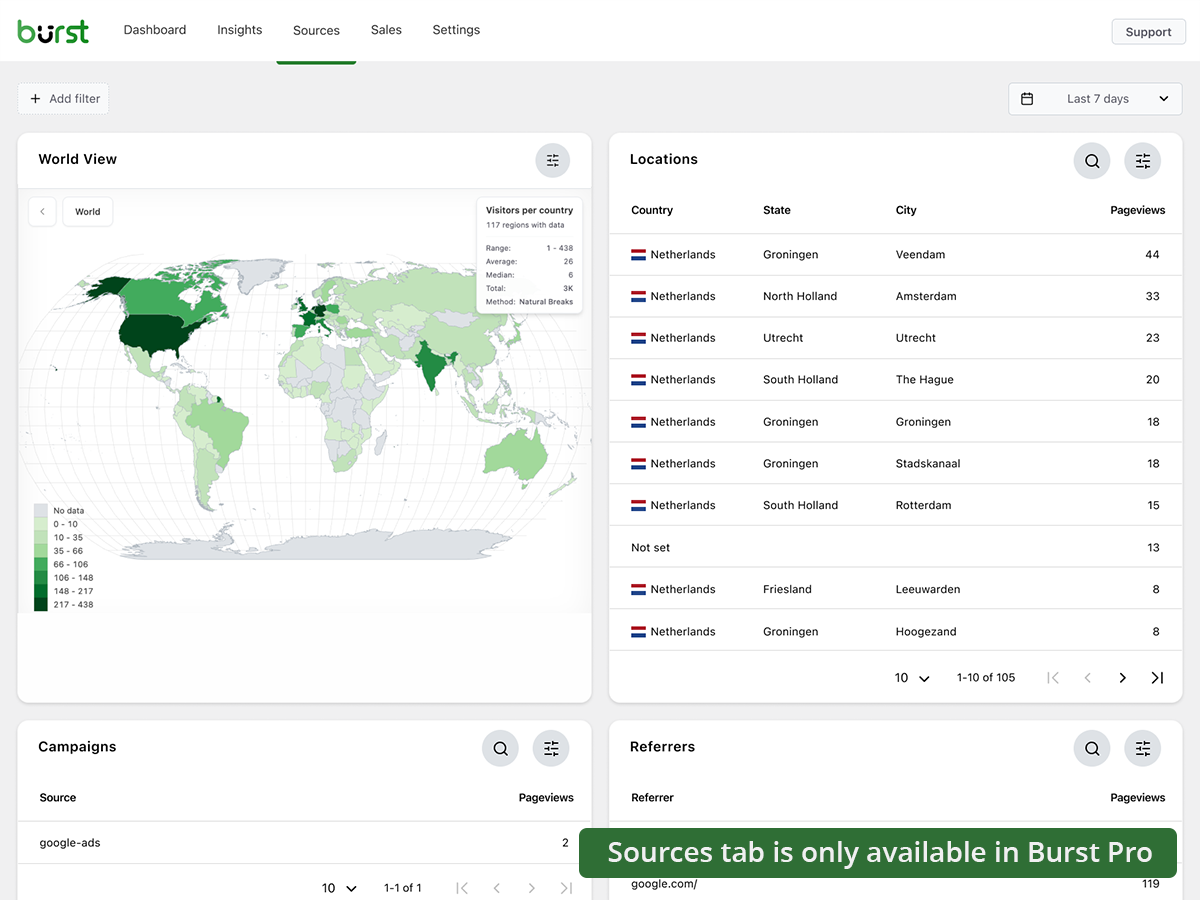
- UTM-kampagnesporing, se hvilke marketingindsatser der giver resultater
- Geografiske data, besøgsindsigt på lande- og byniveau
- Avanceret filtrering, segmenter data efter enhver dimension
- Indstillinger for dataarkivering, hold din database slank automatisk
- Prioritetssupport, direkte kontakt med vores udviklere
BUSINESS-PLAN
- Alt i Creator-planen, plus
- Fuldt WooCommerce-salgsdashboard, se hvilket indhold der genererer mest omsætning
- Omsætningsattribution, forbind WooCommerce-salg med trafikkilder
AGENTUR-PLAN
- Alt i Business-planen, plus
- Rapportering, generer delbare performancerapporter til kunder
Alle Burst Pro-planer inkluderer prioritetssupport. Du får direkte kontakt med vores udviklere – rigtige mennesker, ikke en chatbot.
Sådan klarer Burst sig sammenlignet med andre WordPress-analyseplugins
Vi bliver ofte spurgt, hvordan Burst klarer sig i forhold til andre værktøjer. Ærlig, kort version:
- Google Analytics / GA4, GA4 er kraftfuldt, men bygget til annoncører, ikke siteejere. Det er komplekst, anvender sampling og datatærskling på dine tal og kræver et cookiebanner i de fleste lande. Burst er et enklere, privatlivsvenligt GA4-alternativ, der viser rigtige tal uden besværet. Læs den fulde sammenligning.
- MonsterInsights, MonsterInsights er en connector, der sender dine data til Google Analytics. Hvis du vil have et ægte MonsterInsights-alternativ, der holder data på din egen side i stedet for at sende dem til Google, er Burst et bedre valg.
- Independent Analytics, en respektabel konkurrent med en lignende privacy-first, WordPress-native tilgang. Burst satser hårdere på handlingsorienterede dashboards, dybere UTM- og målsporing, WooCommerce-omsætningsanalyse og rapportering på agentur-niveau. Prøv begge og vælg den, der passer dig bedst.
- Koko Analytics, en ren, letvægtsløsning med fokus på det grundlæggende. Burst går videre med målsporing, realtidsanalyse, UTM-kampagner, WooCommerce-analyse og e-mailrapporter.
- WP Statistics, et velkendt WordPress-statistikplugin med mange muligheder. Mange brugere finder grænsefladen rodet. Burst fokuserer på ét enkelt, klart dashboard designet til klarhed frem for antal funktioner.
- Matomo, selvhostbar og funktionsrig, men tungere og mere kompleks at drive. Burst er den enklere, hurtigere og fuldt WordPress-native løsning.
Nyttige guides og ressourcer
Lær målinger at kende, løs almindelige problemer, og få mere ud af din analyse. Alt gratis på burst-statistics.com.
Kom i gang
- WordPress-analyse og de målinger, der faktisk betyder noget
- Sådan installerer du Burst Statistics fra WordPress-repositoriet
- Sådan opsætter du dit første mål
Privatliv og GDPR
- Hvorfor Burst Statistics er privatlivsvenlig
- Sådan konfigurerer du din hjemmeside uden et cookiebanner
- Sådan sporer Burst hjemmesidebesøgende uden cookies
Målinger og fortolkning af data
- Sådan reducerer du afvisningsprocenten i WordPress
- Hvad er afvisningsprocent?
- Hvad er en sidevisning?
- Hvad er konverteringsrate?
Kampagner og konverteringer
- Sådan sporer du UTM- (og Burst-)parametre
- Kampagne-URL-bygger
- Sådan opretter og A/B-tester du marketingkampagner med Burst
WooCommerce
- 10 dokumenterede måder at reducere WooCommerce-kurvafbrud på
- Introduktion til salgsanalyse for WooCommerce i Burst Pro
Gennemse det fulde lærings-hub for mere.
Installation
- Gå til Plugins → Tilføj ny i dit WordPress-dashboard
- Søg efter Burst
- Klik på Installer nu, og derefter Aktiver
- Gå til Statistik → Dashboard for at se dine analyser
Det er det hele. Ingen eksterne konti. Ingen sporingskoder at indsætte. Burst begynder at indsamle sitestatistik med det samme.
Foretrækker du at installere manuelt eller via Composer? Se installation af Burst Statistics med Composer.
Eksterne tjenester
Burst kører udelukkende på din egen server og sender ikke dine data nogen steder hen. De to valgfrie funktioner nedenfor er de eneste, der kontakter en ekstern tjeneste, og ingen af dem er nødvendige for at bruge Burst. Se vores privatlivserklæring for vores privatlivspolitik; hver funktion nedenfor linker til sin egen, mere specifikke politik.
Google Search Console-integration (valgfrit)
Når du forbinder din Google-konto på indstillingssiden for integrationer, henter Burst dine søgedata (forespørgsler, klik, visninger og placeringer) fra Google Search Console API’et (googleapis.com) og viser dem i dit dashboard. Dette er en envejsstrøm: dit site henter data fra Google, og der sendes ingen besøgs- eller statistikdata til Google eller til os. Kun OAuth-håndtrykket og fornyelsen af tokens går gennem vores relay på search-console.burst-statistics.com; de hentede søgedata går direkte fra Google til dit eget site. Der sker intet, før du forbinder en konto, og du kan afbryde forbindelsen når som helst, hvilket tilbagekalder tokenet hos Google. Læs vores privatlivspolitik for Search Console-integrationen, og se Googles privatlivspolitik og Google API Services User Data Policy.
Anonym datadeling (valgfrit)
Dette er det eneste tilfælde, hvor Burst sender data til os, og det er udelukkende et aktivt tilvalg. Når du vælger at aktivere det, sender Burst med jævne mellemrum anonymiserede, samlede brugs- og performance-statistikker (ingen besøgsdata, ingen personlige data) til api.burst-statistics.com. Til gengæld får du performance-benchmarks fra fællesskabet i dit dashboard, der sammenligner dit site med anonymiserede gennemsnit fra fællesskabet, og det hjælper os med at forbedre pluginnet. Læs hvordan vi håndterer anonyme brugsdata.
Krediteringer
Geografiske data på landeniveau leveres af MaxMind GeoLite2-databasen. Dette produkt indeholder GeoLite2-data skabt af MaxMind, tilgængeligt fra https://www.maxmind.com/.
Source code
The plugin ships the compiled analytics dashboard in includes/Admin/App/build/. The human-readable React/TypeScript source (includes/Admin/App/src/) and the build tooling are published on GitHub. Issues and pull requests are welcome there.
Skærmbilleder
Blokke
Dette plugin giver 1 blok.
- Pageviews Counter
FAQ
Er Burst Statistics virkelig gratis?
Ja. Burst Statistics er 100% gratis uden sporingsbegrænsninger. Burst Pro er valgfrit for brugere, der har brug for avancerede funktioner som UTM-sporing, omsætningsattribution, geografiske data eller klientrapportering. Det er sådan, vi holder Burst Statistics gratis for de fleste brugere.
Hvor er dataene gemt?
Al statistik gemmes i din egen WordPress-database. I modsætning til Google Analytics eller skybaserede værktøjer har vi nul adgang til dine data. Dine data forlader aldrig din server, medmindre du manuelt vælger at dele anonyme brugsdata med os. Læs mere om hvordan Burst håndterer dine data.
Er Burst et godt alternativ til Google Analytics?
Ja. Hvis du synes, GA4 er for komplekst, eller du er bekymret for at sende besøgsdata til Google, er Burst en god erstatning. Du får de trafikstatistikker, du faktisk har brug for – besøgende, henvisninger, topsider og konverteringer – uden at blive overvældet. Læs vores guide til Google Analytics-alternativet for den fulde sammenligning.
Er Burst et godt GA4-alternativ?
Ja. Burst er bygget som et privatlivsvenligt GA4-alternativ til siteejere, der vil have klarhed i stedet for kompleksitet. Ingen Google-konto, ingen tag manager, ingen cookiebanner i de fleste tilfælde. Se hvorfor WordPress-siteejere forlader Google Analytics.
Er Burst et MonsterInsights-alternativ?
Ja. MonsterInsights forbinder din WordPress-side med Google Analytics, så dine data stadig sendes til Google. Burst holder alt på din egen server med sit eget dashboard inde i WordPress. Hvis du vil have analyse, der ikke er afhængig af Google, er Burst det enklere MonsterInsights-alternativ.
Hvordan adskiller Burst sig fra WP Statistics, Independent Analytics eller Koko Analytics?
Burst fokuserer på klarhed frem for mængde. Mens andre WordPress-analyseplugins kan føles rodet, er Bursts dashboard designet til at vise dig det, der betyder noget, uden støjen. Independent Analytics er nærmest i ånd med en fælles privacy-first, WordPress-native tilgang. Burst skiller sig ud med dybere UTM-sporing, WooCommerce-analyse og rapportering på agentur-niveau. WP Statistics tilbyder et bredere funktionssæt, men mange brugere finder det overvældende. Koko Analytics er bevidst minimalt, så det fungerer godt til meget grundlæggende behov.
Hvordan adskiller Burst sig fra Matomo?
Matomo forsøger at være en komplet erstatning for Google Analytics. Burst forsøger at være det klareste og mest handlingsorienterede WordPress-analyseværktøj. Hvis du vil have enkelhed, hurtig opsætning og en native WordPress-oplevelse, er Burst det bedste valg. Hvis du har brug for detaljeret konfiguration og et fuldt GA-lignende funktionssæt, passer Matomo måske bedre til dig.
Skal jeg have en konto?
Nej, du behøver ikke en konto, og der sendes ingen data til andre websites. Hvis du forbinder Google Search Console, henter Burst kun dine søgedata fra Google; der sendes intet om dine besøgende ud. Den ene undtagelse er anonym datadeling, en tilvalgsmulighed, der deler anonymiserede statistikker med os og til gengæld giver dig performance-benchmarks fra fællesskabet.
Er der en grænse for, hvor mange besøgende jeg kan spore?
Nej. Den eneste begrænsende faktor er din egen database og server.
Der er mulighed for at bruge cookiefri sporing, hvis du foretrækker det. Som standard bruger Burst cookies, fordi de er mere præcise og lette. Selv med cookies forbliver Burst privatlivsvenlig, da alle data er anonyme og gemt på din server. Læs mere om hvorfor cookies misforstås.
Burst Statistics kan bruges uden at sætte cookies eller gemme data i browsere. Det kan påvirke nøjagtigheden en smule, så en hybrid-løsning med cookies efter samtykke er også mulig. Se hvordan Burst sporer besøgende uden cookies.
Er Burst GDPR-kompatibel?
Burst er designet til at understøtte overholdelse af GDPR, CCPA, DSGVO, AVG, RGPD og PECR. Data forbliver på din server, sporing er anonym, og du kan deaktivere cookies helt. I de fleste opsætninger er der ikke brug for et samtykkebanner til analyse. Se hvordan du konfigurerer din hjemmeside uden et cookiebanner.
Kan jeg bruge Burst sammen med Google Analytics?
Ja. Mange brugere kører begge i en overgangsperiode, eller beholder GA4 til historiske data, mens de bruger Burst til daglig indsigt. Der er ingen konflikt.
Gør Burst Statistics mit website langsommere?
Nej. Burst er bygget til performance med optimerede databaseforespørgsler, et minimalt sporingsskript og en Turbo-tilstand, hvis hastighed er vigtigere end perfekt nøjagtighed. Den fulde gennemgang finder du i gør Burst Statistics min hjemmeside langsommere.
Virker Burst sammen med WooCommerce?
Ja. Grundlæggende sidevisningssporing fungerer i den gratis version. For fuld WooCommerce-analyse, omsætningssporing, produktperformance og salgsattribution skal du bruge Burst Pro Business.
Hvordan migrerer jeg fra et andet analyse-plugin?
Installer og aktiver Burst – det begynder at spore med det samme. Historiske data fra andre plugins kan ikke importeres, men du kan køre begge side om side i en overgangsperiode.
Er det muligt at installere Burst Statistics med Composer?
Ja. Både den gratis og den premium version kan administreres med Composer. Læs installationsguiden til Composer for mere information.
Kan jeg give feedback om plugin’et?
Vi værdsætter din feedback. Du kan indsende en supportanmodning på WordPress-foraene, og vi vil svare hurtigt.
Anmeldelser


Bidragsydere & udviklere
“Burst Statistics – Enkel WordPress-analyse (Google Analytics-alternativ)” er open source-software. Følgende personer har bidraget til dette plugin.
Bidragsydere


“Burst Statistics – Enkel WordPress-analyse (Google Analytics-alternativ)” er blevet oversat til 66 sprog. Tak til oversætterne for deres bidrag.
Interesseret i udvikling?
Gennemse koden, tjek SVN repository, eller abonner på udviklerloggen via RSS.
Ændringslog
3.7.2
- September 29th 2026
- New: an AI summary block for email reports, which sums up the report period in a few sentences. The block is available when the AI assistant is enabled.
- New: the 404 pages block shows which pages link to a missing page, split into internal and external referrers, with a link to edit the internal page that holds the broken link.
- Improvement: informative dashboard tasks are shown one at a time, and after you dismiss one the next appears three days later. Warnings and errors are always shown.
- Improvement: the interactive tour fills the dashboard with sample data while it runs, instead of installing demo data in the database.
- Improvement: the page picker for goals loads faster on sites with a lot of statistics, and lists pages of every post type.
- Improvement: every dashboard task declares whether it applies inside the MainWP dashboard; tasks that assume the site’s own wp-admin are no longer served to MainWP.
- Improvement: the GoogleOther and Google-InspectionTool crawlers are recognized as bots and no longer tracked, props @draven666
- Fix: the MainWP dashboard offered every date range preset except “All time”; the presets are now localized from one list for the WP admin and the MainWP dashboard.
- Fix: the interactive tour is no longer offered inside the MainWP dashboard (task and settings button), where it cannot run.
- Fix: long messages in the report log batch details wrapped outside their row.
- Fix: since 3.7.1 the beacon hit was sent with fetch() instead of navigator.sendBeacon, so crawlers that render JavaScript, such as Google’s renderer, were counted as visitors. The hit is sent with sendBeacon again; fetch is only used when the beacon cannot be queued, or in debug mode, props @draven666
- Hardening: a user with share link access could extend access to the statistics after the share link expired by changing the password, props Chloe Chamberland / Wordfence.
3.7.1
- 17. september 2026
- Nyt: CartFlows-integration, kassetrin tæller som kassebesøg i blokken for Livetrafik.
- Nyt: interaktiv rundvisning: en guidet gennemgang af dashboardet, indsigter, datatabeller, trafikkilder, AI-assistenten, læseengagement, rapporter, mål og indstillinger, med eksempeldata så hver blok er udfyldt; rundvisningen kan sættes på pause og genoptages, hvor du slap.
- Forbedring: det cookieløse fingeraftryk gengiver ikke længere et WebGL-testbillede, hvilket fjernede det meste af tracking-scriptets CPU-tid ved første interaktion (op til ~190ms på desktop, mere på mobil) uden nævneværdigt tab af unikhed; cookieløse besøgende tælles én gang som nye besøgende efter opdateringen.
- Forbedring: besøgsikoner i Live traffic-blokken bruger tolv forskellige farver og en bedre hash, så forskellige besøgende er nemmere at skelne fra hinanden.
- Forbedring: at aktivere eller deaktivere et plugin under en optimeret Burst REST-request kan ikke længere gemme den reducerede pluginliste, som REST API-optimeringen bruger til den request, tak til Will Lassalle / JLSTech.
- Rettelse: Sammenlign-blokken talte sessioner, besøgende og afvisninger for besøg, der kun anmodede om ikke-eksisterende sider (404-hits, typisk bot-scanninger), mens I dag-blokken og de øvrige blokke udelod dem; alle blokke anvender nu den samme regel, og eksisterende sessioner opdateres af en baggrundsmigrering.
- Rettelse: sider fra indholdstyper, der er registreret af plugins, såsom WooCommerce-produkter, viste en tom url i Sider-tabellen; eksisterende data udfyldes af en baggrundsmigrering.
- Rettelse: “I dag”-tallet i Mål-blokken startede dagen ved UTC-midnat i stedet for midnat i WordPress-tidszonen.
- Rettelse: besøgstal for historiske datoperioder viste næsten nul, mens 3.7.0-migreringen af besøgsindekset stadig kørte; rækker, som migreringen endnu ikke har konverteret, tælles nu efter deres oprindelige besøgs-id, indtil migreringen er færdig.
- Rettelse: statusnotifikationen for databaseopgraderingen startede i halvfemserne og flyttede sig næsten ikke, fordi den talte hver eneste opgradering, der nogensinde er udgivet, i stedet for opgaverne i den kørende batch.
- Rettelse: Source-kolonnen i kampagnetabellen havde ingen overskrift, og kampagneforespørgsler på den kolonne blev ikke genkendt som kampagneforespørgsler af målfilteret.
- Rettelse: der blev vist en advarsel om en manglende tabel for en søgeords-tabel, der ikke længere er i brug.
- Rettelse: tracking-scriptet startede ikke, når samtykkeændrings-eventet fra et cookie-banner ikke inkluderede statistik-kategorien; det tjekker nu også WP Consent API’et direkte, og beacon-requesten bruger fetch med keepalive, hvor det er tilgængeligt.
- Rettelse: REST API-optimeringen læste og afkodede request-bodyen én gang pr. aktivt plugin i stedet for én gang pr. request, og inspicerer nu højst 64 KB af den, tak til Will Lassalle / JLSTech.
For the full changelog, see burst-statistics.com/docs/changelog.