
Beskrivelse
CoBlocks is the most innovative collection of page building WordPress blocks for the new Gutenberg WordPress block editor.
With additional blocks and true row and column building, CoBlocks gives you a true page builder experience for Gutenberg.
CoBlocks is powerful but lightweight: it adds functionality to the WordPress editor without bloat. This is the plugin you’ve been waiting for, and it will make you rethink what WordPress is capable of.
Make Beautiful Web Pages With Gutenberg & CoBlocks
CoBlocks is the last page builder you’ll ever need: you get a winning mix of additional WordPress blocks, and page builder functionality. With CoBlocks you have everything you need to make beautiful web pages with the new block editor:
- Accordion Block
- Alert Block
- Author Profile Block
- Carousel Gallery Block
- Click to Tweet Block
- Collage Gallery Block
- Counter Block (New!)
- Dynamic Separator Block
- Events Block
- FAQ Block
- Features Block
- Food & Drinks Block
- Form Block
- Gif Block
- GitHub Gist Block
- Hero Block
- Highlight Block
- Icon Block
- Logos & Badges Block
- Map Block
- Masonry Gallery Block
- Media Card Block
- Offset Gallery Block
- OpenTable Reservations Block
- Post Carousel Block
- Posts Block
- Pricing Table Block
- Resizable Row/Columns Blocks
- Services Block
- Shape Divider Block
- Social Profiles Block
- Social Sharing Block
- Stacked Gallery Block
Breakthrough Page Builder System
CoBlocks features an innovative block system that allows you to create stunning web pages, and even entire websites, with the new WordPress editor.
You get the extra blocks you need and the layout and design functionality for a true page builder experience.
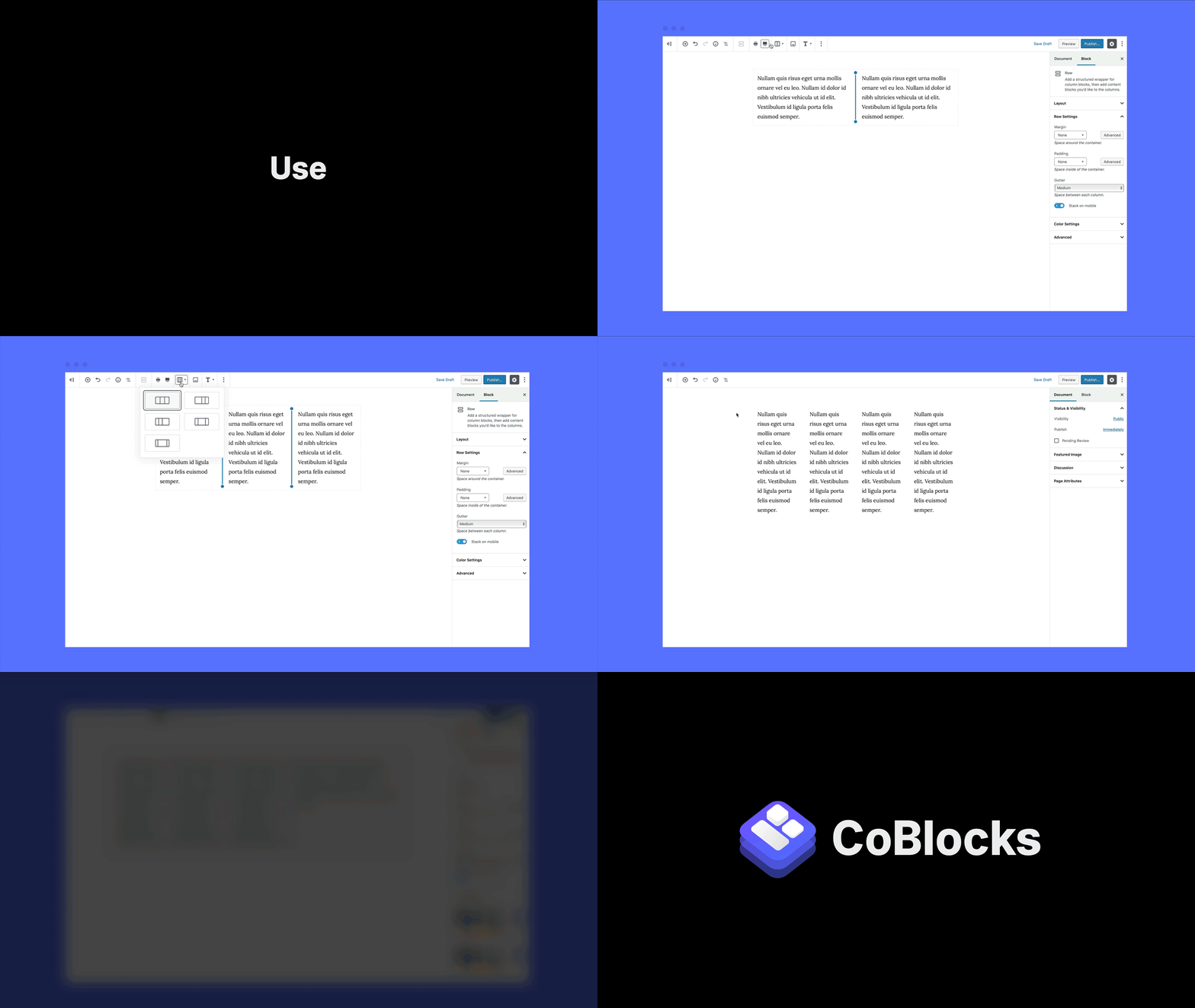
Use the exceptional Row and Columns blocks to add dynamically generated content areas with specific responsive margin and padding settings that only CoBlocks provides.
Style these with innovative new blocks such as the Shape Divider, which lets you split up your content with beautiful dividers.
Each of the WordPress blocks within CoBlocks have been precisely fined tuned to offer a familiar, yet powerful, customization experience. Tailor each block to your taste using our custom controls and settings. Change fonts, set margin and padding, pick colors and more.
Custom Typography Controls
The breakthrough Typography Control Panel within CoBlocks lets you design web pages with alluring typographic elements. Set fonts, sizes, weights, transformations and more, in our CoBlocks blocks, and in core WordPress blocks.
Free Companion Theme
CoBlocks is built to show off the best of Gutenberg, but it requires a Gutenberg-first theme to unlock its full potential. We also created the free Go theme in the WordPress theme repository as the perfect companion for CoBlocks.
Going Beyond Gutenberg Blocks
The vision for CoBlocks is to create a suite of Gutenberg blocks to help folks make beautiful websites easily. These newest releases of CoBlocks is the ultimate expression of that vision.
Built With Developers in Mind
Extensible, adaptable, and open source — CoBlocks is created with theme and plugin developers in mind. If you’re interested to jump in the project, there are opportunities for developers at all levels to get involved. Contribute to CoBlocks on GitHub and join the party. 🎉
Register Custom Block Patterns
Create your own Block Pattern (Appearance > Block Patterns). Seelect the top-most block, Block Toolbar Options, Add Design Pattern to register your Block Pattern and specify which category to assign it to.
Skærmbilleder



Blokke
Dette plugin giver 55 blokke.
- Sociale profiler Få dit publikum til at vokse med links til profiler på sociale medier.
- Harmonika Organiser indhold med harmonikaemner, som kan skjules.
- Gist Embed a GitHub Gist.
- Række Vælg en struktureret wrapper til kolonneblokke, og tilføj de indholdsblokke du gerne vil have i kolonnerne.
- Figuropdeler Add a shape divider to visually distinguish page sections.
- Kort Tilføj en adresse eller placering for at sætte en markør på et Google-kort.
- Karrusel Viser adskillige billeder i et smukt karruselgalleri.
- Advarsel
- Buttons (Deprecated) This block is replaced by core Buttons block.
- Pristabel Tilføj pristabeller for at hjælpe besøgende med at sammenligne produkter og abonnementer.
- Begivenheder Tilføj en liste over begivenheder, eller vis begivenheder fra en offentlig kalender.
- Klik for at tweete Tilføj et citat som dine læsere kan tweete via Twitter.
- Logos Tilføj logoer, badges eller certifikater for at få større troværdighed.
- FAQ Add a list of questions and answers.
- Ikon Tilføj et stiliseret grafisk symbol som signalerer noget mere.
- Funktioner Tilføj op til tre kolonner med små bemærkninger til dit produkt eller din tjeneste.
- Forskydning Display images in an offset brick pattern gallery.
- Formular Add a contact form to your page.
- Indlæg Vis indlæg eller et RSS-feed som stablede eller horisontale kort.
- OpenTable Embed an OpenTable Reservations Widget.
- Post Carousel (CoBlocks) Vis indlæg eller et eksternt blogfeed som karrusel.
- Forfatter
- Hero Et introduktionsområde på en side ledsaget af en lille mængde tekst og en opfordring til handling.
- Mad & drikke Vis menukort eller prisliste
- Dynamic Separator Tilføj definerbar afstand mellem andre blokke.
- Serviceydelser Vælg op til fire kolonner med tjenesteydelser at vise.
- Gif Vælg en vilkårlig gif
- Masonry Gallery Display multiple images in a masonry style gallery.
- Mediekort Tilføj et billede eller en video med et forskudt kort side om side.
- Counter Utilize the CoBlocks Counter block to highlight your company statistics and milestones.
- Fremhævning Tiltræk opmærsomhed og fremhæv den vigtige historie.
- Testimonials Utilize the CoBlocks Testimonials block to display customer feedbacks.
- Del Tilføj links til social deling så du får flere “synes godt om” og delinger.
- Stablet Viser et galleri med adskillige billeder stablet i en enkelt kolonne.
- Collage Assemble images into a beautiful collage gallery.
- Harmonikaemne Tilføj harmonikagenstande som kan skjules til harmonikaer.
- Kolonne En umiddelbart underordnet række.
- Pristabelobjekt En pristabel til at hjælpe besøgende med at sammenligne produkter og abonnementer.
- Begivenhedselement En begivenhed i blokken begivenheder.
- FAQ Item A question/answer within the FAQ block.
- Funktion En enkelt underordnet kolonne i en overordnet funktionsblok.
- Navn Et tekstfelt til at indsamle for- og efternavne.
- Telefon A text field for collecting a phone number.
- Afkrydsningsfelt Et afkrydsningsfelt med adskillige muligheder der kan træffes adskillige valg.
- Websted Et tekstfelt til indsamling af en URL-adresse.
- Skjult Et skjult tekstfelt til indsamling af yderligere data.
- Dato Et felt til at anmode om valg af datoer med en datovælger.
- Indsend A button for submitting form data.
- E-mail Et felt til at indsamle en bekræftet e-mailadresse.
- Tekst A text box for custom responses.
- Radio Et felt med adskillige muligheder hvor man kun kan træffe ét valg.
- Tekstområde En tekstboks til længere besvarelser.
- Vælg Et felt i en rullemenu med adskillige muligheder hvor man kun kan træffe ét valg.
- Food Item Et mad & drikke-emne i blokken Mad & Drikke.
- Tjeneste Et enkelt tjenesteemne i en blok med tjenesteydelser.
Installation
- Upload the
coblocksfolder to your/wp-content/plugins/directory or alternatively upload the coblocks.zip file via the plugin page of WordPress by clicking ‘Add New’ and selecting the zip from your computer. - Install and activate the Gutenberg WordPress plugin.
- Activate the CoBlocks WordPress plugin through the ‘Plugins’ menu in WordPress.
- Use CoBlocks blocks on your next page or post.
FAQ
-
Is CoBlocks free?
-
Yes! CoBlocks is 100% free and always will be.
-
How do I start using Gutenberg?
-
To get the full experience of the next-generation WordPress block editor, it helps to have a properly Gutenberg-optizied WordPress theme, like this one and install WordPress 5.0 or higher.
-
How do I use my first CoBlocks Gutenberg blocks?
-
CoBlocks adds its Gutenberg blocks to the new WordPress editor, so you can use them exactly how you would any other WordPress blocks. Once the plugin is installed, create or edit a WordPress page or post, add a new block using the plus icon, and you’ll find all of CoBlocks’ WordPress blocks available.
-
How do I create a custom Block Pattern?
-
CoBlocks enables you to create your own Block Patterns.
1. Select all blocks that belong together for your pattern
2. Under the kebab (3 dots) menu, select Add Design Pattern
3. Name your block and select a category
4. Save Pattern -
What WordPress themes work with CoBlocks?
-
Any properly developed WordPress theme will work with CoBlocks, though if you’re looking for an exceptional free theme, check out Go.
Developers can also apply minor style touch-ups to their themes if necessary. If you’re a developer and you need help, don’t hesitate to reach out.
-
What version of WordPress does CoBlocks work on?
-
CoBlocks is designed to support the last two major versions of WordPress that are currently released. If you’re using one of these versions, you’re all set to enjoy everything CoBlocks has to offer!
Anmeldelser


Bidragsydere & udviklere
“Page Builder Gutenberg Blocks – CoBlocks” er open source-software. Følgende personer har bidraget til dette plugin.
Bidragsydere


“Page Builder Gutenberg Blocks – CoBlocks” er blevet oversat til 33 sprog. Tak til oversætterne for deres bidrag.
Oversæt “Page Builder Gutenberg Blocks – CoBlocks” til dit eget sprog.
Interesseret i udvikling?
Gennemse koden, tjek SVN repository, eller abonner på udviklerloggen via RSS.
Ændringslog
3.1.15 / 2025-04-09
Bug Fix
- Prevent site editor crashing when altering the site design styles from within the CoBlocks Labs Site Design. #2631
3.1.14 / 2024-12-20
Bug Fix
- Improve nonce handling and permissions in crop settings API. #2624
3.1.13 / 2024-07-25
Bug fix
- Fix block migration error without dependency #2619
- Fix unescaped excerpts in Posts Blocks – Thank you CleanTalk and Dmitrii Ignatyev #2618
3.1.12 / 2024-06-24
Misc
- Use
wp_safe_remote_get()to retreive remote.icsdata #2614
3.1.11 / 2024-06-13
Bug fix
- Fix disappearing buttons in Services block #2613
3.1.10 / 2024-05-30
Bug fix
- Fix a possible XSS vector #2612
3.1.9 / 2024-04-30
Bug fix
- Prevent local URLs from loading with events block #2607
- Fix Site Content extension loading outside of editor #2609
- Fix Site Design extension failing dom operations #2610
3.1.8 / 2024-04-02
Enhancements
Bug fix
- Fix bug around CoBlocks patterns #2599
Misc
3.1.7 / 2024-03-11
Bug Fix
- Security issue patched #2594
3.1.6 / 2024-02-28
Enhancements
- Introduce a blueprint for WordPress preview #2580
Bug fix
- Load extension styles for core blocks #2591
- Fix Lightbox for all CoBlocks galleries #2589
- Fix Lightbox with A3 Lazy Loading plugin #2588
Misc
- Encode URI component in Typography settings #2584
3.1.5 / 2023-11-06
Enhancements
- Compatibility changes for WP 6.4 #2568
Bug fix
- Fix performance around superfluous data-store selectors #2575
- Fix missing animation scripts in some cases #2576
- Fix php warning occurring in some cases #2572
3.1.4 / 2023-09-07
- Fix missing registered scripts #2566
3.1.3 / 2023-08-28
Bug fix
Misc
- Set supported version to 6.1 #2564
3.1.2 / 2023-08-10
Bug fix
- Resolve Shape Divider bug #2553
- Resolve Form Label warnings #2555
- Resolve Form Array condition #2557
- Fix Form name content order #2558
3.1.1 / 2023-08-09
Bug fix
- Correct
Requires at leastvalue to 6.2 #2552
3.1.0 / 2023-08-08
Enhancements
- Register all blocks in PHP #2521
Bug fix
- Fix captions RichText controls across all galleries #2545
- Fix form block test automation with WP 6.3 #2546
- Fix form block saving with WP 6.3 #2543
- Fix blocks for WP 6.3 compatibility #2538
- Fix PHP Unit tests & update to WP-ENV 8.1.1 #2544
3.0.4 / 2023-06-22
Bug fix
- Validate Site Design nonce and capabilities #2535
Misc