
Beskrivelse
The GAinWP Google Analytics Integration for WordPress plugin easily integrates Google Analytics tracking and dashboard reporting into your website in just minutes.
It was created from the excellent Google Analytics Dashboard for WordPress (GADWP) plugin to maintain a simple, direct Google Analytics integration for those concerned about data privacy.
In addition to a set of general Google Analytics stats, in-depth page reports and in-depth post reports allow further segmentation of your analytics data, providing performance details for each post or page from your website.
The Google Analytics tracking code is fully customizable through options and hooks, allowing advanced data collection like custom dimensions and events.
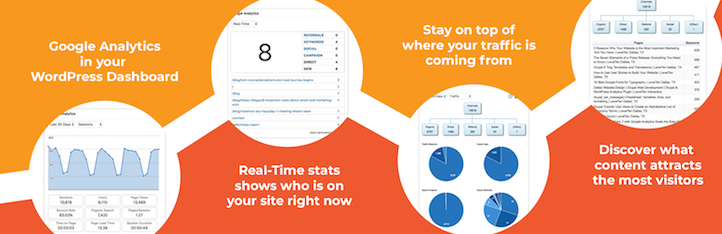
Google Analytics Real-Time Stats
Google Analytics reports, in real-time, in your dashboard screen:
- Real-time number of visitors
- Real-time acquisition channels
- Real-time traffic sources details
Google Analytics Reports
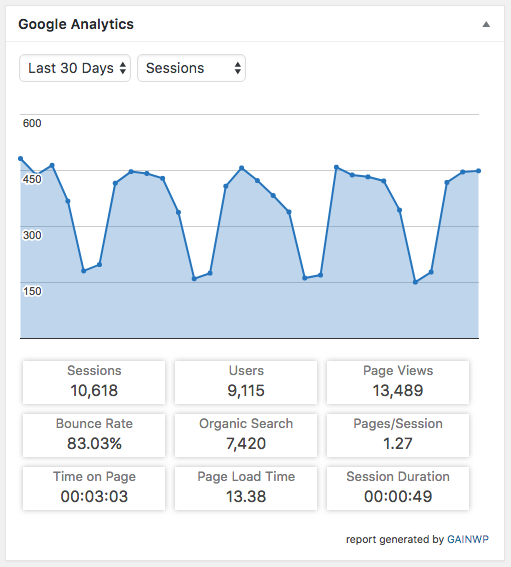
The Google Analytics reports you need, on your dashboard, in your All Posts and All Pages screens, and on site’s frontend:
- Sessions, organic searches, page views, bounce rate analytics stats
- Locations, pages, referrers, keywords, 404 errors analytics stats
- Traffic channels, social networks, traffic mediums, search engines analytics stats
- Device categories, browsers, operating systems, screen resolutions, mobile brands analytics stats
In addition, you can control who can view specific Google Analytics reports by setting permissions based on user roles.
Google Analytics Tracking
Installs the latest Google Analytics tracking code and allows full code customization:
- Universal Google Analytics (analytics.js) tracking code
- Global Site Tag (gtag.js) tracking code
- Enhanced link attribution
- Remarketing, demographics and interests tracking
- Page Speed sampling rate control
- User sampling rate control
- Cross domain tracking
- Exclude user roles from tracking
- Accelerated Mobile Pages (AMP) support for Google Analytics
- Ecommerce support for Google Analytics
User privacy oriented features:
- IP address anonymization
- option to follow Do Not Track (DNT) sent by browsers
- support for user tracking opt-out
GAinWP enables you to easily track events like:
- Downloads
- Emails
- Outbound links
- Affiliate links
- Fragment identifiers
- Telephone
- Page Scrolling Depth
- Custom event categories, actions and labels using annotated HTML elements
With GAinWP you can use custom dimensions to track:
- Authors
- Publication year
- Publication month
- Categories
- Tags
- User engagement
Actions and filters are available for further Google Analytics tracking code customization.
Google Tag Manager Tracking
As an alternative to Google Analytics tracking code, you can use Google Tag Manager for tracking:
- Google Tag Manager code
- Data Layer variables: authors, publication year, publication month, categories, tags, user type
- Exclude user roles from tracking
- Accelerated Mobile Pages (AMP) support for Google Tag Manager
Accelerated Mobile Pages (AMP) features
- Google Tag Manager basic tracking
- Google Analytics basic tracking
- Automatically removes amp/ from Google Analytics tracking page URL
- Scrolling depth tracking
- Custom dimensions tracking
- User sampling rate control
- Form submit tracking
- File downloads tracking
- Affiliate links tracking
- Hashmarks, outbound links, telephones and e-mails tracking
- Custom event categories, actions and labels using annotated HTML elements
GAinWP on Multisite
This plugin is fully compatible with multisite network installs, allowing three setup modes:
- Mode 1: network activated using multiple Google Analytics accounts
- Mode 2: network activated using a single Google Analytics account
- Mode 3: network deactivated using multiple Google Analytics accounts
GAinWP på GitHub
Du kan indsende funktionsanmodninger eller fejl til GAinWP -databasen.
Why this Plugin
IntelligenceWP projektet udnytter GADWP-pluginet til centrale Google Analytics-integrationer.
Efter at Google Analytics Dashboard for WordPress skiftede vedligeholdere i april 2018, udtrykte brugere bekymring over den nye autorisationsproces, som giver tredjeparter adgang til Google API-nøgler og analysedata.
GAinWP implementerer en direkte autorisationsproces, hvor API-nøgler kun findes på dit WordPress-sted, hvilket eliminerer tredjepartsadgang.
Projektets langsigtede mål er at tilvejebringe en åben, standardbaseret Google Analytics WordPress API for at lette integrationen af Google Analytics-data af andre plugins og temaer i WordPress.
Credits
Dette plugin blev oprindeligt oprettet af Alin Marcu som Google Analytics Dashboard for WordPress (GADWP)
Standard Installation
- Upload the full ga-in directory into your wp-content/plugins directory.
- In WordPress select Plugins from your sidebar menu and activate the GAINWP – Google Analytics Integration for WordPress plugin.
- Open the plugin General Settings page, which is located under Google Analytics menu.
- Make sure Setup Mode is set to “Tracking & Reporting” (default).
- Click the Authorize Plugin button.
- Click the red Get Access Code link to open a new browser tab/window and follow the steps to generate the code.
- Back on your WordPress browser tab/window, copy and paste the access code into the Access Code input field.
- Click Save Access Code button.
- After the save, select the Tracking ID / View for your site.
- Click the Save Changes button.
Reporting Only Installation
- Complete steps 1-3 from the Standard Installation.
- Set Setup Mode to “Reporting only”.
- Click Save Changes.
- Complete steps 5-8 from the Standard Installation.
Tracking Only Installation
- Follow setups 1-3 of the Standard Installation.
- Set Setup Mode to “Tracking only”.
- Copy and paste your Tracking ID from Google Analytics into the Tracking ID input.
- Click Save Changes.
Localization
Du kan oversætte GAinWP på translate.wordpress.org .
License
GAinWP frigives under GPLv2. Du kan bruge det gratis på dit personlige eller kommercielle websted.
Skærmbilleder


Installation
The Standard Installation enables both tracking and reporting for your site. If you already have tracking you want to keep, see Reporting Only Installation below. If you only want track your site in Google Analytics and not connect to reporting data, see Tracking Only Installation below.
FAQ
-
Skal jeg indsætte Google Analytics-sporingskoden manuelt?
-
Nej, når plugin’et er godkendt og et standarddomæne er valgt, indsættes Google Analytics-sporingskode automatisk på alle websider.
-
Nogle indstillinger mangler i videovejledningen
-
Vi forbedrer konstant GAinWP, nogle gange er video-instruktionen muligvis en smule forældet.
-
Hvordan kan jeg foreslå en ny funktion, bidrage eller rapportere en fejl?
-
Du kan indsende pull-anmodninger, forslag til features og bugrapporter på vores GitHub-lager .
-
Dokumentation, vejledninger og ofte stillede spørgsmål
-
For dokumentation, vejledninger, ofte stillede spørgsmål og videoer tjek: GAinWP dokumentation .
Anmeldelser


Bidragsydere & udviklere
“GAinWP Google Analytics Integration for WordPress” er open source-software. Følgende personer har bidraget til dette plugin.
Bidragsydere
“GAinWP Google Analytics Integration for WordPress” er blevet oversat til 10 sprog. Tak til oversætterne for deres bidrag.
Oversæt “GAinWP Google Analytics Integration for WordPress” til dit eget sprog.
Interesseret i udvikling?
Gennemse koden, tjek SVN repository, eller abonner på udviklerloggen via RSS.
Ændringslog
5.4.5
- Verified support for WP 5.4
- Bug Fixes:
- fix js events calling non existent ga object after diabled user login
- Enhancements:
- Added Authors (user login) custom dimension
5.4.3
- Verified support for WP 5.2
5.4
- Enable direct Google API auth process to prevent access keys and Google Analytics data sharing with 3rd parties
- Enabled Google Analytics tracking without requiring GAPI authentication
- Consolidate settings
5.3.2
- Bug Fixes:
- fixes for user opt-out feature
- Enhancements:
- use gainwp_useroptout shortcode to easily generate opt-out buttons and links
- adding gainwp_gtag_commands and gainwp_gtag_script_path hooks to allow further gtag (Global Site Tag) code customization
- adds opt-out and DNT support for Google Tag Manager
5.3.1.1
- Bug Fixes:
- avoid tracking issues by not clearing the profiles list on automatic token resets
5.3.1
- Bug Fixes:
- frontend_item_reports PHP notice when upgrading from a version lower than v4.8.0.1
5.3
- Enhancements:
- adds full support for Global Site Tag (gtag.js)
- remove Scroll Depth functionality, since this is now available as a trigger on Google Tag Manager
- adds custom dimensions support for AMP pages with Google Tag Manager tracking
- adds support for button submits
- Bug Fixes:
- form submit events were not following the non-interaction settings
5.2.3.1
- Bug Fixes:
- fixing a small reporting issue
5.2.3
- Enhancements:
- add Google Analytics user opt-out support
- add option to exclude tracking for users sending the Do Not Track header
- add System tab to Errors & Debug screen
- check to avoid using a redeemed access code
- Bug Fixes:
- remove a debugging message
- cURL options were overwritten during regular API calls
5.2.2
- Enhancements:
- more informative alerts and suggestions on the authorization screen
- disable autocomplete for the access code input field to avoid reuse of the same unique authorization code
- GAINWP Endpoint improvements
- Error reporting improvements
- introducing the gainwp_maps_api_key filter
- Bug Fixes:
- use the theme color palette for the frontend widget
5.2.1
- Enhancements:
- avoid submitting empty error reports
- Bug Fixes:
- fixes a bug for custom PHP cURL options
5.2
- Enhancements:
- improvements on exponential backoff system
- introduces a new authentication method with endpoints
- multiple updates of plugin’s options
- code cleanup
- improvements on error reporting system
- option to report errors to developer
- move the upgrade notice from the Dashboard to plugin’s settings page
- enable PHP cURL proxy support using WordPress settings, props by Joe Hobson
- hide unusable options based on plugin’s settings
- Bug Fixes:
- some thrown errors were not displayed on Errors & Debug screen
- analytics icon disappears from post list after quick edit, props by karex
- fix for inline SVG links, props by Andrew Minion
- fixes a bug on affiliate events tracking