Beskrivelse
A shopper asks ChatGPT which natural face cream to buy. The assistant answers from whatever it can read about the products it knows. If your product page has no brand, a vague category and two product blocks with different prices, it is easy to leave you out of that answer.
ShopToAI Connector is the WordPress side of ShopToAI. The ShopToAI service checks your catalog and shows what an AI assistant can’t make sense of. You approve the fixes, and this plugin puts the result on your product pages.
Check your store first
Run the free scan at shoptoai.com/scan. Paste your store address or a link to one product. You don’t need an account. In about 30 seconds you get a score from 0 to 100 and the main problems AI assistants run into, checked on a random sample of up to 20 products.
What you get in the ShopToAI dashboard
- An audit of the whole catalog with a score from 0 to 100. It counts the products with a missing GTIN or EAN, missing brand or category, empty or thin descriptions, broken or duplicated product markup, and checks whether robots.txt blocks AI crawlers.
- Suggested brands, categories and attributes for products that lack them, each with a confidence score. By default nothing goes into your store until you approve it; you can switch on automatic apply for safe fills of an empty brand or category in the dashboard. Any applied change can be undone with one click because the old value is kept. GTIN codes are never made up. Those come from you or your supplier.
- FAQs and comparison guides drafted from your product data (Growth plan and higher).
- A regular check of whether ChatGPT, Perplexity and Gemini name your products when someone asks about your category, so you can compare before and after the fixes.
- One panel for several stores, if you are an agency that looks after client shops.
What the plugin does on your site
- Adds one Schema.org Product block (JSON-LD) to each product page, built from the data you approved in the dashboard.
- Hides the duplicate Product markup that WooCommerce core, the Yoast SEO WooCommerce add-on, Rank Math and All in One SEO Pro add, so an assistant never reads two versions of one product. Your WebPage, Breadcrumb and Organization markup stays as it is.
- Lets AI search crawlers into your store through robots.txt (OAI-SearchBot, ChatGPT-User, PerplexityBot, Claude-SearchBot and others). Crawlers that only collect content to train AI models (GPTBot, ClaudeBot, CCBot and others) stay out unless you tick the option on the settings page. One exception: the plugin also allows Google-Extended. It is not a crawler but a robots.txt token that decides whether Google may use your pages in Gemini, both for Gemini answers and for training Gemini models. Google offers no way to allow one without the other, and blocking it keeps your products out of Gemini answers. If you wrote a rule for a crawler or for Google-Extended yourself, the plugin keeps it.
- Warns you in wp-admin when something overrides its robots.txt rules or
/llms.txt, for example a physical robots.txt file in the site root or an SEO plugin with its own llms.txt feature. - Shows the FAQ you published in the dashboard as a “FAQ” tab on the product page. The FAQPage markup sits inside that tab, so it only describes text your shoppers can see.
- Serves
/llms.txtand your product catalog at/ai-catalog.jsonfrom your own domain, so an assistant that quotes them points to your store. - Shows the comparison guides you published inside your own theme, with your header, menu and footer, at
/poradnik/{slug}(or/guide/{slug}when your product addresses are in English). Product cards take the photo, price and stock straight from WooCommerce, so they are never out of date. A list of guides sits at/poradnik/, each guide is linked from its category page and listed in your sitemap. The address is picked automatically and never takes one your shop already uses. - Sends a heartbeat so the dashboard shows the store as connected.
- When one of your product pages changes, tells Bing and other search engines that use IndexNow, so they can come back to it sooner. Google does not use IndexNow. You can turn this off on the settings page.
The plugin never edits your products, pages or settings. It only shows markup, FAQ and guides from the ShopToAI server, and none of it is saved in WordPress. Disconnect the plugin and all of it is gone. Your store looks just as it did before.
The plugin never invents product data. It only places markup you reviewed in the dashboard. Everything it fetches is cached, and if ShopToAI is briefly unreachable your pages keep the last markup they had, so page speed doesn’t suffer.
The plugin itself is free. ShopToAI has a free plan with a basic audit of one store with up to 100 products. Fixes, AI suggestions, the deep scan and feeds come with the paid plans, listed at shoptoai.com/pricing.
External service: ShopToAI
This plugin requires an account with ShopToAI, a third-party service operated by YAStuning OÜ. It does nothing until you enter your feed token and plugin secret. Once configured, it connects to the ShopToAI API at https://shoptoai.com:
- when a product page is shown and its cached markup has expired, it sends your feed token and the product’s SKU and WooCommerce ID to fetch the product markup and FAQ;
- when
/llms.txt,/ai-catalog.jsonor a guide page is requested and its cached copy has expired, it sends your feed token to fetch that content; - on a regular connection check (heartbeat), when you test the connection and after an update, it sends your feed token and plugin secret, the plugin version, your site language, tagline and sitemap address, the names, product counts and page addresses of your product categories and brands, your guide address, and the technical status of the plugin’s features, including your page-cache plugin and any plugin or file that overrides its robots.txt rules or
/llms.txt; - when you deactivate the plugin or change its keys, it sends your feed token and plugin secret to report the disconnection.
ShopToAI also contacts your site to read the prices and stock status your shop shows for selected products, to clear the page cache, and to refresh pages you publish or take down in the dashboard.
On a paid ShopToAI plan, ShopToAI also asks your site every day for AI order totals. For each day the answer gives the number of paid orders that came from an AI assistant such as ChatGPT or Perplexity, with their total and refunded amounts per assistant and currency, and daily counts of all paid orders. It never contains a single order. You can stop it by unticking “Share AI order totals” in the plugin settings.
The connection check also sends counts of visits by known AI crawlers such as GPTBot or PerplexityBot. For each day and crawler it gives the number of visits by page type (product, category, robots.txt, llms.txt and other pages) and the product pages that crawler read most. To count them, the plugin keeps a short-lived log of crawler visits in your uploads folder (crawler name, page type and page address) and deletes it after a few days. The plugin does not store or send visitor IP addresses or any other visitor data. You can stop counting by unticking “Count AI crawler visits” in the plugin settings.
The plugin does not send customer or cart data. It also never sends individual orders, so names, addresses, email addresses, products and order numbers stay in your store.
- Service: https://shoptoai.com
- Terms of Service: https://shoptoai.com/legal/terms
- Privacy Policy: https://shoptoai.com/legal/privacy
External service: IndexNow
When a product page changes (you edit the product, a fix from the dashboard reaches it, its markup changes, or you unpublish or trash it), the plugin sends the page address to the IndexNow API at https://api.indexnow.org/indexnow. IndexNow shares it with the search engines that take part, among them Bing, Yandex, Seznam and Naver.
The request carries your site’s host name, the plugin’s IndexNow key, the address of the key file on your site and the addresses of the product pages that changed. Nothing is sent before the plugin is connected, from a staging or local copy, or while your site asks search engines not to index it. To stop it, untick “Tell search engines when a product page changes” under Settings > ShopToAI Connector.
- Service: https://www.indexnow.org
- Terms of Service (privacy included): https://www.indexnow.org/terms
Developed by ILUXA WEB (https://iluxa-web.com) for ShopToAI.
Compatibility note
The plugin needs the WooCommerce REST API v3, standard since WooCommerce 3.5. On an older WooCommerce release, connecting the store shows a clear “not found” error instead of failing silently. If you hit a problem on a specific WordPress or WooCommerce release, please report it so we can check it and update this note.
Developer notes
Page-cache purge API verified against each plugin’s own source (latest stable at release):
- WP Rocket 3.23.5.1 – single:
rocket_clean_post( $post_id )(inc/common/purge.php), all:rocket_clean_domain()(inc/common/files.php). - LiteSpeed Cache 7.9.1 – single:
do_action( 'litespeed_purge_post', $post_id ), all:do_action( 'litespeed_purge_all' )(src/api.cls.php). - W3 Total Cache 2.10.7 – single:
w3tc_flush_post( $post_id ), all:w3tc_flush_all()(w3-total-cache-api.php). - WP Fastest Cache 1.5.2 – single:
do_action( 'wpfc_clear_post_cache_by_id', 0, $post_id ), all:do_action( 'wpfc_clear_all_cache' )(wpFastestCache.php). - WP Super Cache 3.1.4 – single:
wp_cache_post_change( $post_id ), all:wp_cache_clear_cache()(wp-cache-phase2.php). - SG Optimizer 7.8.3 – single:
sg_cachepress_purge_cache( get_permalink( $post_id ) ), all:sg_cachepress_purge_everything()(helpers/helpers.php). - Breeze 2.6.0 – no public single-URL purge in the source; the plugin falls back to the full-site hook
do_action( 'breeze_clear_all_cache' )(breeze-admin.php).
Single-URL purge for category pages that link a guide: LiteSpeed Cache do_action( 'litespeed_purge_url', $url ), W3 Total Cache w3tc_flush_url( $url ), WP Fastest Cache do_action( 'wpfc_clear_cache_by_url', $url ), WP Super Cache wpsc_delete_url_cache( $url ), SG Optimizer sg_cachepress_purge_cache( $url ), WP Rocket rocket_clean_files( array( $url ) ). Guide pages call wpfc_exclude_current_page() besides DONOTCACHEPAGE, because WP Fastest Cache 1.5.2 honours DONOTCACHEPAGE only on 403 and 503 pages.
Skærmbilleder


Installation
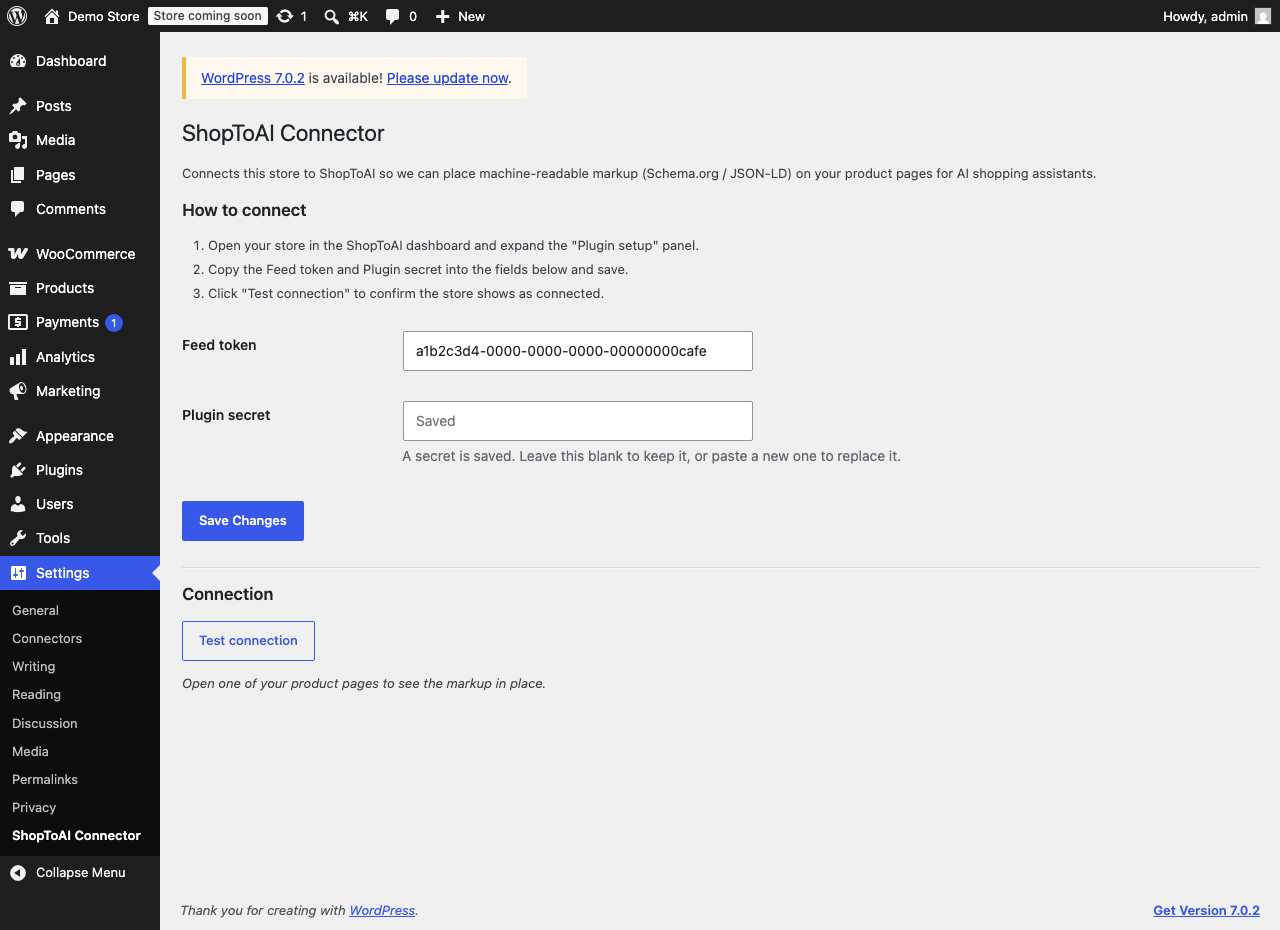
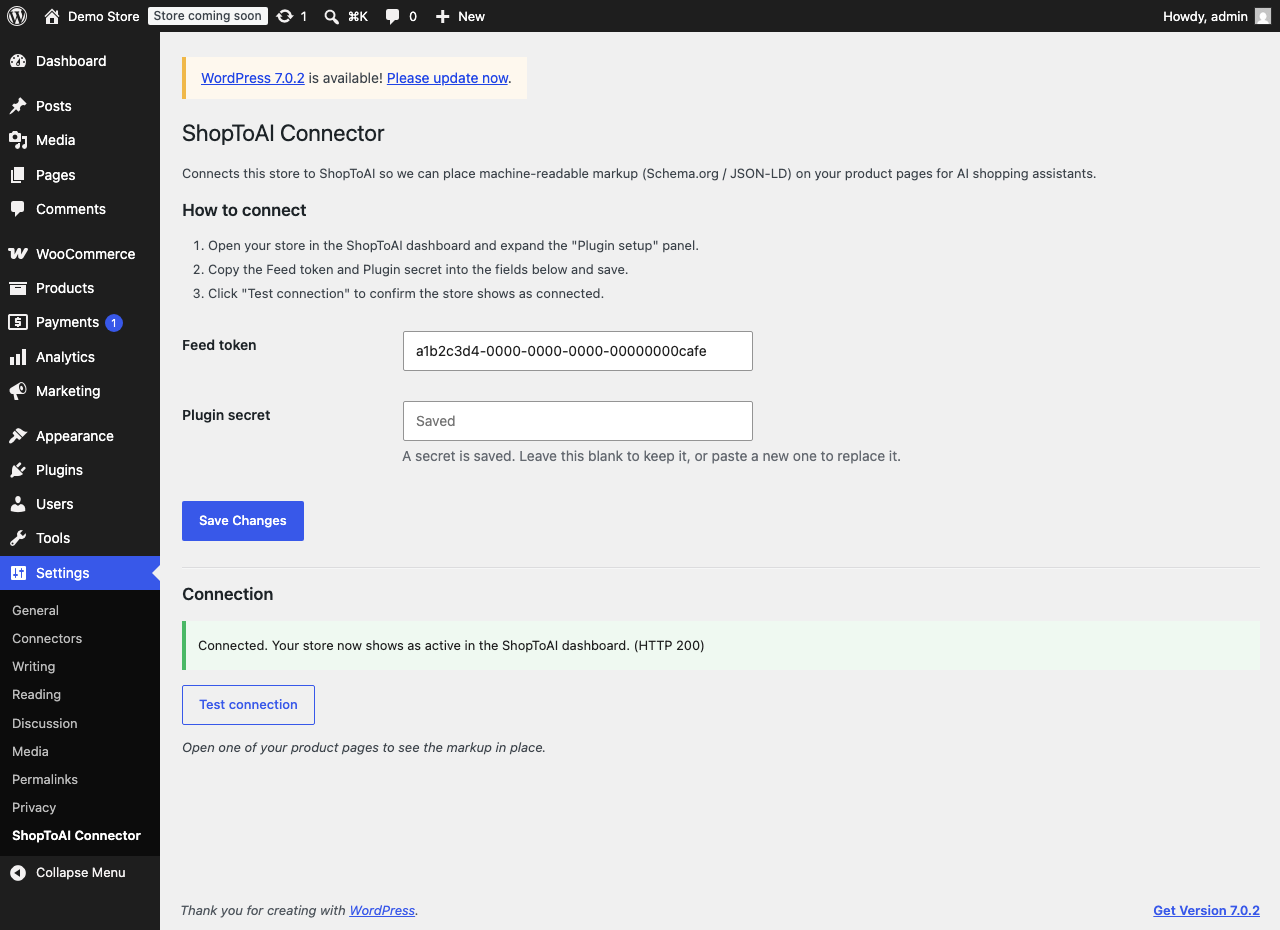
- Install and activate the plugin, then open Settings -> ShopToAI Connector (there is also a Settings link next to the plugin on the Plugins screen).
- Open your store in the ShopToAI dashboard and expand the “Plugin setup” panel.
- Copy the Feed token and Plugin secret into the plugin settings and save.
- Click Test connection to confirm your store shows as connected.
Once an audit or AI enrich has run in the dashboard, your product pages start carrying the approved markup automatically.
FAQ
-
Will this get my products into ChatGPT answers?
-
Nobody can promise that, and we don’t. Each assistant decides what to recommend on its own. What we can do is remove the reasons it skips your products: missing brand or GTIN, no category, thin descriptions, two conflicting product blocks, crawlers blocked in robots.txt. The monitoring in the dashboard then shows whether your products get named more often than before.
-
Do I need a ShopToAI account? Is it free?
-
Yes, you need an account, because the plugin places markup that ShopToAI builds for your catalog. Without the feed token and plugin secret it stays inactive and changes nothing on your site. The plugin is free and so is the scan at shoptoai.com/scan. The free plan covers a basic audit. Fixes and AI suggestions need a paid plan.
-
Will it change my products without asking me?
-
Not by default. Every suggestion waits in the dashboard until you approve it, unless you switch on automatic apply for safe fills of an empty brand or category. Once applied, the old value is stored, and Undo puts it back. GTIN and EAN codes are never generated by AI.
-
I already use Yoast, Rank Math or All in One SEO. Will they clash?
-
No. Keep your SEO plugin. When ShopToAI has approved markup for a product, the plugin hides only the duplicate Product block those plugins add. Breadcrumbs, Organization and WebPage markup stay theirs. If the plugin has no data for a product, your existing markup is left exactly as it was.
-
Does it work with variable products?
-
Yes. The markup lists the price range (lowest and highest price, number of variations) and gives each variant its live price and stock status. Variants you delete or make unpurchasable drop out of the markup on their own.
-
Will it slow down my product pages?
-
No. The plugin caches everything it fetches and waits only briefly for the API. If the API is unreachable, the page keeps the last markup it received, so a page view never waits on repeated requests.
-
Does it send my customer or order data anywhere?
-
It does not send customer data. The plugin sends the ShopToAI API your connection keys and the product and store details listed under External service. On a paid plan ShopToAI also reads daily totals of orders that came from AI assistants. These are counts and amounts per day and never include individual orders, names or addresses. You can turn this off in the plugin settings.
-
I run an agency. Can I manage several client stores?
-
Yes, on the Growth and Agency plans. One ShopToAI account then holds several stores, each with its own audit, suggestions and plugin keys. Install the plugin on every client store and connect it with that store’s keys. You can also send a client a report link showing the score before and after.
-
What happens to the FAQ and guides if I disconnect?
-
They disappear from your store, because they were never saved in WordPress. Your products, pages and settings stay exactly as they were.
-
Can I add a “Prepared with ShopToAI” line to my guides?
-
Only if you want to. It is off by default. You can turn it on in the ShopToAI dashboard under Settings, Plugin; the line then appears under each guide with a nofollow link. Nothing of the kind is added to product pages, the FAQ or the markup.
-
What does uninstalling remove?
-
Everything the plugin stored: your connection settings, all cached feed data, the IndexNow key and queue, and the AI crawler visit counts and log. Deactivating leaves your settings in place, so you can deactivate and reactivate without re-entering anything.
-
I already run the older AEO Connector plugin. What happens?
-
This plugin replaces it. While the old one is still active this one stays out of the way and shows a notice, so your pages never carry two competing Product blocks. Deactivate the old plugin and this one picks up your existing settings automatically.
Anmeldelser
Der er ingen anmeldelser for denne widget.
Bidragsydere & udviklere
“ShopToAI Connector” er open source-software. Følgende personer har bidraget til dette plugin.
BidragsydereOversæt “ShopToAI Connector” til dit eget sprog.
Interesseret i udvikling?
Gennemse koden, tjek SVN repository, eller abonner på udviklerloggen via RSS.
Ændringslog
0.18.0
- IndexNow: when a product page changes, the plugin tells Bing and other search engines that use IndexNow, at most once an hour per page. It stays quiet on staging and local copies and while your site asks search engines not to index it. If Rank Math already sends IndexNow pings, the plugin leaves that to Rank Math. You can turn it off under Settings > ShopToAI Connector.
- AI order totals: on a paid ShopToAI plan, ShopToAI reads daily counts and totals of orders that came from AI assistants such as ChatGPT or Perplexity. Individual orders, customer details and products stay in your store. You can turn it off on the settings page.
- AI crawler visits: the plugin counts visits from known AI crawlers such as GPTBot by day and page type and sends the totals once an hour. You can turn it off on the settings page.
- Uninstalling the plugin also removes the IndexNow and crawler-visit data it stored.
0.17.2
- If the page cache was cleared less than 6 hours before an update, the plugin used to skip the clear after the update, so cached pages kept the old markup. Now it clears the cache once those 6 hours are up.
- If ShopToAI did not answer for a moment (a timeout or a server error), the guide list went empty for a few minutes: the guide index returned 404 and category pages lost their guide link. The plugin now keeps showing the last list it loaded.
0.17.1
- The guide link on a category page now also shows in themes that skip the category description, such as Savoy, and appears only once.
- With All in One SEO or Rank Math active, the guide page carries a single canonical URL, the guide’s own.
- After an update, llms.txt switches to the new guide address right away.
- The guide address is always picked automatically: the “Guide address” setting is gone, and the old
/ai-guides/address is no longer served.
0.17.0
- Guides now open inside your theme, with your header, menu, footer, fonts and colours. Product cards show the photo, price and stock live from WooCommerce, in a grid that fits phones, tablets and desktops.
- Guide addresses follow your shop’s language:
/poradnik/for Polish product addresses,/guide/otherwise, or your own choice on the settings page. Old/ai-guides/links redirect with a 301. - A list of guides at
/poradnik/(or/guide/), a link to each guide from its category page, and the guides in your sitemap (WordPress core, Yoast or Rank Math). - A guide is no longer kept by the page cache, so its prices stay current.
- Publishing or taking down an FAQ or a guide in the dashboard refreshes those pages right away, also in the page cache.
- New “Guide layout” setting: pick the simple page if your theme or page builder breaks the guide.
0.16.0
- New setting “Allow ShopToAI to clear the page cache”, on by default. With it off the plugin never clears the cache, not even for a single product page.
- Pages cached before the plugin was installed kept the old markup. The plugin now clears the page cache once after connecting and once after each update, and the hourly sweep also refreshes product pages that were never rendered with ShopToAI markup.
- When you start a Deep scan in the dashboard, ShopToAI can ask the plugin to clear the page cache first (a request signed with your plugin secret, like the prices endpoint), so the scan sees the current markup. Clearing after a bulk change happens at most once in 6 hours.
0.15.0
- The connection now tells ShopToAI your site tagline, your sitemap URL (Yoast, Rank Math or the WordPress core sitemap) and your Woo product_brand pages, so your llms.txt summarizes the store and links its brand pages.
- Reports which page-cache plugin is active (WP Rocket, LiteSpeed Cache, W3 Total Cache, WP Fastest Cache, WP Super Cache, SG Optimizer or Breeze) so the dashboard can warn when the page cache may hide fresh markup.
- When ShopToAI publishes new markup for a product, the plugin now purges that product’s page in the active cache plugin so visitors and bots see the new version at once. Pages served without PHP are refreshed by a bounded sweep on each heartbeat; more than 50 products changed at once trigger one site-wide purge instead of a storm.
0.14.2
- Serves your full product catalog at
/ai-catalog.jsonon your own domain, cached as a file for an hour. - Reports your product categories with their page links, so your llms.txt links to the real category pages.
- Live prices and stock status are now applied to every product variant in the markup, not only to the top-level offer. Variants that were deleted or made unpurchasable are removed from the markup automatically.
- Category names longer than 200 characters are trimmed to keep the heartbeat well under the server limit.
- Fixed: large catalog files served with other caching plugins active no longer risk running out of PHP memory.
- Fixed: stale temporary files left by interrupted catalog downloads are removed before each new download.
/ai-catalog.jsonand/llms.txtare now marked as uncacheable to page-cache plugins (DONOTCACHEPAGE).
0.14.1
- On sites where WP-Cron is disabled (DISABLE_WP_CRON), the connection check with ShopToAI now recovers within 15 minutes after a missed scheduled run, instead of waiting up to an hour.
0.14.0
- The FAQ you publish in the dashboard now appears as a “FAQ” tab on the product page, with its FAQPage markup inside that tab. FAQ markup is no longer added to the page head, where shoppers could not see it (Google requires marked-up questions to be visible), and questions built automatically from product data are no longer added.
- robots.txt: a rule you set for an AI crawler yourself is never overridden any more. Before, the plugin’s “Allow” silently cancelled a “Disallow” you had written for the same crawler.
- robots.txt: only AI search crawlers are allowed by default. Crawlers that only collect training data (GPTBot, ClaudeBot, CCBot and others) are allowed only if you tick the new option on the settings page.
- robots.txt: each crawler the plugin adds now keeps your site-wide rules (such as the WooCommerce log and add-to-cart blocks), and the rules are added after SEO plugins have written theirs.
- Updated Anthropic’s crawlers to Claude-SearchBot and Claude-User; the retired Claude-Web and anthropic-ai tokens are no longer written.
- Duplicate Product markup from Rank Math and All in One SEO Pro is now hidden too.
- Product markup states the price the way your shop shows it: with or without tax, following the WooCommerce “Display prices in the shop” setting, in the shop’s currency and number of decimals.
- Variable products get the full price range again (lowest and highest price and the number of variations), as WooCommerce’s own markup had it, instead of only the lowest price.
- A product whose price was removed no longer shows the last synced price in its markup.
- Product markup states the stock status the product has right now (in stock, out of stock, on backorder), not the one from the last sync.
- Product markup carries star ratings only when reviews and star ratings are enabled in WooCommerce, as WooCommerce’s own markup does.
- ShopToAI reads the prices your shop shows (with or without tax, sale prices, variation prices and stock) through a new endpoint only your ShopToAI connection can call (each request is signed with your plugin secret, which is never sent), so your Google Merchant feed lists the same prices as your pages.
- The connection now tells ShopToAI your site language, so generated FAQs and guides default to it until you choose a language yourself.
- Product pages wait at most 3 seconds for the API and keep the last good markup during an outage.
- Warns in wp-admin, and reports to the dashboard, when a physical robots.txt or llms.txt file or an SEO plugin’s llms.txt feature overrides the plugin.
- Declares compatibility with WooCommerce order storage (HPOS) and cart/checkout blocks, and states the minimum WooCommerce version in the plugin header.
- Tested with WordPress 7.1 and WooCommerce 11.1.
0.13.3
- The API URL is now fixed to https://shoptoai.com and is no longer an editable setting, so it can’t be misconfigured.
0.13.2
- Confirmed compatibility with current WordPress and refreshed the “Tested up to” version (no functional change).
0.13.1
- Corrected the “Tested up to” WordPress version and added the WooCommerce minimum
version this plugin actually depends on (no functional change).
0.13.0
- Renamed all internal functions and constants to a
shoptoai_prefix. Existing settings are carried over automatically. - Stays inactive while the older AEO Connector plugin is present, so no page ever carries two Product blocks.
- Uninstalling now removes the options and cached entries the plugin created.
- The plugin secret is entered in a password field instead of a plain text one.
- The API URL must be https outside local development, since your keys travel over it.
- Reactivating reports to the dashboard immediately instead of showing disconnected for up to an hour.
- Guide URLs keep underscores, and guide caches clear when you save settings or test the connection.
- Rewrite rules refresh on update, so
/llms.txtand/ai-guides/keep working after an upgrade. - No longer redirects you on activation.
0.12.0
- Per-product JSON-LD fetch so injection scales to large catalogs.
- Serve
/llms.txtand/ai-guides/{slug}from the store domain. - Heartbeat and disconnect signals for accurate connection status in the dashboard.
- Negative caching so a briefly unreachable API never slows product pages.