
Beskrivelse
AI-Kit brings practical AI helpers to WordPress while keeping privacy first.
AI-Kit is part of the WP Suite product family by Smart Cloud Solutions, Inc. WP Suite keeps WordPress as the CMS and editing layer, while optional connected features can extend selected workflows into modular AWS-backed services for identity, AI, APIs, workflows, protected routes, and static delivery. The free AI-Kit features described here do not require a WP Suite account, subscription, or AWS backend unless you explicitly configure an external service or upgrade-only backend feature.
Free (local-only) mode
AI-Kit uses Chrome’s built-in on-device AI capabilities (when available). In this mode, content is processed locally in the browser.
Key features
* Media Library: SEO image metadata generation
* Works in the Media Library list view and grid view
* Supports both the attachment details panel and the attachment edit screen
* Includes bulk workflows (preview and accept/save items one-by-one)
* Gutenberg: AI-Kit Sidebar
* Post metadata generation
* Text generation (topic + instructions + tone + length + language)
* Gutenberg: Inline tools (toolbar group)
* Proofread, rewrite, and translate selected/editable text blocks
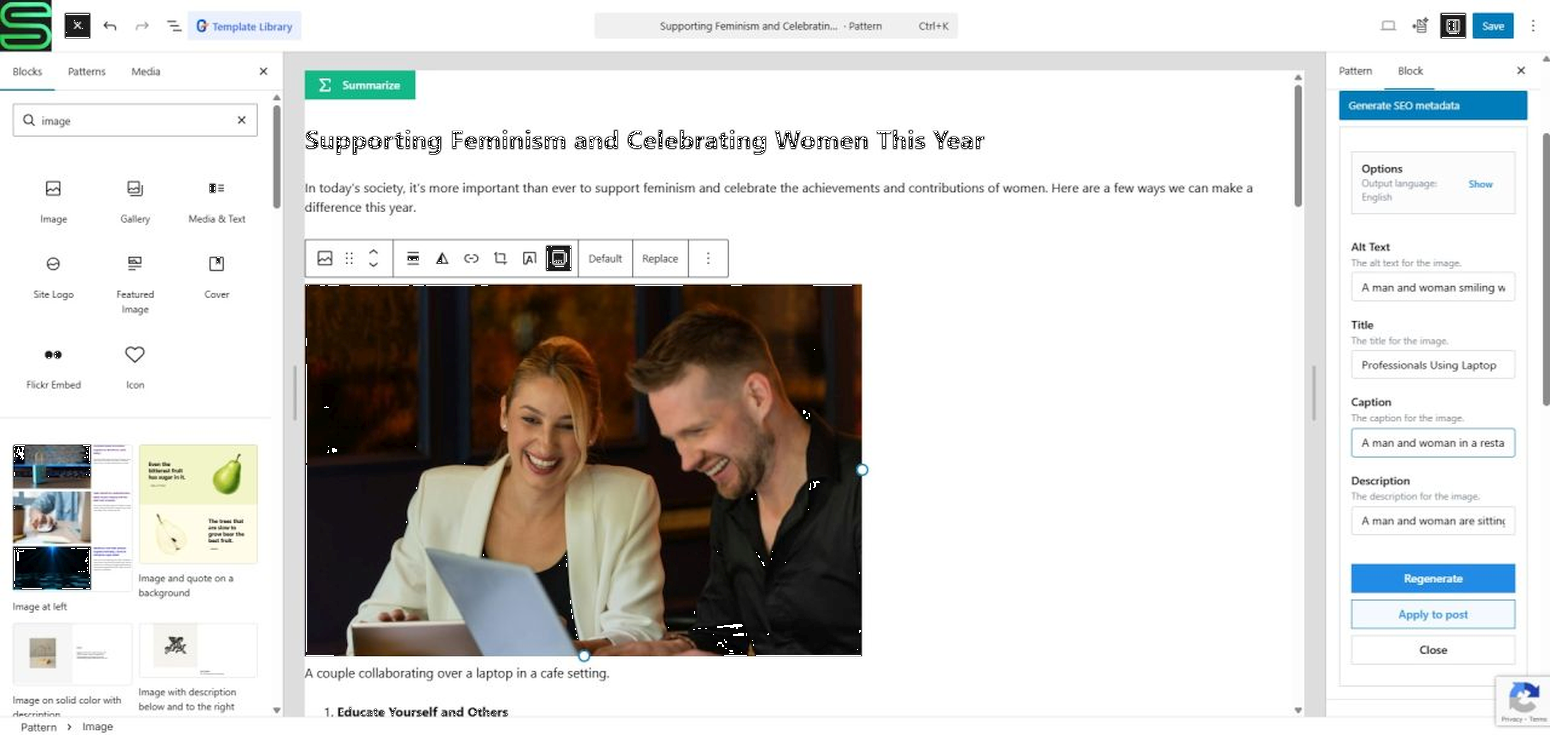
* Gutenberg: SEO Metadata panel for image-like blocks
* Adds a dedicated panel for core/image, core/cover and core/media-text, to generate SEO metadata for images
* PRO: AI-Kit Chatbot
* Add an on-site chatbot widget configurable from WP Admin (appearance, labels, behavior)
* Customize chat UI labels (e.g., title and placeholder), language and text direction (LTR/RTL/auto)
* Customize the open button (position, label, optional base64 icon)
* Use Preview to instantly try your current settings without saving
* PRO: AI-Kit Feature block
* Add front-end buttons to summarize, write, rewrite, translate, and proofread
* PRO: [smartcloud-ai-kit-feature] shortcode
* Use the same “AI-Kit Feature” functionality in other editors/builders via a shortcode
* Developer API
* AI-Kit exposes a small JS surface under globalThis.WpSuite.plugins.aiKit.features so developers can integrate AI-Kit features in their own plugins and custom code.
You can find the plugin’s continuously expanding documentation at:
This plugin is not affiliated with or endorsed by Google, Amazon Web Services, or the WordPress Foundation. All trademarks are property of their respective owners.
Free and Premium Usage Notice
AI-Kit works in Free mode without registration or subscription, using local-only (on-device) AI inside supported desktop Chrome browsers.
Pro features are optional and become available after connecting your WordPress site to a WP Suite workspace:
* AI-Kit Chatbot (on-site widget + customizable settings + Preview)
* Front-end AI-Kit Feature Gutenberg block
* Front-end smartcloud- shortcode
* Optional backend-only / backend-fallback modes (when on-device AI is unavailable or when you explicitly choose backend processing)
When backend is used, requests go to an API endpoint you configure — typically an AWS API deployed into your own AWS account using the “wpsuite-ai-kit” SAR template.
Machine-readable resources
- AI plugin manifest: https://wpsuite.io/.well-known/ai-plugin.json
- OpenAPI spec: https://wpsuite.io/.well-known/openapi.yaml
External Services
This plugin may integrate with the following external services, depending on configuration:
-
Google reCAPTCHA v3
- What it is & what it’s used for:
Client-side bot detection. If enabled, AI-Kit can request reCAPTCHA tokens in the browser to protect certain interactions. - What data is sent & when:
The browser may contact Google to retrieve a reCAPTCHA token (client-side). - Configuration in WordPress:
Enter your reCAPTCHA site key in AI-Kit Settings (or the relevant WP Suite settings screen, depending on your setup). - Links:
- About reCAPTCHA: https://www.google.com/recaptcha/about/
- Google Terms: https://policies.google.com/terms
- Google Privacy: https://policies.google.com/privacy
- What it is & what it’s used for:
-
Customer-configured AI backend endpoint (Pro only)
- What it is & what it’s used for:
An API endpoint you configure for backend-only or backend fallback processing when on-device AI is unavailable or when you choose to run on the backend. - What data is sent & when:
Text and/or image-related inputs required to fulfill the specific feature request (e.g., rewrite input, summarization text, metadata prompts). - Where it goes:
Requests are sent to the API URL you provide — typically an AWS API deployed to your own AWS account (e.g., via the “wpsuite-ai-kit” SAR template). - How it’s called:
Standard HTTPS requests (fetch) from the browser.
- What it is & what it’s used for:
-
WP Suite platform connection (optional; site/workspace linking & shared features)
- When it applies:
When you use WP Admin SmartCloud Connect your Site to WP Suite to link this WordPress site to a WP Suite workspace, or to switch/disconnect later. - What it’s used for:
Storing and retrieving Pro feature configuration (e.g., API/chatbot/feature settings) and enabling an admin-side preview experience so you can try Pro features in WP Admin before enabling them on the live site. - What data may be sent:
Minimal account/session data required for authentication, and minimal site/workspace linking data required to associate a WordPress site with a workspace (e.g., site/workspace identifiers and the site’s URL/domain). - Where it goes / how it’s called:
Secure HTTPS requests from the browser to WPSuite.io services (e.g. wpsuite.io and api.wpsuite.io). - Links:
- WPSuite.io Privacy Policy: https://wpsuite.io/privacy-policy
- WPSuite.io Terms of Use: https://wpsuite.io/terms-of-use
- When it applies:
-
Amazon Cognito (optional; authentication for WP Suite Hub and/or protected APIs)
- When it applies:
- When using the WP Suite Hub, users authenticate (sign in / sign up) before creating/selecting a workspace and linking a site.
- If a plugin is configured to access protected endpoints that rely on Cognito, authentication/token flows may also be used for those requests.
- What it’s used for:
User authentication and token-based authorization for subsequent API calls (e.g., to WPSuite.io APIs). - Links:
- AWS Service Terms: https://aws.amazon.com/service-terms/
- AWS Privacy: https://aws.amazon.com/privacy/
- When it applies:
-
Stripe (optional; subscription/purchase flow)
- When it applies: Only when the user opens the optional WP Suite subscription / purchase flow in the shared admin component.
- What it’s used for: Displaying hosted pricing/subscription UI for optional paid features.
- What data may be sent: Browser/session data required by Stripe to render the hosted purchase UI and process the purchase flow.
- Links:
- Terms: https://stripe.com/legal/consumer
- Privacy: https://stripe.com/privacy
Trademark Notice
Google Chrome and reCAPTCHA are trademarks of Google LLC.
Amazon Web Services, AWS, Amazon Cognito, and Amazon Bedrock are trademarks of Amazon.com, Inc. or its affiliates.
AI-Kit is an independent project and is not affiliated with, sponsored by, or endorsed by Google, Amazon Web Services, or the WordPress Foundation.
Source & Build
Public (free) source code:
All code that ships in the public (free) version of AI-Kit is available here: https://github.com/smartcloudsol/ai-kit
Build & distribution:
AI-Kit is shipped to WordPress.org as a pre-built distribution. Build steps and developer notes are maintained in the GitHub repository documentation.
Shared WP Suite components:
Some admin UI modules may originate from shared WP Suite components to support workspace linking, license validation, and subscription management across WP Suite plugins.
Pro-only features (source availability):
AI-Kit Pro includes additional functionality (such as the AI-Kit Chatbot, backend-powered processing, and the front-end Feature block/shortcode experience). The code that enables these paid-only features is distributed to Pro users but is not published in the public repository.
Skærmbilleder




![PRO – [smartcloud-ai-kit-feature] shortcode usage in a page builder](https://ps.w.org/smartcloud-ai-kit/assets/screenshot-12.png?rev=3453852)


Blokke
Dette plugin giver 3 blokke.
- AI-Kit Feature (PRO) AI-Kit Feature – add AI-powered features to your site
- AI-Kit Doc Search (PRO) AI-Kit Doc Search – knowledge base search summary with sources
- KB Section Designate a section for Knowledge Base extraction
Installation
- Upload the plugin ZIP (or install via the WordPress plugin repository).
- Activate the plugin through the “Plugins” screen in WordPress.
- Go to WP Admin SmartCloud AI-Kit Settings and review the defaults.
- Open:
- Media Library (for image metadata generation), or
- the Gutenberg editor (for the editor tools and blocks).
FAQ
-
What browsers are supported?
-
Free (local-only) mode requires a recent desktop Chrome with on-device AI enabled (availability depends on Chrome version, OS, and device capabilities).
-
Does AI-Kit send my content to third parties?
-
In Free mode, AI-Kit is designed to run locally in the browser. If you enable reCAPTCHA or configure backend usage (Pro), the plugin will perform external network calls — see “External Services” below.
-
What happens if on-device AI is not available in my browser?
-
In Free mode, AI features that require on-device AI may be unavailable. In Pro, you can enable backend-only or backend fallback so features keep working even when on-device AI is unavailable.
-
Do I need API keys?
-
No for Free local-only mode. For Pro backend usage, your backend may require authentication depending on how you deployed/configured it (API key / IAM / JWT / Cognito).
-
Will it work with static exports?
-
Yes. AI-Kit runs in the browser.
- In local-only mode, all processing happens on-device in Chrome.
- In backend-only / backend-fallback modes (Pro), requests are sent directly from the visitor’s browser (front-end) or the admin/editor UI to your configured API endpoint.
WordPress/PHP does not proxy these calls — your site does not need server-side connectivity to the API, but the user’s browser must be able to reach the endpoint.
This also means your hosting environment does not need outbound access to the AI API; only the client’s network matters. -
Does this work outside Gutenberg?
-
Yes — Pro includes the [smartcloud-ai-kit-feature] shortcode so you can use AI-Kit Feature in other editors/builders. Developers can also integrate the JavaScript APIs directly.
Anmeldelser
Der er ingen anmeldelser for denne widget.
Bidragsydere & udviklere
“SmartCloud AI-Kit – On-Device AI Tools” er open source-software. Følgende personer har bidraget til dette plugin.
Bidragsydere
Oversæt “SmartCloud AI-Kit – On-Device AI Tools” til dit eget sprog.
Interesseret i udvikling?
Gennemse koden, tjek SVN repository, eller abonner på udviklerloggen via RSS.
Ændringslog
1.4.4
- Compatibility: Refined paid-feature handling in preparation for upcoming WP Suite Agency subscriptions.
1.4.3
- Docs: Updated WP Suite brand wording and platform positioning across the readme.
- Fix: Improved Knowledge Base source parsing so posts are identified more accurately as Elementor-managed or Gutenberg content, including cases where stale Elementor metadata remains after a page is moved back to Gutenberg.
1.4.2
- Performance: Added schedule-after-initial-paint mounting so frontend UI yields the main thread sooner and improves early paint metrics where supported.
- Feature: AI-Kit now loads shared WP Suite Theme CSS inside supported shadow-root UI, making site-wide reusable component styling available alongside block-level overrides.
- Feature: Added pattern override support so synced patterns can override selected original block attributes without forking the source block structure.
1.4.1
- Performance: Moved frontend runtime scripts and shared vendor assets to the footer and enabled deferred loading where safe, reducing render-blocking work during initial page load.
- Internal: Improved script loading order so lightweight bootstrap data can be available early without forcing heavier frontend dependencies into the page head.
1.4.0
- Maintenance: Updated the admin UI dependency stack, including the shared UI React packages used by WP Suite admin screens.
- Maintenance: Updated shared Gatey Core and WP Suite Core dependencies used by AI-Kit integrations.
- Compatibility: Updated the “Tested up to” value for WordPress 7.0.
- Internal cleanup: Refreshed related frontend and shared runtime dependencies for better alignment across WP Suite plugins.
1.3.3
- Fixed Mantine CSS versioning to use the dedicated Mantine asset version for more accurate cache handling.
1.3.2
- Updated project dependencies.
- Improved site settings saving so global reCAPTCHA settings are no longer overwritten accidentally.
- Versioned CSS files loaded into rendered shadow roots for more reliable cache handling.
1.3.1
- Feature: Added an admin-configurable chatbot
maxTokenssetting, which is now passed through by the frontend in chatbot requests. - Fix: Hardened client-side chatbot response handling for empty or truncated responses.
- Fix: Improved KB source markdown conversion by normalizing whitespace-only empty lines, resulting in cleaner generated markdown with fewer unnecessary blank lines.
1.3.0
- Compatibility: Updated AI-Kit packages for TypeScript 6 and newer shared dependency versions.
- Compatibility: Aligned admin and block code with current WordPress typings.
- Refactor: Updated the admin help-label flow to use the shared InfoLabelComponent pattern.
- Fix: Replaced legacy WordPress block-type usages so builds complete cleanly again.
- Internal: Improved overall typing stability across admin and block packages.
1.2.16
- Fix: Improved frontend block mounting so DocSearch and AiFeature can no longer mount multiple times in parallel on the same element.
- Refactor: Moved the shared race-condition protection into a unified shared helper for more consistent frontend initialization.
- Performance: Optimized DocSearch metadata-options loading so requests start only when the component is actually opened.
- Performance: Added client-side caching and in-flight request deduplication to prevent repeated unnecessary metadata requests.
1.2.15
- Feature: Extended Knowledge Base editing so separately defined KB sections can now override their own document title and URL.
- Feature: Metadata for KB section-based documents is now editable from the Knowledge Base admin screen, including category, subcategory, and tags.
- UX: Gives editors fuller control over section-level KB documents directly from the admin UI.
1.2.14
- Feature: Added a document description override option in the KB admin/editor UI.
- Feature: The overridden description is used as the excerpt shown below the title in DocSearch result lists.
- UX: Gives editors more control over how Knowledge Base documents appear in search results.
1.2.13
- Feature: Extended the KB admin editing UI for generated documents and sections.
- Feature: Base document metadata can now be overridden even for automatically enabled KB sources that do not have a dedicated KB Section override.
- Feature: The document title used in the Knowledge Base can now also be overridden from the admin UI.
- UX: Makes it easier to refine generated KB classification and naming without requiring a separate section-level override.
1.2.12
- Fix: Improved Elementor widget parameter handling for more reliable widget configuration and rendering.
- Fix: Added missing frontend translations to complete the user-facing UI in more cases.
- UX: Frontend AI-Kit components now behave more consistently across Elementor-based integrations.
1.2.11
- Fix: Stabilized loading of
admin/logger.phpand initialization of theLoggerclass in the admin environment. - Fix: Prevented cases where admin PHP pages could break because the logger initialized later than required.
- Improvement: Monaco Editor is now fully bundled with the plugin instead of being loaded from an external CDN.
- Compliance: The editor loading is now fully contained in the plugin codebase and does not rely on remote third-party asset delivery.
- Stability: Ensures the logger is reliably available during admin page load across all affected admin screens.
1.2.10
- Security/Compliance: Replaced the previous custom Monaco loader shim with the editor loading approach recommended by the Monaco Editor developers.
- Security/Compliance: No external CDN calls are required for the editor; the loading behavior is fully contained in the published plugin source code.
- Compatibility: Switched Elementor widget loading to namespace-based registration under
SmartCloud\WPSuite\AiKit. - Stability: Improved shared hub loading and race-condition handling for more reliable startup together with other WP Suite / wpsuite.io plugins.
1.2.9
- Improved the robustness of script loading and dependency ordering for shared functions, blocks, and related assets.
- Added defer loading where possible so scripts no longer block page rendering unnecessarily.
1.2.8
- UX: The AI Feature UI language can now be changed while the component is already running.
Behavior: The language change is applied immediately to the user interface, without interrupting the currently running task.
Note: The active in-progress operation continues with its original settings; the new language selection applies to subsequent interactions and UI rendering.
1.2.7
- Stability: Improved plugin bootstrap order so AI-Kit can no longer initialize before the shared WP Suite hub when multiple WP Suite plugins load together.
- Internal: Adjusted hub-loader sequencing and hardened global
WpSuitenamespace initialization to prevent race conditions during startup. - UX: Added a small per-component UI language switcher for AiFeature so the rendered component language can be changed directly in the UI.
- Behavior: Changing the displayed UI language now also updates
outputLanguage, making front-end AI Feature experiences more consistent and user-friendly.
1.2.6
- Admin: Modified WP Suite site settings loading behavior.
1.2.5
- Fixed rendering of numeric DocSearch properties in the shortcode and Elementor widget integrations.
1.2.4
- Added and updated language files.
- Extended quota-aware chunked processing from summarizer mode to write and rewrite modes.
- When on-device limits are exceeded, AI-Kit now processes content in chunks and combines the intermediate results into a final output.
1.2.3
- Improved the DocSearch mobile layout by wrapping long source URLs.
1.2.2
- Fixed boolean block attributes handling
1.2.1
- Fixed missing kb-quick-edit.js
1.2.0
- Moved reCAPTCHA handling and script loading to the shared hub-for-wpsuiteio package.
- Added optional admin-side PHP debug logging. Requires WP_DEBUG and WP_DEBUG_LOG to be enabled.
- Improved AiFeature input processing by converting selected HTML content to Markdown before AI handling.
- Added quota-aware chunking and result merging for summarize, rewrite, and translate modes.
- Added summary-of-summaries generation for chunked summarization.
- Added backend fallback for larger requests that would require more than two frontend iterations.
- Improved quota error messaging when backend fallback is unavailable.
- Updated AiKitSidebar, LanguageUtils, and GenerateMetadataBox to initialize renderAiFeature with the current WordPress language, with English fallback when no translation is available.
1.1.6
DocSearch & AI Feature: More accurate handling of property default values.
1.1.5
DocSearch: More accurate citation highlights. If a server-side span.end lands mid-word, it is adjusted to the start of the next word.
Backend: Improved span correction logic for span.start / span.end to keep citation ranges aligned with the generated response text.
1.1.4
DocSearch: Show the “Subcategories” label only when there are subcategory options for the selected categories.
Chatbot: Reset confirmation is now a true modal and overlays the chat content properly.
KB Admin: Fix missing WP Admin REST API changes from the previous release (restores full functionality).
1.1.3
DocSearch: Show the Filters section only when real categories or tags exist.
DocSearch/Backend: When enableUserFilters is on, always send userSelectedCategories (even as an empty array) so backend filtering is disabled and search runs across all documents.
DocSearch: Reset KB session when top-level categories change to avoid responses influenced by previous KB RAG context.
1.1.2
DocSearch: Optional user-facing search filters (categories/subcategories/tags). When enabled, backend search uses the filter parameters sent by the user instead of the query builder’s auto-generated KB filter.
1.1.1
DocSearch: showOpenButton support across Gutenberg block, shortcode, and Elementor widget.
Admin: Toggleable debug logging (writes to wp-content/debug.log when WP_DEBUG + WP_DEBUG_LOG are enabled).
KB Admin: Embedded post updates now trigger KB source regeneration / “needs review” when published as KB content.
1.1.0
Feature: Knowledge Base Admin — manage KB sources directly from WordPress (enable posts/pages as KB sources, generate markdown, and publish documents to your backend).
Feature: New “KB Source” bulk actions in the Posts list to quickly enable/disable items as knowledge base sources.
Feature: Full Elementor support for AI Feature and DocSearch (dedicated Elementor widgets, matching the Gutenberg blocks + shortcodes).
Feature: New “KB Section” block + Elementor widget to control KB ingestion per section:
– Exclude content from the Knowledge Base
– Split sections into separate KB documents with custom taxonomy/metadata
– Mark sections as overrideable so regenerated markdown won’t overwrite them
1.0.8
Fix: Improved WebCrypto polyfill initialization so AI-Kit works reliably even in insecure (non-HTTPS) environments where crypto.subtle may be unavailable during early boot.
1.0.7
Improved: Doc Search modal view now uses a wider dialog for a better search-focused layout.
1.0.6
PRO: Added Doc Search (Knowledge Base research) UI surface:
* New AI-Kit Doc Search Gutenberg block (smartcloud-ai-kit/doc-search)
* New [smartcloud-ai-kit-doc-search] shortcode for Classic Editor / page builders
* New developer helper: renderSearchComponent() (UI injection) and sendSearchMessage() for programmatic KB search
1.0.5
Perf: Chatbot requests now reuse a successful reCAPTCHA verification for a short time window to reduce latency and verification costs.
Admin: Added a “reCAPTCHA chat verification window (seconds)” setting (default: 120s).
1.0.4
Fix: Fixed translation of some AI Feature results into the requested language. In certain cases the translation context (admin vs frontend) was missing, causing translations to be routed through the admin context unintentionally.
1.0.3
UX: During backend calls, AiFeature and AiChatbot now display the same user-friendly status messages as the on-device flow (e.g. “Generating text…” instead of “Sending request…” / “Waiting for backend…”).
Admin: The chatbot “Assistant is thinking…” text can be overridden in the admin UI.
1.0.2
Fixed the pre-run language detection/translation flow for AiFeature blocks so it now respects the configured context.
1.0.1
- Improved backend error diagnostics (including clearer reCAPTCHA failures)
- Added chat history retention controls + fixes for persisted image attachments/preview
1.0.0
- Initial release: Media Library metadata generation, Gutenberg tools, and onboarding UI.
- Pro features: Chatbot, frontend Feature block/shortcode, and backend-only/fallback hooks.