

Beskrivelse
Formerly known as Woo Additional Terms, trusted by WooCommerce stores since 2017.
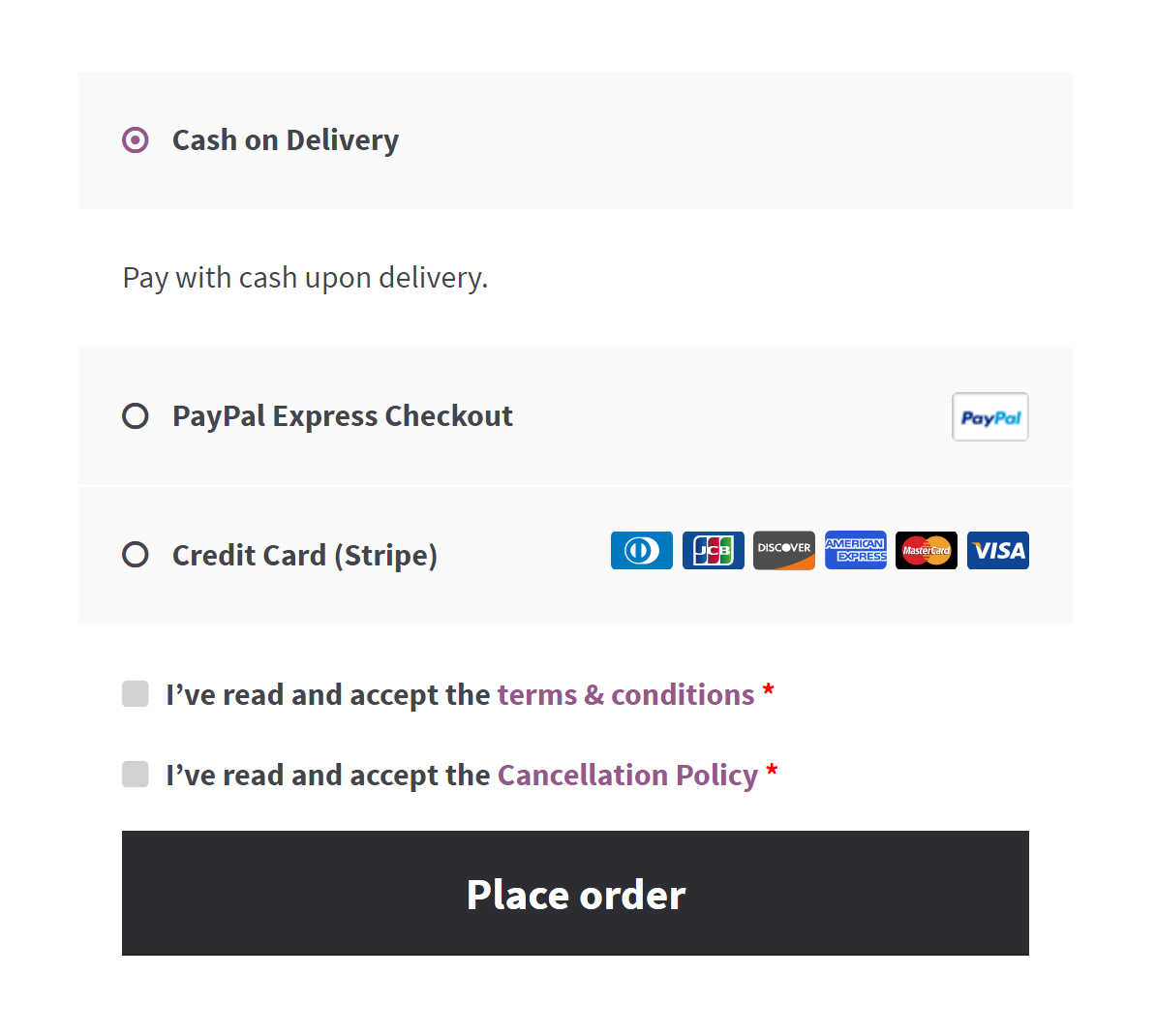
Make sure customers actually agree to your policies before they can place an order. Additional Terms Lite for WooCommerce adds a dedicated “I agree” checkbox to your checkout so shoppers must acknowledge your refund policy, privacy notice, age restriction, delivery terms, or any other policy that matters to your store. Every acceptance is saved with the WooCommerce order, so you have a record if a question or dispute ever comes up.
Setup takes about two minutes. Write your checkbox text, optionally link a policy page, decide whether it is required, and save. No coding, no page builder, no fuss.
This is useful when you want to:
- Get explicit agreement to a specific policy at checkout.
- Add a second agreement alongside the default WooCommerce terms checkbox.
- Link the checkbox to a policy page customers can read without leaving checkout.
- Keep a record of what each customer accepted with their order.
- Reduce refund disputes, chargebacks, and avoidable support messages.
Get explicit consent to your policies at checkout
WooCommerce ships with a single terms and conditions checkbox tied to one page. That is fine until you need customers to explicitly agree to something specific, such as a no-refund sale, a pre-order delay, an age-restricted item, a subscription renewal, or a cash-on-delivery instruction. Additional Terms gives you that dedicated, purpose-built agreement and keeps a clear record of it on the order.
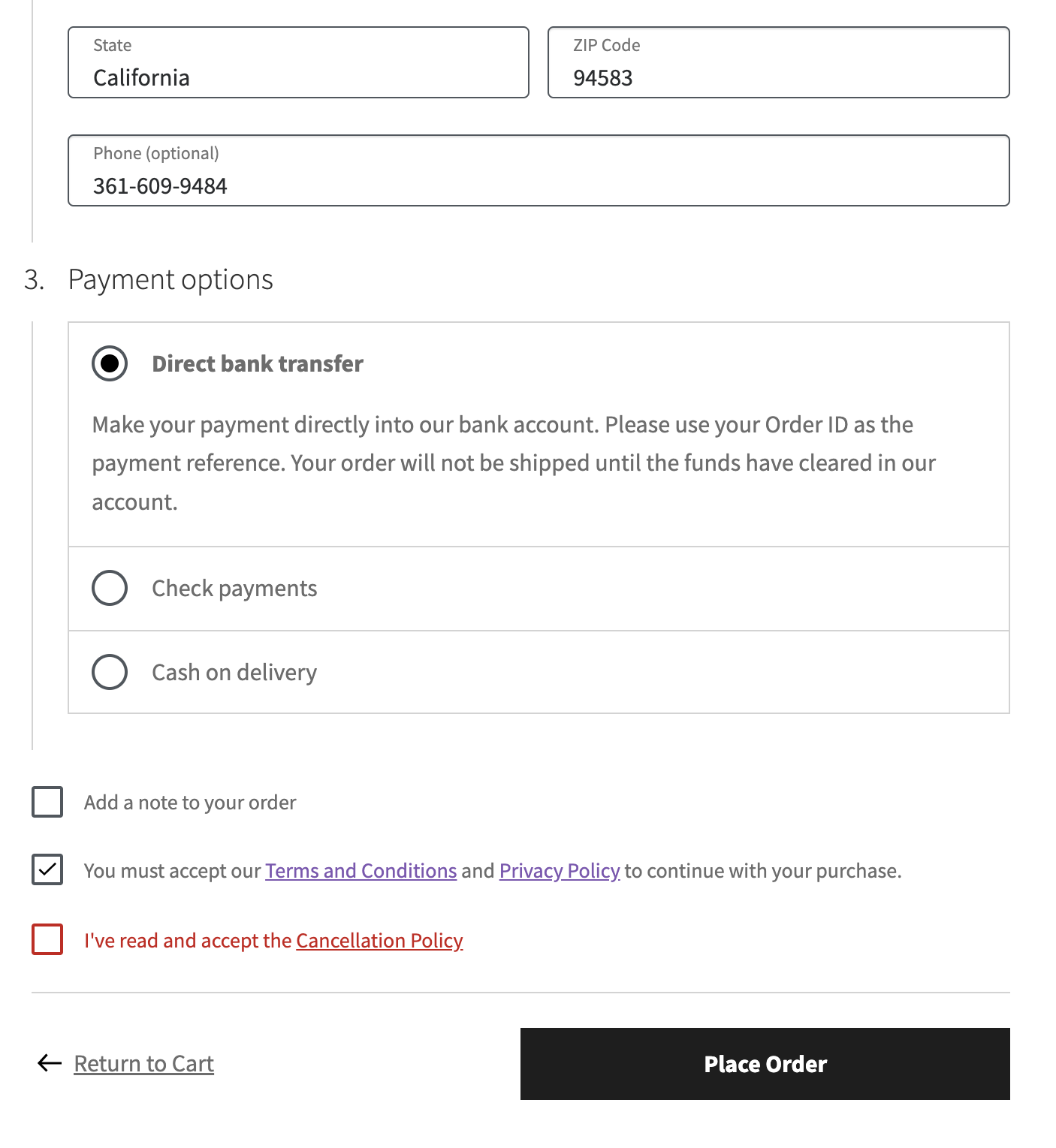
You decide whether the checkbox is required, so customers cannot complete checkout until they tick the box, or you can leave it optional when you only need to surface a notice.
Link and display your terms your way
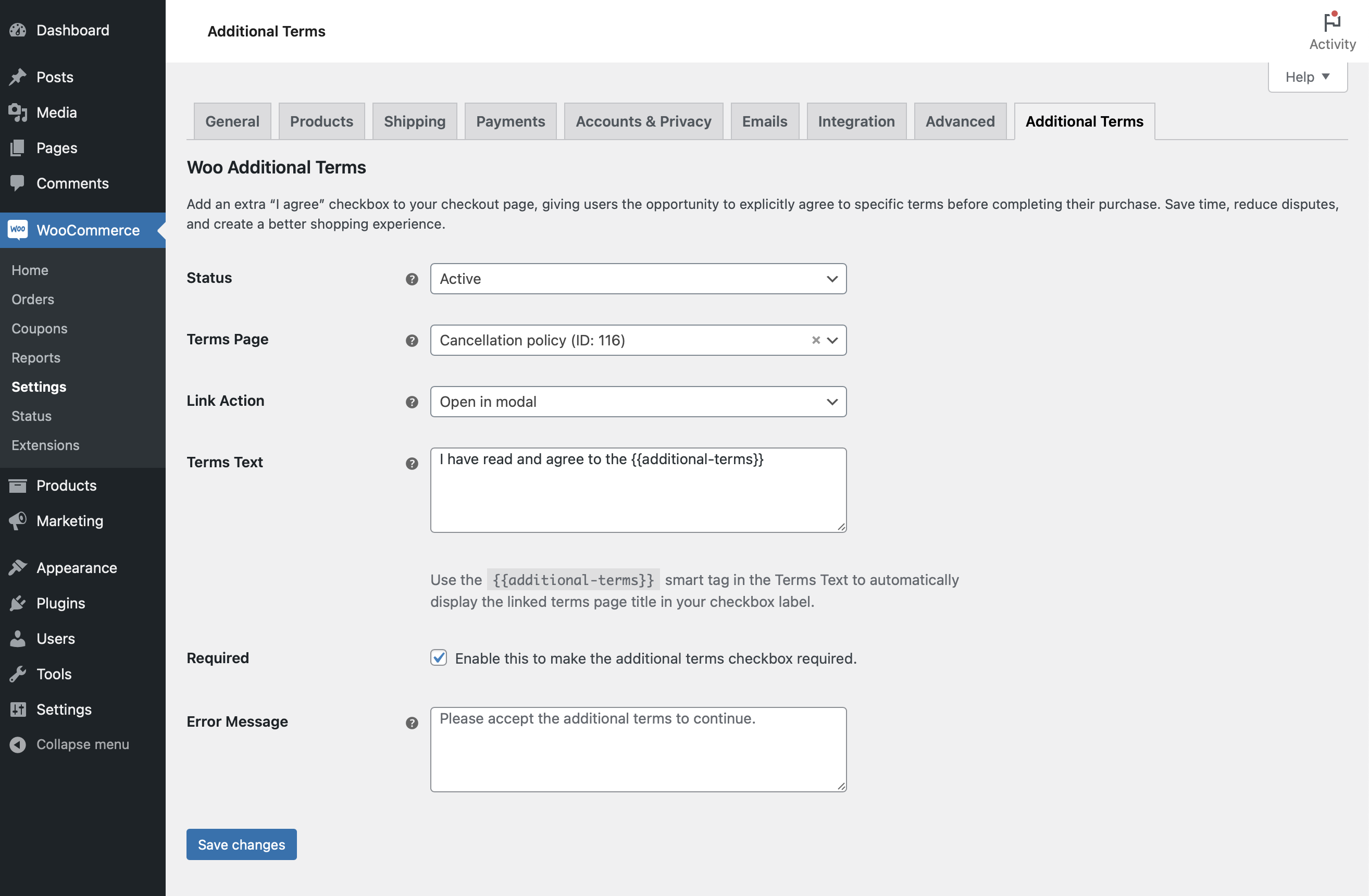
Point the checkbox at any policy page and drop it into the label with the {{additional-terms}} smart tag. The tag is replaced with a clickable link to that page at checkout.
Customers can read the linked terms without leaving checkout. Open them in a modal, embed them directly above the checkbox, or open them in a new tab, whichever suits your store.
Keep a record of every acceptance
When a customer places an order, their agreement is saved to the WooCommerce order notes. That gives you a clearer record of which checkout agreement was accepted, which helps with internal review, customer support, and dispute prevention.
Works with classic and block checkout
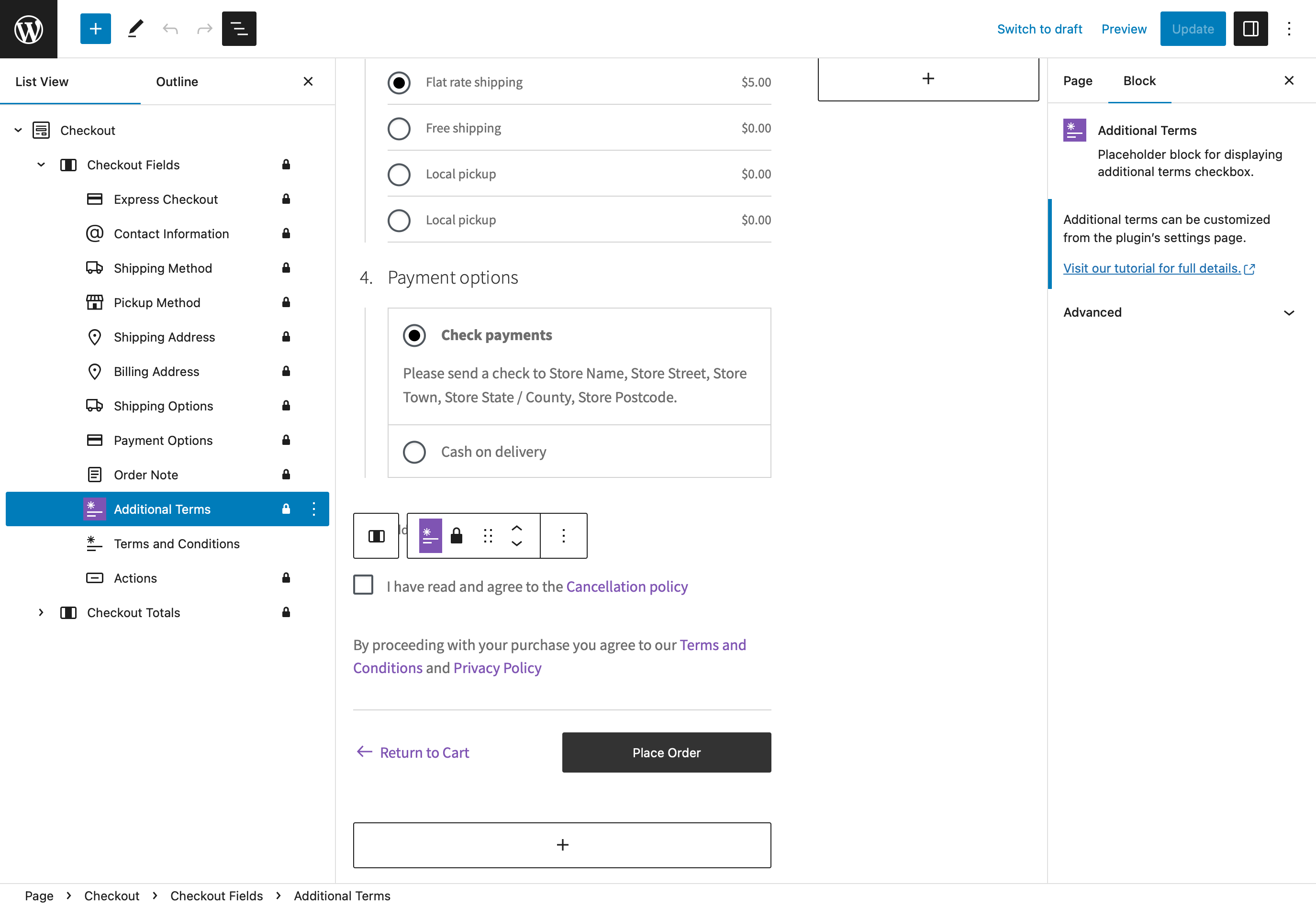
On classic [woocommerce_checkout] stores, the checkbox appears right beside the standard terms area. Using the WooCommerce Checkout Block? Add the dedicated Additional Terms block inside the checkout layout and position it exactly where you want it.
Built for real store situations
Additional Terms Lite for WooCommerce is designed for the agreements WooCommerce merchants actually need: refund and cancellation policies, age-restricted products, pre-orders, digital downloads, subscription terms, liability waivers, warranty acknowledgements, privacy and GDPR consent, and payment-method notices for bank transfer, cash on delivery, manual payments, or financing.
The plugin is translation-ready and includes configuration support for multilingual stores using WPML and Polylang.
Lite features
- Add an “I agree” checkbox to WooCommerce checkout.
- Make the checkbox required, or leave it optional.
- Show a custom validation message when a required checkbox is not accepted.
- Kobl afkrydsningsfeltets tekst til en side med udvalgte termer ved hjælp af smart-tagget
{{additional-terms}}. - Display linked terms in a modal, embedded above the checkbox, or in a new tab.
- Enable or disable the checkbox without deleting your saved settings.
- Show the checkbox on the classic WooCommerce checkout shortcode.
- Indsæt det særlige blok med yderligere vilkår i WooCommerce-kasseblokken.
- Save customer acceptance details in the WooCommerce order notes.
- HPOS compatible.
- Translation-ready with WPML and Polylang support.
Need more control? Upgrade to Additional Terms Pro
The free plugin handles a single agreement well. Additional Terms Pro is built for stores that need more than one policy, want the right terms to appear at the right moment, need to add fees to agreements, and want records that hold up.
Upgrade to Additional Terms Pro to unlock the full workflow.
With Additional Terms Pro, you can:
Add every agreement your store needs
- Create unlimited terms checkboxes, a dedicated agreement for every policy, product line, or scenario.
- Add a fixed or percentage fee when a customer accepts an “I agree” checkbox, with configurable tax settings. Fees can be used with required or optional agreements.
- Show a checkbox on the cart, the checkout, or both.
- Set default checkbox states for optional agreements.
- Link a checkbox to any post type, not only standard WordPress pages.
- Insert ready-made message templates for your checkbox label and error text, then edit them to taste.
Show the right terms to the right customer
- Use smart conditional display so a checkbox only appears when it is relevant.
- Match on cart contents: products, categories, tags, WooCommerce brands, product types, or shipping classes.
- Match on applied coupons, so a checkbox appears only when a specific coupon has been added to the cart.
- Match on cart totals and weight: subtotal, total, discount total, shipping total, or cart weight.
- Match on the chosen payment gateway, shipping location, or billing location.
- Match on user role or the day of the week.
- Match on Store Vacation status, including current closure and checkout availability states.
- Match on URL parameters from campaign, affiliate, or custom links.
- Copy conditions from one checkbox to another so you never rebuild the same rules.
- Use Hidden Cart Matching for custom checkout layouts where a theme or builder hides or changes products.
Keep proof that holds up
- Show an acceptance summary on the WooCommerce order details screen.
- Display the accepted terms inside WooCommerce order emails.
- Attach a downloadable PDF receipt of the accepted terms to the confirmation email.
- Record the exact terms text, plus the customer’s IP address and device, at the moment of acceptance.
- Keep any charged fee details with the acceptance record across admin and customer records, emails, PDF receipts, CSV exports, and order notes.
Set up faster and manage smarter
- Draft a structured Terms and Conditions document with the guided Terms Generator.
- Use Smart Tags in Terms Text for dynamic terms page, checkbox, fee, site, and customer details.
- Import and export your settings to move a configuration between stores.
- Receive premium updates and priority support through WooCommerce.com.
If your store needs multiple agreements, product-specific or payment-specific terms, conditional display, agreement fees, or clearer records of what customers accepted at checkout, Additional Terms Pro is the best upgrade path.
Skærmbilleder

Blokke
Dette plugin giver 1 blok.
- Additional Terms
Installation
Minimum Requirements
- PHP version 7.4 or greater.
- MySQL version 5.6 or greater, or MariaDB version 10.0 or greater.
- WordPress version 6.5 or greater.
- WooCommerce version 5.5 or greater.
Automatic installation
Automatic installation is the easiest option. WordPress handles the file transfer, and you do not need to leave your web browser.
To install the plugin automatically, log in to your WordPress dashboard, navigate to Plugins » Add New, and search for “Additional Terms Lite for WooCommerce”.
Once you find the plugin, click “Install Now”, then activate it.
Manual installation
The manual installation method requires downloading the plugin and uploading it to your web server using your preferred FTP application.
You can also read the WordPress guide for managing plugins manually.
Updating
Automatic updates should work smoothly, but it is always recommended to back up your site before updating plugins.
FAQ
-
Why should I use Additional Terms Lite for WooCommerce?
-
Use it when your store needs an extra checkout agreement in addition to the default WooCommerce terms and conditions checkbox. It helps customers clearly review and accept an important policy before placing an order, and it keeps a record of that acceptance.
-
I installed “Woo Additional Terms”, is this the same plugin?
-
Yes. Woo Additional Terms has served WooCommerce stores since 2017. It was renamed to Additional Terms Lite for WooCommerce to comply with WooCommerce branding guidelines, and the underlying plugin, your settings, and your saved configuration all carry over automatically. Only the display name changed.
If you arrived here from a tutorial, video, blog post, or forum thread that references “Woo Additional Terms”, you are in the right place. No re-installation, no re-configuration, and no data migration is required.
-
Hvor kan jeg finde indstillingerne for plugin’et?
-
Go to WooCommerce » Settings » Additional Terms in your WordPress dashboard.
-
How do I add the checkbox to checkout?
-
Open WooCommerce » Settings » Additional Terms, write your checkbox text, choose a terms page if you want one, set whether the checkbox is required, then save your changes.
-
Hvordan linker jeg teksten i afkrydsningsfeltet til en side med vilkår?
-
Select a terms page in the settings, then add the
{{additional-terms}}smart tag inside the checkbox text. The smart tag is replaced with a linked page title at checkout. -
Kan kunderne læse betingelserne uden at forlade kassen?
-
Yes. Depending on your settings, linked terms can open in a modal, appear directly above the checkbox, or open in a new browser tab.
-
Fungerer pluginet sammen med WooCommerce Checkout Block?
-
Yes. The plugin includes a dedicated Additional Terms block that can be added inside the WooCommerce Checkout Block and positioned wherever you like.
-
Gemmer plugin’et kundens godkendelse?
-
Yes. The free version saves acceptance details in the WooCommerce order notes. Additional Terms Pro adds an order details summary, accepted terms inside order emails, and a downloadable PDF receipt.
-
Kan jeg oprette mere end én afkrydsningsfelt til vilkår?
-
The free version is designed for one additional checkout checkbox. Additional Terms Pro allows unlimited custom terms checkboxes.
-
Kan jeg vise forskellige afkrydsningsfelter for forskellige produkter eller kunder?
-
Conditional display is available in Additional Terms Pro. It can show a checkbox based on products, categories, tags, WooCommerce brands, product types, shipping classes, applied coupons, cart totals, payment gateways, shipping or billing location, user role, weekday, Store Vacation status, or URL parameters.
-
Can I add a fee to an Additional Terms checkbox?
-
Yes, in Additional Terms Pro. You can add a fixed or percentage fee when a customer accepts an “I agree” checkbox and configure how the fee is taxed. Fees can be used with required or optional agreements, and charged fee details are kept with the acceptance record.
-
Kan jeg kun vise vilkår for bestemte betalingsmetoder?
-
Yes, in Additional Terms Pro. It can display a checkout agreement based on the selected payment gateway, which is useful when a method needs extra instructions, such as bank transfer details, cash on delivery notices, financing terms, or manual payment policies.
-
Kan godkendte vilkår vises i e-mails fra WooCommerce?
-
Yes, this is available in Additional Terms Pro. It can display the accepted terms in WooCommerce order emails and attach a PDF receipt of what the customer agreed to.
-
Kan jeg oprette indhold til vilkår og betingelser med pluginet?
-
Additional Terms Pro includes a guided Terms Generator that helps create a structured Terms and Conditions draft based on your business details. Always review generated content before publishing.
-
Er pluginet kompatibelt med flersprogede hjemmesider?
-
Ja. Pluginet er klar til oversættelse og kan bruges sammen med flersprogede løsninger som f.eks. WPML og Polylang.
-
Is Additional Terms Lite for WooCommerce compatible with HPOS?
-
Yes. The plugin supports WooCommerce High-Performance Order Storage.
-
What is the difference between the Lite and Pro versions?
-
The Lite version covers a single checkout agreement with a required or optional checkbox, a linked terms page, three display styles, and acceptance saved to the order notes. It is enough for a straightforward one-off policy.
Additional Terms Pro adds unlimited checkboxes, fixed or percentage agreement fees, cart and checkout placement, smart conditional display, Smart Tags, accepted terms in emails, PDF receipts, an order-screen acceptance summary, IP and device consent records, a guided Terms Generator, and import and export tools.
If you need more than one agreement, product-specific or payment-specific terms, or clearer records of what customers accepted, Pro pays for itself quickly.
-
Does Additional Terms Lite for WooCommerce have a Pro version?
-
Yes. Additional Terms Pro adds unlimited checkboxes, fixed or percentage agreement fees, smart conditional display, Smart Tags, applied coupon and payment gateway rules, Store Vacation conditions, accepted terms in emails, PDF terms receipts, an order acceptance summary, a guided Terms Generator, and import and export support.
You can learn more here: Additional Terms Pro
-
How can I get help with the plugin?
-
The easiest way to receive support is to visit the Community Forums page and create a new topic.
Make sure to check the “Notify me of follow-up replies via email” option so you receive updates when someone replies.
-
Can I contribute to translating the plugin into a new language?
-
Yes. Additional Terms Lite for WooCommerce is translation-ready and localized using the GNU framework. You can help translate it through the official WordPress translation platform.
-
What is your opinion about the concept behind this plugin?
-
If you enjoy using Additional Terms Lite for WooCommerce, a 5-star rating would be greatly appreciated. Reviews help support continued plugin development and improvements.
Anmeldelser


Bidragsydere & udviklere
“Additional Terms Lite for WooCommerce” er open source-software. Følgende personer har bidraget til dette plugin.
Bidragsydere
“Additional Terms Lite for WooCommerce” er blevet oversat til 1 sprog. Tak til oversætterne for deres bidrag.
Oversæt “Additional Terms Lite for WooCommerce” til dit eget sprog.
Interesseret i udvikling?
Gennemse koden, tjek SVN repository, eller abonner på udviklerloggen via RSS.
Ændringslog
1.7.3
- Update – Compatibility with WP 7.1.
- Update – Compatibility with WC 11.1.
1.7.2.1
- Fixed: Incorrect documentation page URL.
- Compatibility: Tested with WooCommerce 10.9.
1.7.2
- Opdatering – Kompatibilitet med WP 7.0.
- Opdatering – Kompatibilitet med WC 10.8.
1.7.1
- Rettelse – Forbedret kompatibilitet med WooCommerce HPOS vedrørende lagring af ordrerelaterede metadata.
- Opdatering – Kompatibilitet med WP 6.9.
- Opdatering – Kompatibilitet med WC 10.5.
1.7.0
- Fix – Added support for translating settings fields.
1.6.9
- Kompatibilitet: WooCommerce 10.0
1.6.8.1
- Pluginet er blevet omdøbt for at overholde WooCommerces retningslinjer for branding.
1.6.8
- Løsning på problemet med indholdet af tomme sider i Divi-temaet.
1.6.7
- Forbedret håndtering af indhold fra siden »Termer« i kortkoden til kassen.
- Kompatibilitet med WordPress 6.6
- Kompatibilitet med WooCommerce 9.2
1.6.6
- Kompatibilitet med WooCommerce 8.9.
1.6.5
- Kompatibilitetsproblemer med WooCommerce-kasseblokken er blevet løst.
- Kompatibilitet med WordPress 6.5.
- Kompatibilitet med WooCommerce 8.7.
1.6.4
- Kompatibilitet med visning af indhold på sidesider, der er oprettet med Elementor.
1.6.3
- Problemet, der forhindrede, at ikke-offentliggjorte sider kunne tildeles som søgeordsider, er nu løst.
- Der er rettet en PHP-fejl, der opstod ved hentning af ordrens metainformation til visning på ordresiden.
1.6.2
- Pakken med afhængighedsinjektionscontaineren er blevet isoleret for at forhindre mulige fatale PHP-fejl, når den bruges af andre tredjeparts-plugins.
1.6.1
- Rettelse af en fejl i betalingsblokken, der opstod, når yderligere vilkår og betingelser var deaktiveret.
- Forbedret visning af godkendelse af yderligere betingelser under faktureringsadressen.
- Kompatibiliteten med plugin’et “WooCommerce PayPal Payments” er sikret.
- Kompatibiliteten er bekræftet med WordPress version 6.3.
- Kompatibiliteten er bekræftet med WooCommerce version 8.0.
1.6.0
- Der er nu mulighed for at angive status for afkrydsningsfeltet for yderligere vilkår.
- Der er tilføjet en tilpasningsmulighed, hvor man kan vælge, hvordan siden med vilkår vises (i et pop op-vindue, som indlejret eller i et nyt faneblad).
- Der er tilføjet en ny indstilling, der gør det muligt at springe afkrydsningsfeltet for vilkår og betingelser over.
- Husk at godkende de supplerende betingelser i ordrekommentarerne.
- Den underliggende kodestruktur er blevet optimeret for at sikre bedre ydeevne og vedligeholdelsesvenlighed.
1.5.2
- Kompatibilitet med WordPress 6.2.
- Kompatibilitet med WooCommerce 7.5.
1.5.1
- Skriftstørrelsen i betalingsblokken er blevet opdateret.
- Kompatibilitet med WooCommerce 7.4.
1.5.0
- Kompatibilitet med WooCommerce Checkout-blokken.
- Kompatibilitet med WooCommerce 7.3.
1.4.1
- Forbedret logik ved visning af administratorbeskeder.
1.4.0
- Kompatibilitet med WooCommerce 7.2.
1.3.6
- Kompatibilitet med WordPress 6.1.
- Kompatibilitet med WooCommerce 7.0.
1.3.5
- Kompatibilitet med WordPress 6.0.
- Kompatibilitet med WooCommerce 6.9.
1.3.4
- Kompatibilitet med WordPress 5.6.
- Kompatibilitet med WooCommerce 4.8.
1.3.3
- Flere forbedringer af kodestandarder.
- Kompatibilitet med WordPress 5.5.
- Kompatibilitet med WooCommerce 4.4.
1.3.2
- Kompatibilitet med WooCommerce 4.3.
1.3.1
- Vis bekræftelse af vilkår og betingelser på siden til redigering af ordren.
1.3.0
- Indholdet af yderligere vilkår kan nu vises på siden, når der klikkes på linket, så kunderne kan gennemgå det uden at forlade kassen.
- Kompatibilitet med WooCommerce 4.2.0.
1.2.2
- Der er tilføjet en sprogkonfigurationsfil til understøttelse af WPML/Polylang.
- Kompatibilitet med WordPress 5.4.1.
- Kompatibilitet med WooCommerce 4.1.1.
1.2.1
- Flere forbedringer af kodestandarder.
- Kompatibilitet med WordPress 5.4.0.
- Kompatibilitet med WooCommerce 4.0.1.
1.2.0
- Opdateret sprogfil.
- Den underliggende kode på pluginets indstillingsside og i kontrolelementerne er blevet omstruktureret og omorganiseret.
- Kompatibilitet med WordPress 5.3.1.
- Kompatibilitet med WooCommerce 3.8.1.
1.1.0
- Kompatibel med WordPress 4.9.6.
- Kompatibel med WooCommerce 3.4.2.
1.0.2
- Kompatibel med WordPress 4.7.0.
- Kompatibel med WooCommerce 2.6.9.
1.0.1
- Der er tilføjet skærmbilleder.
1.0.0
- Første udgivelse.