

Beskrivelse
The easiest to use Google Maps, Leaflet and Open Layers Map Plugin (including a Map Block)!
Formerly WP Google Maps.
Add a customized Google map, map block or Store Locator to your WordPress posts and/or pages quickly and easily with the supplied shortcode. No fuss. No iFrames and super easy to use! Perfect for contact page maps, routes, maps showing delivery areas and any other use you can think of!
While the free version of WP Go Maps allows you to create a Google map with as many markers as you like, the Pro version allows you to do so much more!
Create Elementor Maps, map blocks and map widgets easily with our WP Go Maps Elementor map block integration, straight out the box!
Do you use the classic editor? We still support map widgets for classic WordPress installations. No need to compromise, the map widget includes the same functionality as our map blocks!
The WP Go Maps Pro Version version allows you create custom Google maps with high quality markers containing locations, descriptions, images, categories, links and directions.
Lite Version (Free)
- The most popular WordPress map plugin
- Choose between Google Maps, Leaflet, Azure Maps, Stadia Maps, Maptiler, LocationIQ, Zero Cost or Open Layers Maps
- Super easy to use, no coding required!
- Create as many map markers as you need by simply typing in the address
- Responsive maps
- Elementor Map block
- Edit your map markers with the click of a button
- 9 popular map themes to choose from
- Create or add your own map theme
- Drag map markers to an exact location
- Add a map block to your page
- Google Maps Streetview supported
- UTF-8 character support
- Map widget functionality
- Full screen map functionality
- Support for localization
- Choose from four Google maps types: roadmap, terrain, satellite and hybrid
- Define your own width, height and zoom level for your map
- Add animations to your map markers!
- Store locator functionality
- Restrict a store locator search by country
- Add Polygons to your Map
- Add Polylines / Routes to your map
- Create a map in less than a 30 seconds!
- Right click to add a marker to your map
- No advertising or links
- Google Maps Autocomplete
- Google Maps Transport Layer
- Set the max zoom level for your map
- Serve your map marker data via your database or an XML file
- Compatible with caching plugins
- Compatible with Cloudfare
- Latest Google Maps API
- Latest OpenLayers API
- Latest Leaflet API
Professional Edition
- Create multiple maps!
- Allow your visitors to get directions to your markers.
- Add descriptions, links and images to your map markers.
- Add categories to your map markers
- Filter markers by category
- Mashup multiple maps
- Advanced map blocks
- Store locator map block
- Directions map block
- Infowindow block
- Map block (filter)
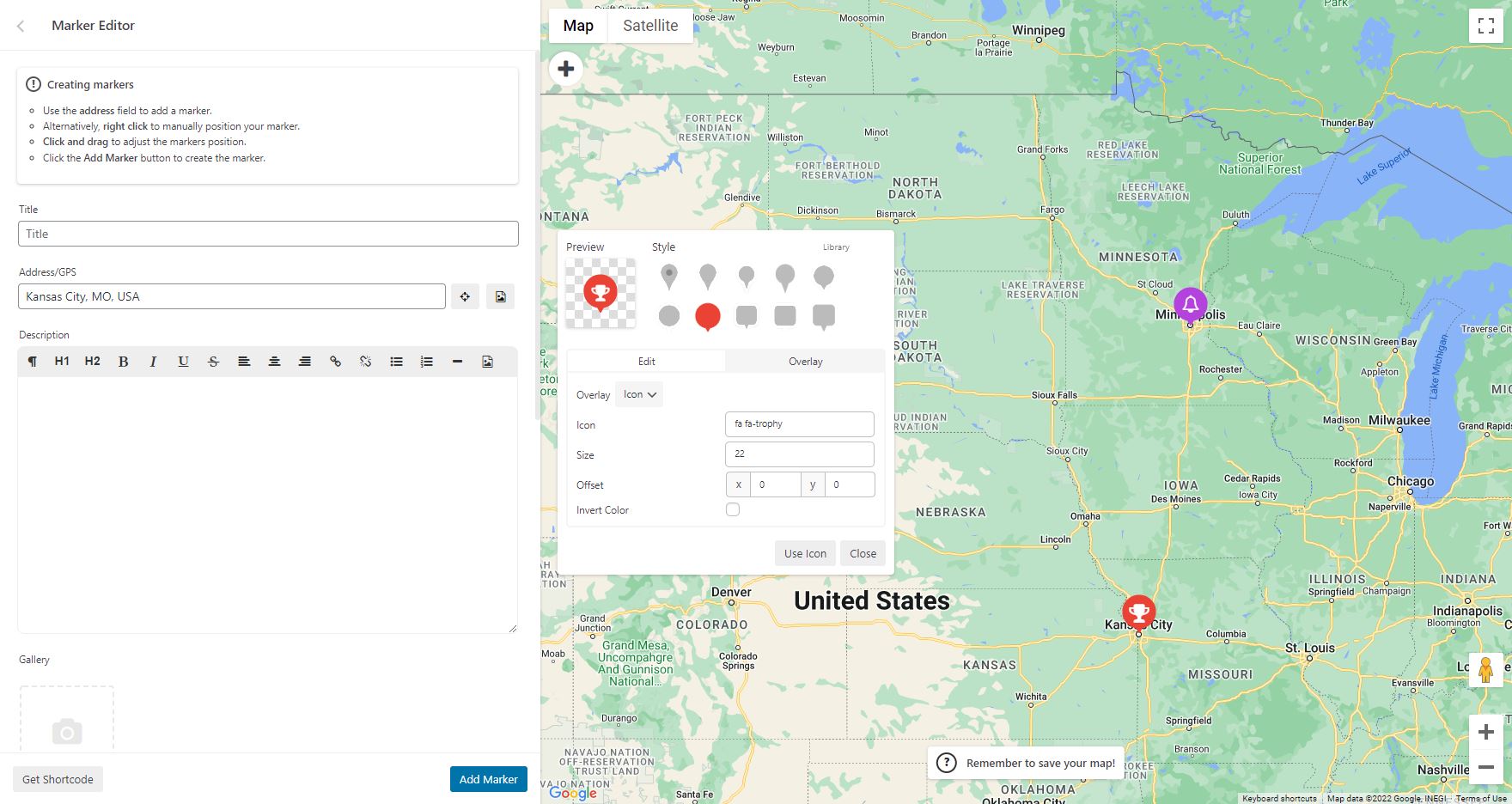
- Add different marker icons, or your own icons to make your map really stand out!
- List your map markers in the four ways; basic list, basic table, carousel, advanced table
- Allow visitors to use their map location as the starting or ending point for the directions
- Choose between the Default Google Maps Infowindow and the new Modern Infowindow
- Export/Import your markers to a CSV file for quick editing.
- Link Fusion tables to your Google Maps
- Show your visitor’s location on the Map
- Import KML/KMZ files to your map
- More advanced options for the Store Locator
- Allow users to use their map location for the store locator
- Store locator search by category
- Hide all map markers until a store locator search is done
- Move your marker list inside the map window
- Multiple map widget functionality
- Add retina-ready map marker icons
- WordPress Network friendly
- Get the WP Go Maps Professional Edition
Translations
Get a free copy of the WP Go Maps Pro version in exchange for translating our plugin!
- English – default
- Russian (Alexandra Bondareva)
- German
- French (Arnaud Thomas)
- Polish (Michal Kotnowski)
- Finnish (Johanna Joutti)
- Dutch (Jan Wind)
- Hebrew (Gal Dotan)
- Danish (Patrick Jepsen)
- Italian (Tommaso Mori & Massimo Bregani)
- Croatian (Sven Kopun)
- Greek (Konstantinos Koukoulakis)
- Romanian (Cosmin Stroe)
- Spanish (Carmelo Villegas Cruz)
- Portuguese (Jose Antonio Ribeiro)
- Brazilian Portuguese (Roberto Costa)
- Turkish (Suha Karalar)
- Swedish (Martin Sleipner)
- Bulgarian (Lyubomir Kolev)
- Indonesian (Neno)
- Lithuanian
- Czechoslovakian^
^Language file needs to be updated
Demos
WP Go Maps Lite
- Basic Google Map with Markers
- Store Locator
- Polygons & Polyines/Routes
- Google Maps Transit Layer
- Google Maps Traffic Layer
- Google Maps Bicycle Layer
WP Go Maps Pro
- Google map with advanced markers
- Marker listings – Simple
- Marker listings – Advanced
- Google Maps Directions
- Responsive Map
- Marker Categories (Filtering)
- Advanced Store Locator
- WP Go Maps Editor (Back-end Screenshots)
- Visitor Generated Markers – (WP Go Maps VGM Add-on)
- Custom Map Styling (WP Go Maps Gold Add-on)
Documentation
- Installing WP Go Maps
- Creating your first map
- Adding a map block to your page or post
- Google Maps mashup (Pro)
- Exporting and importing map markers (Pro)
- Changing the Google Maps language
- Create a google map and marker using custom fields (Pro)
- View all documentation
Troubleshooting
Skærmbilleder





Blokke
Dette plugin giver 2 blokke.
- Store Locator WP Go Maps Store Locator block, allowing to separate your store locator from your map
- Map The easiest to use Google Maps plugin! Create custom Google Maps with high quality markers containing locations, descriptions, images and links. Add your customized map to your WordPress posts and/or pages quickly and easily with the supplied shortcode. No fuss.
Installation
First time WP Go Maps user
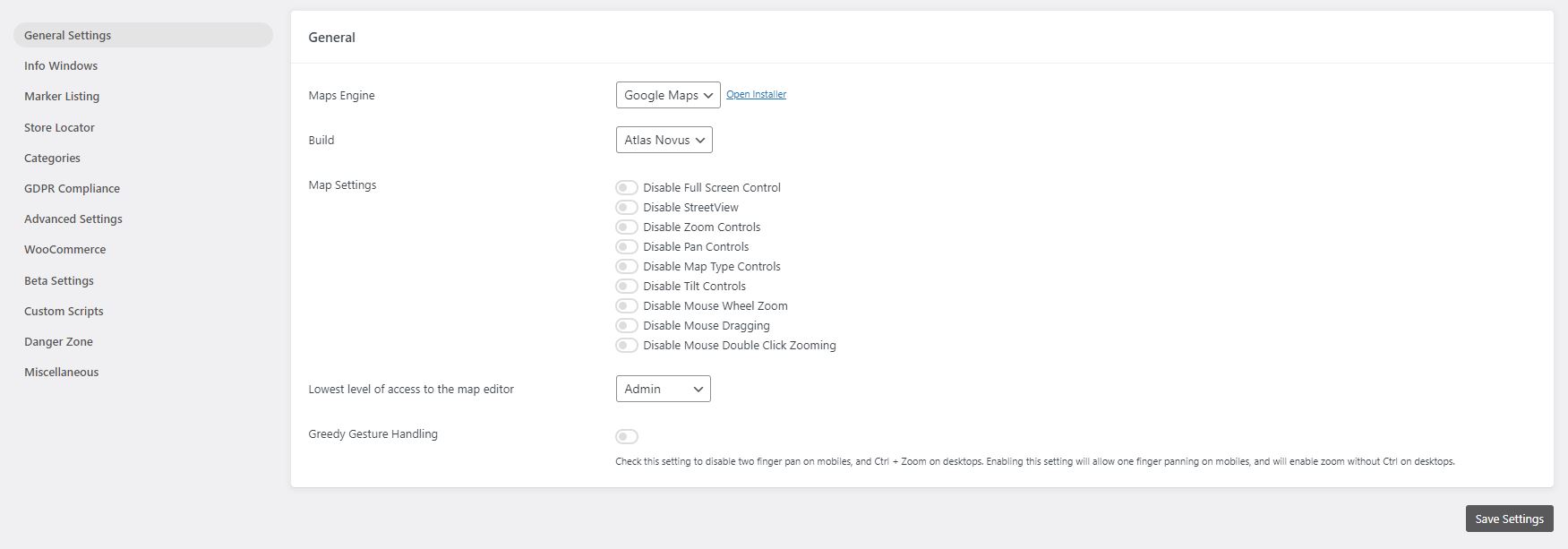
Thank you for choosing WP Go Maps! In order to create your Google map, simply activate the plugin and click on “Maps” in your left navigation menu. Once the WP Go Maps page loads, set the options for your map (height, width, map type, zoom level etc) and then use your mouse to drag your Google map to your desired location and press the “Save map” button. Copy and paste the shortcode into your post or page and WP Go Maps will automatically create the map on your page using the settings you chose above.
Adding your first map marker
To add a marker to your Google map, scroll to below the map in your admin section and enter the address or GPS location in the Address input field. Click “Add Marker” and WP Go Maps will add your marker to the address you specified.
Setting up a Google Maps Store Locator
In order to make use of WP Go Maps Store Locator functionality, simply click on the “Store Locator” tab in the map creation page and select “Yes”
FAQ
-
How do I get WP Go Maps Pro?
-
Simply visit https://www.wpgmaps.com and purchase the WP Go Maps Professional Edition. Free updates and support included forever.
-
I’ve installed the plugin, now what?
-
Once installed and activated, a link should appear in your left navigation panel within your WP-ADMIN section. Click on the “WP Go Maps” link and follow the on screen instructions.
-
How do I put a Google map on my page/post?
-
In order to show your custom Google map on your page or post, simply copy the shortcode supplied and paste it into your page or post. WP Go Maps will automatically configure the map to the settings you selected in the map edit page.
-
How do I add a map block to my page or post?
-
It’s super easy to add a map block to your page or post. Simply add a block in the normal page editor, then type in “Map” and you should see the map block option. For more information please review this tutorial
-
How do I add a map widget to my widget area?
-
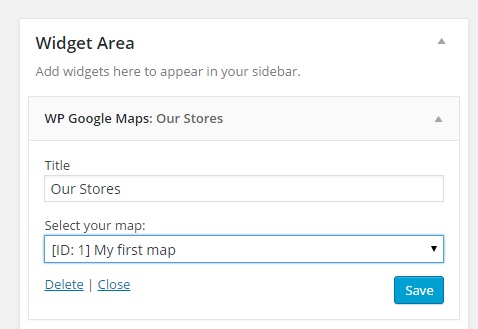
To add your map to your widgets area, simply go to Appearance->Widgets and drag the “WP Go Maps” Map Widget to your sidebar. You then edit the map widget to reflect the correct map.
-
Do I need a Google Maps API key?
-
Only if you choose Google Maps as your map engine. WP Go Maps also supports Leaflet, OpenLayers, Stadia Maps, Maptiler, LocationIQ, Microsoft Azure and a Zero Cost option, none of which require a Google API key. You can switch engines at any time from Maps > Settings.
-
Which map engine should I choose?
-
If you want Google’s native maps and have an API key, choose Google Maps. If you prefer an engine that does not require a billing-enabled API key, Leaflet (OpenStreetMap tiles) is a popular choice. OpenLayers, Stadia Maps, Maptiler, LocationIQ and Microsoft Azure are also supported. Zero Cost is a Leaflet-based option that requires no setup. Engine choice does not affect your stored markers, so you can switch later without losing data.
-
Why is my map not showing on the front-end?
-
First, confirm the shortcode or block is added to the page correctly. Then open your browser’s developer console and look for errors related to the map engine you are using. If you are using Google Maps, check that the API key in Maps > Settings is valid and is not restricted to a different domain. Theme or plugin conflicts are also common. For a full troubleshooting walkthrough see our troubleshooting documentation.
-
Is the plugin GDPR-compliant?
-
WP Go Maps does not set tracking cookies and does not transmit visitor data to third parties beyond the map tile and geocoding requests required to render the map. The plugin includes a built-in GDPR consent prompt that blocks those API requests until a visitor accepts. Configure it under Maps > Settings > GDPR.
-
How many markers can I add to a single map?
-
There is no hard limit. The free version supports as many markers as you need to add manually. The Pro version adds bulk CSV import, marker categories, marker clustering and batched loading for sites with thousands of markers.
-
Does the plugin work with Elementor, Divi, Gutenberg and other page builders?
-
Yes. WP Go Maps ships with a Gutenberg map block, an Elementor widget and a classic WordPress widget. The map shortcode works in any page builder that accepts WordPress shortcodes, including Divi, WPBakery, Beaver Builder and Oxygen.
-
Does the plugin support WPML, Polylang and multilingual sites?
-
The free version is translation-ready and ships with full translations for French, German, Italian, Spanish and Polish, plus partial coverage for many other languages. WP Go Maps Pro adds dynamic translation support for marker fields (title, description, address) via WPML.
-
Can I import markers from a CSV or spreadsheet?
-
Yes, with WP Go Maps Pro. The Pro version’s import tool accepts CSV, KML and KMZ files and supports batched imports for very large datasets. The free version supports manual marker entry only.
-
Is the plugin compatible with caching plugins and Cloudflare?
-
Yes. WP Go Maps works with all major caching plugins including WP Rocket, W3 Total Cache and LiteSpeed Cache, as well as Cloudflare. If the map stops loading after enabling aggressive optimisation (JS minification or deferral), exclude the wp-google-maps scripts from those rules and the map will render correctly.
-
How can I report security bugs?
-
You can report security bugs through the Patchstack Vulnerability Disclosure Program. The Patchstack team help validate, triage and handle any security vulnerabilities. Report a security vulnerability.
Anmeldelser


Bidragsydere & udviklere
“WP Go Maps – Google Map, OpenStreetMap, Leaflet Map” er open source-software. Følgende personer har bidraget til dette plugin.
Bidragsydere


“WP Go Maps – Google Map, OpenStreetMap, Leaflet Map” er blevet oversat til 25 sprog. Tak til oversætterne for deres bidrag.
Oversæt “WP Go Maps – Google Map, OpenStreetMap, Leaflet Map” til dit eget sprog.
Interesseret i udvikling?
Gennemse koden, tjek SVN repository, eller abonner på udviklerloggen via RSS.
Ændringslog
10.1.10 – 2026-09-28
- Fixed issue where the compressed marker ID buffer could be undersized for certain marker sets, causing the server to reject the request and marker searches to return no results. Thanks to Adamcengel
- Fixed issue where the compressed marker ID list could be corrupted when a large gap existed between filtered marker. Thanks to Mikael Føyen
- Fixed issue where event dispatcher may prevent event bubbling if an error occurs within the trigger call. Thanks to Mikael Føyen
- Updated built-in notices to disclose Pro V8 EOL to prevent confusion
10.1.09 – 2026-09-01
- Fixed issue where a crafted unauthenticated request to the compressed REST API parameter parser could trigger an unbounded loop, causing excessive CPU usage and log file growth (denial of service). Security issue, thanks to Asim Alshaya
10.1.08 – 2026-08-19
- Improved point label overlay offset manipulation system to be based on percentages instead of pixel values, this is more consistent across engines
- Improved Leaflet point label overlay to match Google and OpenLayers, where center-center is the standard
- Fixed issue where point label overlay placement would not be consistent across all engines, causing some variation with pixel placement
- Fixed issue where a translation in the cs_CZ language file was incorrectly utilizing a placeholder twice, causing a fatal error in the editor
10.1.07 – 2026-08-13
- Added extended data storage support in point labels to support feature expansion
- Added a new event trigger in MarkerFilter, ‘filteringstart’, which runs before a filter is about to start a run
- Added option to hoist script loading for environments that require early script loading
- Improved OpenLayers text overlays to be DOM based instead of canvas based, allowing element styling as part of a new styling module
- Improved modal serialization to ensure data is correctly serialized where needed, specifically addressing an issue with checkbox values not being serialized correctly
- Improved clarity of the theme JSON we support for Google Maps, specifically mentioning the requirement for legacy JSON not cloud based JSON
- Fixed issue where country restriction were not applied to all address providers, and as a result would provide wide results
- Fixed issue where Atlas Major marker list in editor would not correctly pull title/address from datatables request when system was in lazyload mode
- Tested with WP 7.1
10.1.06 – 2026-07-23
- Fixed issue where inactive map data would be served on direct /maps requests even if the map was not active. Security issue, thanks to Bao – BlueRock
- Fixed issue where individual datasets like /marker, /polygon and /polyline would be served even if the map was inactive. Security issue, thanks to Bao – BlueRock
10.1.05 – 2026-07-23
- Fixed issue where inactive map data would still be visible via the /features REST endpoint. Security issue, thanks to Bao – BlueRock
- Improved JSON encoding in the REST API response layer, using wp_json_encode instead of json_encode to ensure proper handling of multibyte characters and other edge cases. Thanks to Christopher Ross
- Updated installation module to enforce a 75/25 split between Atlas Novus and Atlas Major for new installations, as part of internal split testing.
10.1.04 – 2026-07-10
- Fixed issue where unauthenticated SQL Injection was possible via the limit paramater in the Marker Filter. Security issue, thanks to Jakub Herman
10.1.03 – 2026-06-17
- Fixed issue where the internal engine assignment could be skipped on fresh installs, defaulting new installations to Atlas Major instead of the intended random assignment
10.1.02 – 2026-06-15
- Fixed issue where unauthenticated requests could trigger unintended database writes via the DataTables REST endpoint. Security issue, thanks to Thanh Diem (Wordfence)
- Fixed issue where Datatables language files may not load correctly in some environments due to name case. Fallback system developed to resolve and fail gracefully if unavailable
10.1.01 – 2026-06-10
- Added a canonical POT translation template (languages/wp-google-maps.pot) so translators and contributors can generate and maintain language files from a single source rather than reconstructing the template locally each pass
- Added a fully complete French (fr_FR) translation, refreshed against the 10.1.00 codebase including all Atlas Major UI strings.
- Added a fully complete German (de_DE) translation, refreshed against the 10.1.00 codebase including all Atlas Major UI strings.
- Added a fully complete Italian (it_IT) translation, refreshed against the 10.1.00 codebase including all Atlas Major UI strings.
- Added a fully complete Spanish (es_ES) translation, refreshed against the 10.1.00 codebase including all Atlas Major UI strings.
- Added a fully complete Polish (pl_PL) translation, refreshed against the 10.1.00 codebase including all Atlas Major UI strings.
- Improved responsiveness of the map editor at narrow viewports (Atlas Major).
- Fixed issue where Leaflet frontend maps could place markers at incorrect pixel positions when the page layout had not finished settling at map construction time. An invalidateSize() call after first paint forces the origin to be recalculated against the correct container dimensions
10.1.00 – 2026-06-03
- Added Atlas Major, a new editor UI.
- Added live preview to the map editor, showing how the page will render with real-time updates as settings change (Atlas Major)
- Added automatic background save via REST. Form changes are persisted shortly after a change with a “Saved” indicator, falling back to a native form submit after 3 seconds if the REST request fails (Atlas Major)
- Added live tileset swap, applying a tileset to the editor map immediately on selection without needing to save (Atlas Major)
- Added click-drag isolation on info-window panels, directions boxes, and inner-stack overlays so panel interactions no longer drag the map underneath (Atlas Major)
- Added “Save & Reload” confirmation modal for settings that require a fresh map construction, with an in-progress overlay during the reload (Atlas Major)
- Added auto-scroll to top and address field focus after a successful Add Marker (Atlas Major)
- Added auto-close of info window panel after delete, and auto-refresh of info window content after a marker save (Atlas Major)
- Added store locator text override preservation across editor rebuilds (Atlas Major)
- Added 🔑 indicator next to engines in the engine switch dropdown that require an API key
- Added missing API key notice for Microsoft Azure, Stadia Maps, Maptiler, and LocationIQ. Previously only Google Maps would surface this notice
- Added auto-return to the feature list panel after a successful Add Marker or Add shape
- Fixed issue where saving the map in basic would write empty strings into Pro-only store locator visual fields, leading to invisible store locator circles after Pro was activated
- Fixed issue where info-window distance calculation read the wrong unit source, causing “miles away” labels to render kilometre values
- Fixed issue where the map list page displayed poorly on small screens due to DataTables 2 colgroup widths
- Fixed issue where the map editor REST autosave returned a 500 error under Pro because an admin-only file include was not available in the REST request context
- Fixed issue where the Plugin class __isset method was missing magic-getter cases, causing several live preview Pro template injections to silently fail (Atlas Major)
- Fixed issue where the custom image overlay live preview could corrupt the map start coordinates because the Leaflet CRS is locked at map construction (Atlas Major)
- Fixed issue where unchecked checkboxes were treated as enabled in live preview (Atlas Major)
- Fixed issue where the action bar Save Map and Preview buttons would wrap to separate rows on narrow sidebars (Atlas Major)
- Fixed issue where the bulk markers REST endpoint would return unapproved markers to unauthenticated users. Security issue, thanks to Fraudless.tech (Ilyess Ghalem)
- Improved default map height for new maps from 400px to 600px
- Improved Save Map button feedback to pulse red with a spinner during autosave and manual saves (Atlas Major)
- Improved engine switching from the editor toolbar to reload the editor so the new engine libraries load correctly
- Improved missing API key notice to render as a centered card over the map area
- Improved store locator radius circle cleanup when components rebuild in live preview (Atlas Major)
- Improved editor diagnostics by removing verbose console output on page load and save (Atlas Major)
- Improved internationalisation by auditing UI strings and migrating hardcoded text to WPGMZA.localized_strings (Atlas Major)
- Improved cursor handling across editor panels and info-window overlays so Leaflet’s grab cursor no longer leaks into UI surfaces (Atlas Major)
10.0.10 – 2026-05-13
- Fixed issue where Datatables AJAX fallback would bypass the approval filter. Security issue, thanks to WPScan, Jetpack, Automattic (Erwan)
- Fixed issue where single marker endpoint and AJAX fallback would bypass the approval filter. Security issue, thanks to WPScan, Jetpack, Automattic (Erwan)
- Fixed issue where Pro users below V10.0.06 would experience issues with admin marker tables, which do not have access to V2 library methods
- Fixed issue where Pro users below V10.0.06 would experience issues Google Drawing Manager, which is being deprecated in favor of an internal module
- Fixed issue where WPML users would experience failure in the settings area when running legacy UI
10.0.09 – 2026-04-16
- Fixed issue where minified code base was not accurately compiled due to issue with internal build tools. Only affected pro users
10.0.08 – 2026-04-16
- Fixed issue where users on Pro below V10 would experience a DataTables V2 init failure, preventing access to the map editor and marker list. When Pro below V10 is detected, DataTables V1.12 and its Responsive extension are now loaded from CDN instead
- Fixed issue where users on Pro below V10 would see an init failure on the map editor due to the Google Drawing Manager library not being loaded. The drawing library is now injected into the Google Maps API URL via the compatibility layer when Pro below V10 is detected on the map edit page
10.0.07 – 2026-04-15
- Added methods to internal Google Drawing Manager, internalizing this feature, and allowing removal of native Google Drawing Manager. Due to upcoming deprecation
- Added scale line control support for Google Maps, Leaflet, and OpenLayers. Can be enabled on a per map basis
- Added ability to override plugin language from within the settings. Defaults to site language
- Added ability to override custom tile server token field name
- Added ability to override custom tile server type (raster or vector)
- Added native Elementor integration with Map and Store Locator widgets, mirroring the existing Gutenberg block structure
- Added ElementorModuleWidget abstract base class to provide a shared preview/render pattern for all Elementor module widgets
- Added support for WPML post type translations, ensuring integrated post type marker sources respect the active language
- Added blueprint JSON file to assets for preview mode support moving forward
- Fixed issue where script loader would throw a notice for Google vertex menu when not using Google Maps engine
- Fixed issue where Leaflet maps set to a starting zoom below 2 would cause incorrect marker placement due to EPSG3857 world-copy wrapping; a safe minZoom floor of 2 is now enforced for standard tile maps (custom tile/CRS.Simple maps are unaffected)
- Fixed issue where Astra Theme Compatibility layer may trigger an error on some environments
- Improved the language loader to ensure we don’t unexpectedly trigger a global language file due to missing files, as this leads to outdated translations
- Improved all datatables related styles to better support the V2 upgrade
- Updated FR translation files. Thanks to Madevcomfr
- Updated credits page to include new contributors and translators
- Updated internal process to ensure accurate version management (SVN)
- Updated DataTables to V2 release, and migrated core modules to support this change
- Updated WritersBlock internal library to add additional features
- Remove responsive DataTables extension as this is bundled in our V2 files
- Removed Google Drawing Manager as a dependency, in favour of internal module, which is being deprecated by Google
10.0.06 – 2026-03-17
- Fixed issue where nonce refresh actions were missing permission checks, creating an XSS vulnerability. Security issue. Thanks Nguyen Ba Hung (bashu) (KCSC) (Wordfence)
- Fixed issue where settings storage would rely purely on nonce checks, without reasserting permissions. Security issue. Thanks Nguyen Ba Hung (bashu) (KCSC) (Wordfence)
- Fixed issue where Google marker click event for AdvancedMarkerRender mode was set to ‘click’ instead of the suggested ‘gmp-click’
- Fixed issue where marker offset method would fail in Leaflet causing issues with NVC systems and other marker nudge modules
10.0.05 – 2026-01-14
- Fixed issue where notice actions were missing permission checks. Low level users could trigger actions like switching map engines. Security issue. Thanks Moose Love (Nagasaki Prefectural University) (Wordfence)
- Fixed issue where deferred loading with WP Rocket would lead to initialization error. We now exclude inline initializer and settings object from this system. Can be disabled in settings
- Fixed issue where batch marker loading would incorrectly trigger final shape fetch request
- Fixed issue where internal map library loaders would not respect force-load flag when enqueueing scripts
- Fixed issue with setMap calls on point labels
- Improved point label architecture to support regeneration and map ID changes if needed
10.0.04 – 2025-12-04
- Added pro features page and menu item
- Added additional page construction hooks
- Added demo list to maps view page
- Added LocationIQ to engine swap toolbar
- Improved PHP 8.5 stability & compatibility
- Fixed issue where engine swap toolbar would not set tileserver defaults for first time users
- Fixed issue where map list clicks were not being handled correctly for action buttons
- Fixed issue where PHP 8.5 would throw a deprecation warning due to an outdated switch case
- Fixed issue with our internal links, docs, site, support, forums, throughout the plugin
- Fixed issue where bulk marker selection button would not work in some environments
- Fixed issue where info-window link controls were available in basic
- Updated marker listing demo image
10.0.03 – 2025-11-27
- Added first time usage flow which opens the marker creator once for new users (UX Improvement)
- Added engine swap toolbar to map editor for first time usage, once dismissed does not show again (UX Improvement)
- Added a new setting to enable dynamic translations, as this must be an opt in for large data sites
- Updated internal CTA buttons and controls from gold to blue (UX Improvement)
- Removed a console log within the map initialization controller, it is not relevant with delayed loading
- Removed the disable dynamic translation, instead we now allow this via an opt in instead
10.0.02 – 2025-11-17
- Added shapes and overlays sub-section to map editor, moving all relevant datasets into that panel (UX Improvement)
- Added ability to click on a map from the map list to open the editor (UX Improvement)
- Added primary button color to edit map button within map list (UX Improvement)
- Added blue highlight to primary dataset creation buttons to make it clearer how to add datasets (UX Improvement)
- Added button to marker quick tip notice to jump straight to marker creation (UX Improvement)
- Added conditional checks for major version mismatches in compiler, preventing mismatched major versions from throwing build errors
- Added a one time hint tool to our internal map editor tour system, which will show helpful usage hints after the main tour is completed.
- Fixed issue where Google Maps logo would not display on some installations, within the engine selector
- Fixed issue where plugins that load bootstrap in our editor might cause editor placement issues, plugin conflict
- Fixed issue where map preview would not generate on some themes. We now generate a draft page, which is reused and pruned when new previews are created
- Moved save map notice in map editor to top anchor
- Moved add marker quick tip notice in map editor to bottom left anchor
- Removed bounds reset system when adding a marker to a map, to allow multiple markers to be added to the same region without reset
10.0.01 – 2025-11-10
- Fixed issue with compatibility layer for older versions of Pro add-on (V8 and below)
10.0.00 – 2025-11-10
- Added Leaflet engine support
- Added Azure engine, powered by Leaflet
- Added Stadia engine, powered by Leaflet
- Added Maptiler engine, powered by Leaflet
- Added LocationIQ engine, powered by Leaflet
- Added support for OpenLayers V10
- Added ability to use legacy (V6) OpenLayers, should be considered deprecated. Will be removed in the future
- Added ability to change address providers, for autocomplete and client side geocoding
- Added additional address providers including Google Maps, Azure Maps, Nominatim, LocationIQ and engine default
- Added ability to provide a supplementary address provider API key if needed
- Added ability to switch tile servers, with another from the same provider, on a per map basis
- Added additional tile server options, with providers and automated groupings
- Added ability to set line thickness on both rectangles and circles
- Added tile server previews for improved customization
- Added support for dynamic content translations with WPML
- Added Atlas Novus as the default internal build
- Added danger zone tool to reindex any spatial coordinate data for markers, where a spatial coordinate has gone missing
- Added ability to adjust rectangle boundaries with boundary input
- Added ability to bulk delete shapes
- Added ability to center on shapes and datasets within the editor
- Added dropdown context meny to shape datatables
- Added option to cachebust REST API requests
- Added improved GDPR styling, it becomes the new default
- Added quick delete button to info-window within the map editor
- Added ability to override any HTML template part via a child theme override
- Added map preview system, allowing maps to be previewed on frontpage
- Added default indexes to all tables to improve performance
- Added spatial indexes to tables where applicable to improve performance
- Added fullscreen map editor panel mode, for dataset listings, allowing more data to be viewed
- Added extended maximum zoom level (22) which is supported by all map engines
- Added mobile settings tab to editor
- Added ability to set a different map width/height for mobile devices
- Added new default engine/installer preset for zero cost mapping, for all new installations
- Added ability to reduce marker editor geocoder usage. Skips geocoding if lat/lng coordinates are present, opt in available in settings
- Added ability to select store locator button style (Icons (default), or Text) on a per map basis
- Added accessibility support, with the goal of being WCAG Level AA compliant
-
- Aria labels and roles added where needed
-
- Improved focus cues and managing of indexing
-
- Keyboard navigation added (tab, enter, space, and escape for panels)
-
- Hierarchy restructuring where needed to better support navigation
-
- Tested with various tools:
-
-
- Microsoft Accessibility Insights: Pass (FastPass)
-
-
-
- Axe DevTools: Pass (WCAG Level AA)
-
-
-
- Google Lighthouse: Pass (100% Accessible)
-
-
-
- Wave Tools: Pass
-
-
- Manual testing completed for navigation with a keyboard
-
- We will continue to improve this over time
-
- Known Issues
-
-
- Only supported on the frontend
-
-
-
- Does not allow marker selection via the map container (Marker listings supported, and encouraged for accessibility focused installations)
-
-
-
- Although a substantial rework has been implemented, this has not been verified by 3rd party compliance testers at this stage
-
-
-
-
- We know that accessibility is more nuanced than simple machine driven tests, we’d like to work with our community to ensure we improve this further
-
-
-
-
-
- Please reach out to us if you find anything that you feel should be improved as a priority!
-
-
- Improved internal autocomplete modules for better user experience and management
- Improved theme preset user interface
- Improved theme CSS editor
- Improved tile server system to handle params and authentication more efficiently
- Improved tile server system to properly attribute various service providers
- Improved settings user interface, adding sections and descriptors for better clarity
- Improved Google Maps Advanced Marker render mode support
- Improved Google Async support
- Improved zoom sliders within editor
- Improved map initialization state control
- Improved map initialization error correction
- Improved map initialization automatic delayed retry module
- Improved info-window open calls to include data-props in container for styling
- Improved styling system to allow native info-windows to inherit brand styling
- Improved open layers native info-window, now includes border radius and shadows
- Improved checkbox styling within the map viewport
- Improved available WP filters within our AjaxTable class, allowing count values to be filtered
- Improved internal shape architecture
- Improved batch loader logic and modularized method
- Improved welcome page to include new features
- Improved all option management by disabling autoloading, reducing impact on server resources
- Improved Legacy to Atlas Novus migration flow by introducing automatic map settings migration modules
- Improved DomDocument param handlers where needed
- Fixed issue where marker labels would not render & symbols correctly
- Fixed issue where major version mismatch would cause UI error to be thrown in REST API requests
- Fixed issue where shape datatables within the editor couldn’t be searched fully
- Fixed issue where touch events would not dispatch on OpenLayers shapes
- Fixed issue with error suppression in DomDocument class, added LIBXML_NOERROR when
- Fixed issue where some overlays would overlap info-windows in Open Layers (Example clusters)
- Fixed issue with clustering translations in DE language files
- Fixed issue where engine switch notice would show even if the user has already switched to Atlas Novus (manually)
- Moved build selection Danger Zone
- Moved optimization options out of beta
- Moved map mobile zoom level control to mobile panel section
- Removed Stamen Design tile servers, as they have moved to Stadia
- Removed OpenPtMap tile server due to missing SSL
- Removed duplicate map fetch methods, which were unused
- Archived V9 changelogs
For more, please view the WP Go Maps site.